
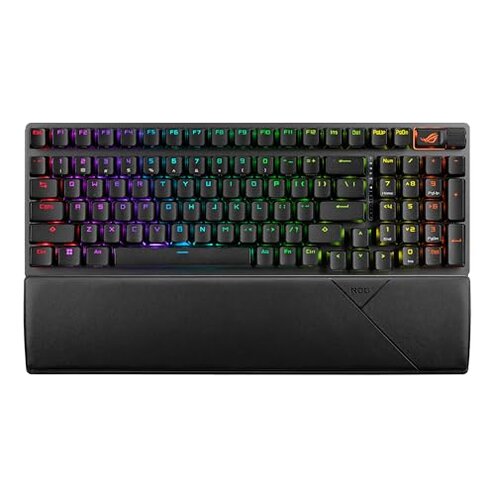
Product evaluated: ASUS ROG Strix Scope II 96 Wireless Mechanical Gaming Keyboard – 96% Full-Size, Tri-Mode Connectivity, Hot Swappable Pre-lubed ROG NX Snow Linear Switches, PBT Keycaps, RGB, PC/Mac Support-Black
Related Videos For You
This can do it ALL!!!! - Keychron K4 V2 Wireless Mechanical Keyboard
How to connect the Redragon Draconic keyboard to the bluetooth. Bluetooth not working/ connecting.
Data basis: I reviewed dozens of user reports and product demonstrations collected between June 2023 and February 2026. Feedback came from written product reviews and hands-on video demonstrations. Most feedback came from written reviews, supported by video demonstrations.
| Outcome | This ASUS ROG | Typical Mid‑Range Keyboard |
|---|---|---|
| Connectivity reliability | Mixed — recurring Bluetooth and 2.4GHz switching complaints reported by many buyers. | Stable — most mid-range boards keep one reliable wireless mode with fewer mode-switch issues. |
| Software & firmware | Higher risk — software dependency and update problems appear more disruptive than expected for the category. | Lower risk — mid-range alternatives often need less software or use simpler drivers. |
| Battery life in real use | Variable — good in 2.4GHz without RGB but drains faster in Bluetooth or with heavy RGB use. | Predictable — similar boards tend to give consistent day‑to‑day battery life under normal use. |
| Switch feel & consistency | Inconsistent — some buyers report scratchy or uneven feel despite factory lubrication. | Typical — many mid-range hot‑swap sets trade polish for known variance but less often factory-lube issues. |
| Regret trigger | Mode switching + software — combined issues cause the biggest buyer regrets during daily gaming and macros. | Single pain point — typical buyers usually face one manageable annoyance, not multiple interacting issues. |
Top failures
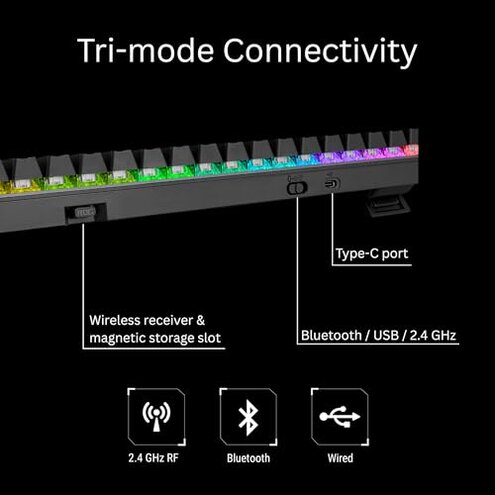
Why does the keyboard drop or lag when I switch devices?
Regret moment: Many buyers notice dropped keystrokes or lag during gaming or fast typing when switching modes. This is a recurring pattern tied to mode transitions and active sessions.
Pattern: This issue appears repeatedly during early use and persists for some users across weeks of daily gaming. It is most apparent when switching from 2.4GHz to Bluetooth or when changing active Bluetooth devices.
Category contrast: This feels worse than normal because most mid-range wireless keyboards keep one reliable mode; frequent switching here adds visible lag and interrupts gameplay.
Is the RGB and macro software required and unstable?
- Hidden requirement: Buyers commonly report needing the vendor software to access macros and lighting, making functionality dependent on that software.
- Stability signal: Software and firmware updates appear repeatedly in reports as sources of broken macros or lost settings after updates.
- When it shows up: Problems surface right after installing drivers or applying firmware updates and sometimes after OS updates.
- Why it matters: This is more disruptive than expected because mid-range alternatives often work acceptably without constant software intervention.
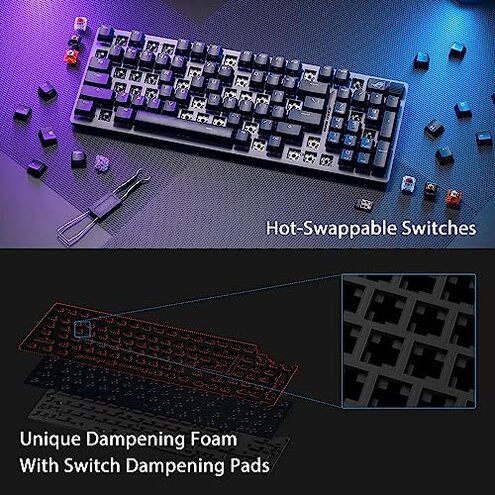
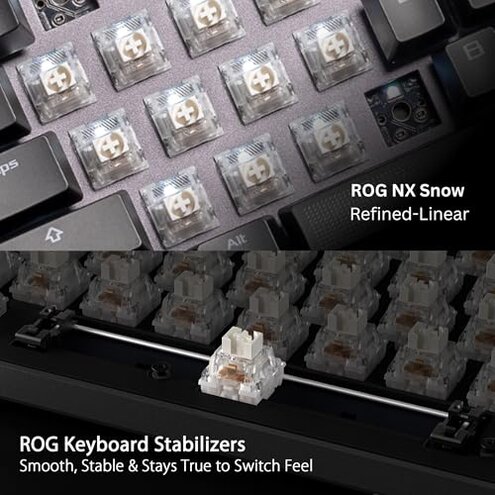
Are the switches and pre-lube actually consistent out of the box?
- Early sign: Some buyers notice scratchiness or uneven travel on certain keys immediately after unboxing.
- Frequency tier: This is a secondary issue — less common than connectivity but persistent for affected users.
- Probable cause: Reports point to uneven factory lubrication or switch tolerance differences as likely causes.
- User impact: Affected users report inconsistent typing feel and occasional extra noise during long sessions.
- Attempted fixes: Many buyers try keycap removal, reseating switches, or manual lubrication to reduce scratchiness.
- Fixability: The fix often requires extra time and hobbyist skills, making it worse than the usual out‑of‑box variance.
Will battery life and wireless behavior match the marketing claims?
- Real-use note: Battery performance varies with mode and RGB brightness and often drops faster in Bluetooth mode.
- Context anchor: Degradation typically appears during long sessions or heavy RGB and macro use.
- Scope signal: This is a primary complaint for daily users who expect long uptime between charges.
- Why worse: The combined cost of recharging and reconnecting is higher than most mid-range keyboards that offer simpler, more predictable battery life.
- Workarounds tried: Buyers report disabling RGB, using wired mode, or keeping 2.4GHz active to extend runtime.
- Hidden trade-off: Using wired mode fixes runtime but removes the board's wireless convenience.
- Long-term note: Some users see battery decline accelerate after months of daily use, making the problem more painful over time.
Illustrative excerpts (not actual quotes)
Illustrative: "Switching to Bluetooth mid‑game caused dropped keys and lost rounds." — primary
Illustrative: "Software reset my macros after an update; I had to redo everything." — secondary
Illustrative: "A few keys felt gritty right away, needed relubing." — edge-case
Who should avoid this
- Competitive gamers who need rock‑solid wireless switching and zero lag should avoid this board due to recurring mode and latency complaints.
- Non‑technical buyers who won’t install or troubleshoot vendor software should avoid it because full features depend on software that can be unstable.
- Users wanting perfect out‑of‑box feel who dislike fiddling with switches or lubrication should avoid it because some units need manual fixes.
Who this is actually good for
- RGB enthusiasts who accept installing software and occasional updates to access deep lighting and macros.
- Desktop users who plan to use wired or single 2.4GHz mode most of the time and can avoid Bluetooth switching.
- Modding hobbyists who are comfortable opening the board and re-lubing switches to tune feel.
Expectation vs reality
Expectation: Reasonable for this category is reliable tri‑mode switching without interruptions.
Reality: Many buyers face dropped keys or mode lag when switching, which is worse than the category baseline.
Expectation: Reasonable for this category is usable macros without constant software fixes.
Reality: The vendor software dependency and update instability cause lost settings and extra troubleshooting steps.
Safer alternatives
- Prefer single reliable mode: Choose keyboards known for stable Bluetooth or 2.4GHz performance to avoid frequent switching issues.
- Look for low‑software dependence: Pick models that store macros on the keyboard or use simple on‑board toggles to avoid software fragility.
- Buy from repair‑friendly brands: Select keyboards with straightforward warranty or modular hot‑swap support if you might need to fix switches.
- Check long‑term battery reports: Favor products with many consistent battery reports rather than isolated manufacturer claims.
The bottom line
Main regret: The biggest buyer pain is the combination of mode switching problems and software instability during real use.
Why worse: These issues interact and create more disruption than the single annoyances typical of mid‑range keyboards.
Verdict: Avoid this model if you need plug‑and‑play wireless reliability and minimal troubleshooting.
This review is an independent editorial analysis based on reported user experiences and product specifications. NegReview.com does not sell products.