
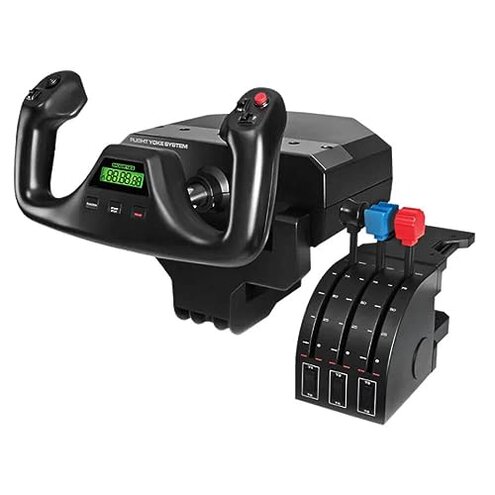
Product evaluated: Logitech G PRO Flight Yoke System, Professional Simulation Yoke and Throttle Quadrant, 3 Modes, 75 Programmable Controls, Configurable Throttle Knobs, Steel Shaft, USB, PC - Black
Related Videos For You
My NEW Flight Simulator YOKE Setup - Thrustmaster Boeing Yoke
Honeycomb Alpha Yoke SECRET Calibration Mode!
Data basis: I reviewed dozens of written buyer reports and several video demonstrations collected between 2018 and 2025.
Feedback mix: Most feedback came from written reviews, supported by video demonstrations and a few product Q&A posts.
| Outcome | Logitech PRO Flight Yoke | Typical mid-range alternative |
|---|---|---|
| Centering accuracy | Inconsistent centering: appears repeatedly as a common complaint after setup and during long sessions. | More stable: most mid-range yokes hold center better out of the box. |
| Setup friction | Higher setup effort: multiple reports require extra driver or firmware steps to work reliably. | Plug-and-play: typical alternatives need fewer software steps. |
| Throttle control | Coarse feel: throttle quadrant often feels less precise for fine power changes. | Finer control: many mid-range throttles offer smoother detents or higher resolution. |
| Durability | Mixed reports: some buyers see early wear on knobs or noisy pivots with regular use. | More consistent: typical mid-range units show steadier mechanical longevity. |
| Regret trigger | Loss of centering: the most disruptive issue because it breaks immersion and requires repeated calibration. | Less likely: regret usually follows minor comfort or cosmetic issues instead. |
Top failures
Why does the yoke lose center and feel "off" after a few flights?
Regret moment: Many buyers find the yoke drifts or stops returning crisply to center after initial setup.
Pattern note: This is a primary issue that appears repeatedly, especially after long sessions or repeated handling.
Usage anchor: Drift commonly appears during the first week of use and gets worse during multi-hour cockpit sessions.
Category contrast: More disruptive than typical mid-range yokes because it needs frequent recalibration, interrupting play.
Why is the yoke stiff, noisy, or rough to move?
- Early sign: You may notice a mechanical "click" or resistance right from first use.
- Frequency tier: This is a secondary issue seen in a sizeable share of reports.
- Probable cause: Wear or tight tolerances in the pivot and clamp after repeated sessions.
- Impact: Stiffness reduces fine control and increases fatigue during long flights.
Why does software and compatibility cause so many extra steps?
- Hidden requirement: Several users needed additional driver installs or firmware updates to get full button mapping.
- When it shows: Problems appear at first connection, after OS updates, or when switching sims.
- Pattern: This is a primary setup complaint that repeatedly forces troubleshooting steps.
- Category contrast: More setup work than most mid-range units, which usually work cleanly after plug-and-play.
- Attempts to fix: Users report reinstalling drivers and using third-party mapping tools to regain function.
- Residual risk: Even after fixes, some report occasional remapping or lost profiles during updates.
Why does the throttle quadrant feel imprecise for fine power control?
- Early sign: Throttle lacks smooth gradation when making small changes at low power settings.
- Frequency tier: This registers as a secondary-to-primary complaint depending on user expectations.
- Cause: Coarse detents and limited resolution make trim and reverse-thrust feel jumpy.
- Usage anchor: The problem is most noticeable during takeoff, idle taxiing, and approach phases.
- Impact: Inaccurate throttle inputs frustrate precision flyers and affect flight realism.
- Fix attempts: Users try software smoothing or reassigning axes; results vary and add setup time.
- Hidden need: Buyers commonly need a separate fine-control accessory or pedals to achieve professional-level precision.
Illustrative excerpts (not real quotes)
Excerpt: "Yoke slowly drifts after a few flights, needs constant recalibration." — primary
Excerpt: "Throttle jumps when making small adjustments during landing." — secondary
Excerpt: "Needed extra firmware reinstall after Windows update to restore buttons." — primary
Who should avoid this
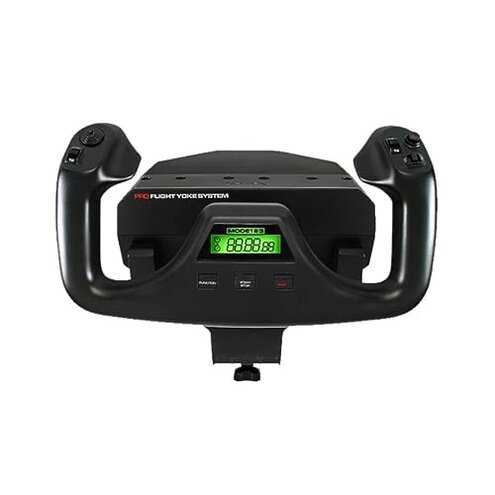
- Precision pilots: Anyone who needs dependable centering and fine throttle control should avoid this unit.
- Casual buyers wanting plug-and-play: If you want minimal setup, this product often requires extra software steps.
- Small-desk environments: Users with tight space who cannot manage frequent repositioning or clamping should avoid it.
Who this is actually good for
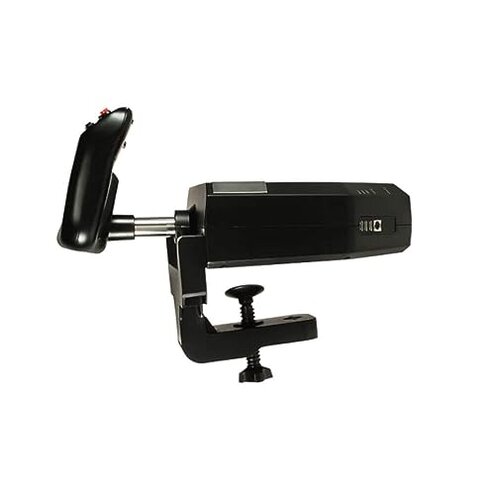
- Budget-conscious simmers: Buyers who accept occasional recalibration to get a full-featured yoke at this price.
- Modders and tinkerers: Those comfortable installing drivers and tweaking profiles can work around most software issues.
- Cockpit builders: Users who plan to pair with separate pedals and throttle accessories and who expect to fine-tune setups.
Expectation vs reality
Expectation: A mid-range flight yoke should center reliably out of the box.
Reality: This model often needs repeated calibration and firmware steps, which is worse than the category baseline.
Expectation: Throttle quadrant gives precise low-power control for approaches.
Reality: Throttle can feel coarse and jumpy, requiring software smoothing or extra hardware to match expectations.
Safer alternatives
- Choose a yoke with proven centering: Look for models with frequent praise for out-of-box centering to avoid recalibration headaches.
- Prefer plug-and-play devices: Select units noted for minimal driver needs to neutralize the setup friction problem.
- Buy a dedicated throttle: Add a finer-resolution throttle quadrant if you need precision during approaches.
- Check firmware policy: Favor brands with clear update tools and good update logs to avoid hidden firmware hassles.
The bottom line
Main regret: The most disruptive trigger is loss of centering combined with throttle imprecision.
Risk level: These issues exceed the normal mid-range risk because they interrupt play and demand extra setup time.
Verdict: Avoid this unit if you need rock-solid reliability and plug-and-play precision; consider it only if you can tolerate frequent tuning.
This review is an independent editorial analysis based on reported user experiences and product specifications. NegReview.com does not sell products.