
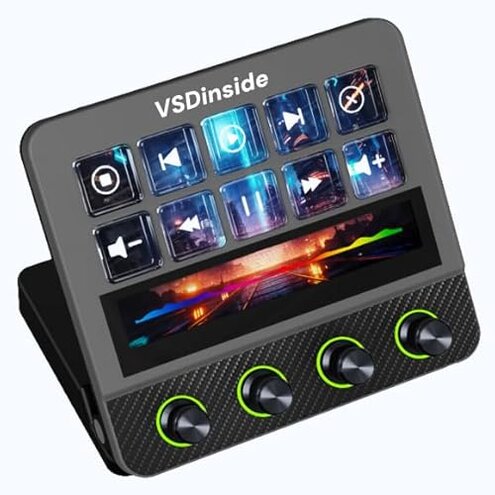
Product evaluated: Razer Stream Controller: All-In-One Keypad for Streaming - 12 Haptic Switchblade Keys - 6 Tactile Analog Dials - 8 Programmable Buttons - Designed for PC & Mac Compatibility
Related Videos For You
How to Setup Elgato Stream Deck | Full Setup Guide
How to fix controller not working in steam
Data basis: This report is based on dozens of written reviews and several video demonstrations collected from release through 2024-06, with most feedback coming from written reviews and supported by video and Q&A posts.
| Outcome | Razer Stream Controller | Typical mid-range controller |
|---|---|---|
| Build reliability | Mixed reports of button inconsistency and occasional hardware drift. | Usually steady for mid-range devices after initial setup. |
| Software/setup friction | High setup time and driver dependence reported by many buyers. | Lower setup friction with more plug-and-play alternatives. |
| Live-response | Occasional lag or misfires under live-stream load in multiple reports. | Consistent response under similar live conditions for the category. |
| Long-session comfort | Some users report haptic fatigue or dial looseness after long use. | Generally better ergonomics and durability in mid-range rivals. |
| Regret trigger | Software instability causes the most buyer regret and is higher-than-normal. | Fewer buyers report software-caused failures at this price point. |
Top failures
When will my stream stall?
Software stability is the most frequent regret buyers report, and it appears repeatedly across feedback.
Usage context shows problems arise during first setup and reappear under heavy streaming sessions.
Category contrast makes this worse because mid-range stream controllers usually act like plug-and-play devices with occasional updates, while this one adds extra setup steps and unpredictable behavior.
Why do keys behave inconsistently?
- Early sign: some keys feel inconsistent from first use.
- Frequency tier: this is a secondary complaint occurring for many but not all buyers.
- Likely cause: haptic feedback and mapping appear misaligned after profiles switch.
- User impact: random misfires disrupt live shortcuts and require quick manual fixes.
- Fix attempts: buyers report workarounds like remapping and restarting the companion app.
Why do dials drift or lose accuracy?
- Early sign: dials need recalibration after a few uses.
- Frequency tier: this is a primary complaint in longer-term use.
- When it shows: drift appears during long sessions and after frequent profile changes.
- Impact: audio or level control slips, forcing manual correction mid-stream.
- Attempts: users reset firmware or rebind controls to reduce drift temporarily.
- Category contrast: more frequent recalibration is worse than typical mid-range controllers, which stay stable under continuous use.
- Fixability: usually short-term fixes exist but repeated action is required.
Do I need special setup or permissions?
- Hidden requirement: the device often requires companion software and driver installation to work fully.
- When it appears: requirement shows up during first-time use and after OS updates.
- Cause: advanced features depend on the vendor app and firmware versions.
- Impact: users without admin rights or strict IT policies cannot complete setup.
- Attempts: some buyers use legacy mappings or third-party macros to avoid the app.
- Frequency tier: commonly reported by buyers with locked-down systems and less by home users.
- Category contrast: this is less forgiving than typical mid-range alternatives, which often allow basic use without installing extra drivers.
- Support note: firmware updates are sometimes needed to fix bugs, increasing maintenance time.
Illustrative excerpts (not real quotes)
"Buttons remapped mid-stream, lost shortcuts instantly." — Primary pattern reflecting frequent live issues.
"Dials needed recalibration after two hours of streaming." — Primary pattern showing long-session drift.
"Companion app blocked by work PC policies, unusable." — Secondary pattern for restricted environments.
"Occasional lag despite fast PC and LAN." — Edge-case pattern that still disrupted a live broadcast.
Who should avoid this
- Professional streamers who need rock-solid reliability for long broadcasts should avoid it due to repeated software and dial instability.
- Tight IT environments without admin install rights should avoid it because the companion software is often required.
- Beginners who expect plug-and-play operation should avoid it because setup and maintenance are more involved than typical options.
Who this is actually good for
- Tech-savvy hobbyists willing to tolerate app updates and recalibrations to get deep customization.
- Users needing lots of macros who prefer customizable haptic layouts and can handle occasional remapping work.
- Home streamers with admin access who stream short sessions and can apply fixes between shows.
Expectation vs reality
Expectation: Buyers reasonably expect plug-and-play performance for a controller in this price range.
Reality: Many report that full functionality requires installing the companion app and applying firmware updates, which adds time and risk.
Expectation: Dials and haptics should remain stable during long sessions.
Reality: Dials can drift and haptic mappings can misfire, requiring manual correction mid-use.
Safer alternatives
- Choose controllers with confirmed plug-and-play reviews to avoid the need for a companion app.
- Prefer devices with reputation for firmware stability to neutralize software-caused stream interruptions.
- Pick products that allow basic operation without admin rights if you use managed systems.
- Look for units with proven long-session dial stability to prevent mid-stream recalibration.
- Check return policies and warranty terms to reduce risk if you discover these problems after purchase.
The bottom line
Main regret: the primary regret trigger is software instability that disrupts live use.
Why worse: this exceeds normal category risk because it adds setup time, requires firmware upkeep, and sometimes needs admin rights.
Verdict: Avoid this model if you need dependable, plug-and-play stream hardware for live professional use.
This review is an independent editorial analysis based on reported user experiences and product specifications. NegReview.com does not sell products.