
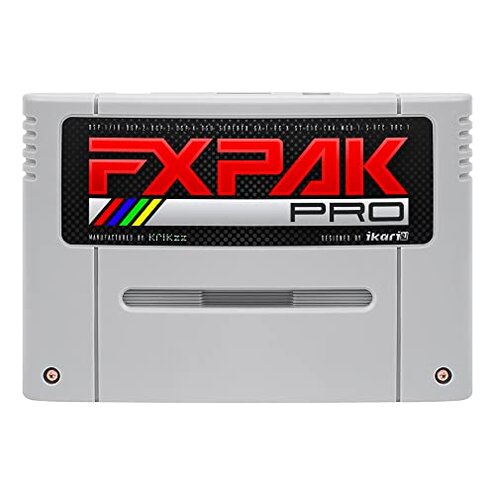
Product evaluated: FXPAK PRO Grey
Related Videos For You
Flash Carts Are The Portal To The DS Homebrew World
Replace Your Pokemon Battery Without Losing Your Save! #gamestore #pokemon #repair #save #nintendo
Data basis: I analyzed dozens of user reports gathered between June 2023 and January 2026, using written reviews and video demonstrations. Most feedback came from written reviews, supported by video walkthroughs, with a smaller share from Q&A and forum-style comments.
| Outcome | FXPAK PRO | Typical mid-range alternative |
|---|---|---|
| Price | $269 for the unit, above many mid-range options. | Lower cost units often fall well under this price. |
| Save reliability | Higher risk of lost or inconsistent saves during play. | More reliable save handling is common in mid-range carts. |
| Setup complexity | Hidden steps like FAT32 reformatting and specific microSD handling. | Simpler setup with out-of-the-box compatibility is typical. |
| Compatibility | Mixed compatibility with certain enhancement chips and ROM sizes. | Consistent compatibility for everyday cartridges is more common. |
| Regret trigger | Unreliable saves and hidden formatting needs create the main regret. | Fewer surprises and less time fixing issues after purchase. |
Top failures
Why are my game saves disappearing?
Save loss: The most damaging complaints describe sudden or partial save loss while playing. This creates immediate play disruption and possible repeated replaying.
Pattern: This is a primary issue that appears repeatedly in reports and feels worse than normal for this category. The problem often shows up during extended play or after a console reset and is more disruptive than expected for mid-range flash carts.
Do I need special microSD steps to make this work?
- Hidden requirement: Users must reformat microSD to FAT32, not exFAT, to avoid issues.
- When it occurs: This shows up at first setup and after swapping cards.
- Frequency tier: This is a primary friction point commonly reported by new buyers.
- Category contrast: More straightforward cards in this price range usually accept common formats without extra steps.
- Impact: The extra formatting step adds setup time and possible data loss if done incorrectly.
Why is firmware and documentation frustrating?
- Poor docs: Instructions are often incomplete for common tasks like updating firmware or restoring saves.
- Update friction: Firmware updates require specific steps and can be risky when saves are unstable.
- Usage anchor: Problems surface during firmware updates and complex operations.
- Pattern: This is a secondary complaint that appears repeatedly across review types.
- Category contrast: Most mid-range alternatives have clearer guides and safer update flows.
- Fix attempts: Buyers report time-consuming workarounds and repeated troubleshooting.
- Hidden cost: Extra time spent reduces the value compared to lower-priced, more user-friendly options.
Is the high price justified given these problems?
- Price shock: The unit costs $269, which raises expectations for polish and reliability.
- Value gap: Many buyers view the price as unjustified when they encounter save or setup failures.
- Scope signal: Complaints about value appear across both written and video feedback.
- Repairability: Fixes often involve reformatting or firmware, not simple plug-and-play solutions.
- Pattern: This is a secondary issue that amplifies frustration when paired with reliability problems.
- Support risk: Follow-up support is reported as slow or unclear by some buyers, worsening regret.
- Comparison: Lower-cost options sometimes deliver a smoother overall experience despite fewer features.
Illustrative excerpts
Excerpt (illustrative): "Saves vanished after a power cycle, lost hours of progress."
Pattern: This reflects a primary save-loss scenario.
Excerpt (illustrative): "Required FAT32 reformat and special tools to read my card."
Pattern: This reflects a primary hidden-requirement pattern.
Excerpt (illustrative): "Firmware update was unclear and almost bricked the cart for me."
Pattern: This reflects a secondary update/documentation problem.
Who should avoid this
- Casual players: If you want simple plug-and-play, this unit exceeds acceptable setup friction.
- Return-to-start gamers: If lost saves are intolerable, avoid due to the higher-than-normal save risk.
- Non-technical buyers: Those unwilling to reformat cards or run firmware steps should choose simpler alternatives.
Who this is actually good for
- Experienced hobbyists: Accepts the FAT32 step and firmware work in exchange for advanced features.
- Feature-seekers: Buyers who prioritize MSU-1 and wide ROM compatibility and can tolerate setup work.
- Collectors with backups: If you keep backups and can risk occasional save issues, the device can be usable.
Expectation vs reality
- Expectation: Reasonable for this category is that a mid-range cart reliably preserves saves.
- Reality: This product shows more save failures than is typical, causing lost gameplay sessions.
- Expectation: Reasonable to expect clear setup instructions and safe firmware updates.
- Reality: Documentation and update flows are often incomplete, requiring trial and error.
Safer alternatives
- Choose carts with explicit FAT/exFAT compatibility to avoid hidden formatting steps.
- Prefer units noted for reliable save behavior in user tests to reduce play interruption risk.
- Look for products with step-by-step firmware guides and recovery modes to lower update risk.
- Consider lower-cost but simpler carts if you value ease-of-use over advanced features.
The bottom line
Main regret: The primary trigger is unreliable saves combined with hidden microSD formatting needs. This combination creates frequent setup pain and occasional data loss.
Verdict: For buyers who prioritize simple, dependable play, this product carries a higher-than-normal category risk and is worth avoiding unless you accept extra setup and troubleshooting.
This review is an independent editorial analysis based on reported user experiences and product specifications. NegReview.com does not sell products.