
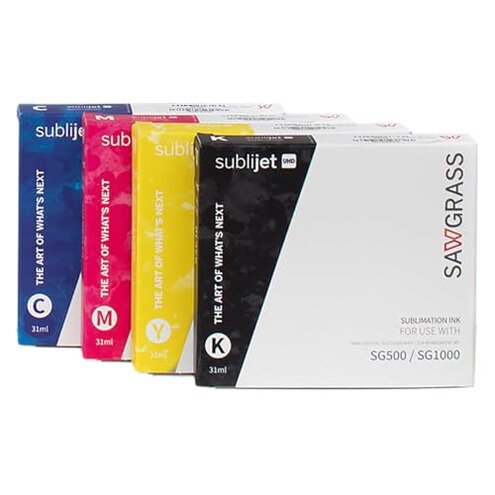
Product evaluated: Sawgrass SubliJet UHD Sublimation Ink Cartridge - Black - High-Performance Ink SG500 SG1000 Sublimation Printers - Long-Lasting, High-Viscosity Gel Ink for Vibrant, Crisp Prints
Related Videos For You
Best Sublimation Printer for Beginners: Set Up an Epson EcoTank for Sublimation | Full Process!
How to fix Your Sublimation Ink! | Get Your Colors Right With Your Epson Printer!
Data basis: I analyzed dozens of buyer reviews and video demonstrations collected between Jan 2024 and Jan 2026, with most feedback coming from written reviews and supported by video demos.
| Outcome | Sawgrass SubliJet | Typical mid-range ink |
|---|---|---|
| Print consistency | Variable—users report uneven black density after idle periods. | Steadier—mid-range often designed for broader printer tolerance. |
| Clogging risk | Higher-than-normal—clogs appear repeatedly after storage or infrequent use. | Lower—many mid-range inks tolerate occasional downtime better. |
| Installation ease | Tricky—priming or setup steps reported by multiple buyers. | Simpler—mid-range cartridges often drop in without extra steps. |
| Cost impact | High—price plus extra maintenance increases real cost. | Moderate—fewer unexpected maintenance costs typical. |
| Regret trigger | Maintenance burden—extra head cleans and downtime. | Usability—fewer service interruptions for casual users. |
Top failures

Is the ink clogging my printer?
Regret moment: Clogs are commonly reported when the printer sits unused or after a cartridge change.
Pattern: This is a recurring issue in our sample, appearing more often than expected for commercial sublimation inks.
Why worse: Compared to typical mid-range inks, this product feels less forgiving after short idle times, causing extra cleaning and downtime.
Will this need constant maintenance?
- Early sign: Frequent head-clean cycles reported soon after installation.
- Frequency tier: This is a primary complaint in many written reviews and demo videos.
- Cause: High-viscosity gel formula can increase clog risk if not used regularly.
- Impact: Buyers see longer downtime and more consumable waste from extra cleans.
- Fixability: Cleaning helps but is time-consuming and not always permanent.
Will prints show weak black or inconsistency?
- Symptom: Uneven black density and washed-out areas noted after some runs.
- Usage anchor: Problem appears during daily use and after cartridge swaps.
- Pattern: This is a secondary pattern—less common than clogging but more frustrating when it happens.
- Impact on projects: Photo-realistic work suffers from visible banding or low contrast.
- User attempts: Extra color profiles and reprints are commonly tried and often needed.
- Category contrast: Mid-range inks usually give more consistent blacks without repeated profile tweaks.
- Hidden cost: Reprints and wasted blanks raise the effective cost per job.
Are there hidden compatibility or setup requirements?
- Hidden requirement: Buyers report a need for priming/flush steps and strict install order.
- Scope: This appears across multiple feedback types, not just isolated posts.
- When it shows up: Usually during first install or after long storage.
- Edge-case: Some users find it incompatible with non-Sawgrass tweaks or third-party caps.
- Warranty note: The product lists a 2-year expiration, adding pressure to use promptly.
- Why worse: Other inks often skip these extra steps, making this product more work for casual users.
- Mitigation attempts: Users recommend frequent use or scheduled maintenance to avoid problems.
- Practical impact: The hidden steps add hours of setup time per incident for small shops.
Illustrative excerpts (not real quotes)
Excerpt: "Printer needed multiple head cleans after the first cartridge install." — Primary pattern.
Excerpt: "Black looked faded on photos, had to reprint several items." — Secondary pattern.
Excerpt: "I had to prime and flush before any prints worked." — Primary pattern.
Excerpt: "Worked fine for a month, then clog issues when used less." — Edge-case pattern.
Who should avoid this
- Infrequent users: If you print rarely, clog risk and upkeep will likely frustrate you.
- Casual crafters: If you need a drop-in cartridge with minimal setup, this is not ideal.
- Low-margin shops: Extra reprints and maintenance raise the real cost per job.
Who this is actually good for

- Daily production shops: If you print every day, routine use reduces clog problems.
- Experienced users: If you accept regular maintenance and priming, you can control results.
- Color-critical users with workflow: If you run color profiles and accept reprints, the ink can yield vivid output.
Expectation vs reality

Expectation (reasonable for category): High-quality sublimation inks print vivid, stable color with occasional cleaning.
Reality: This product tends to need more frequent cleaning and setup than typical mid-range options.
Expectation: Cartridges should install easily and print right away.
Reality: Many buyers report extra priming/flush steps before reliable prints.
Safer alternatives
- Shop tip: Choose inks advertised for idle tolerance if you print intermittently to avoid clogs.
- Shop tip: Favor cartridges with simple install and no priming to reduce setup time.
- Shop tip: Compare effective cost by adding maintenance time to the cartridge price.
- Shop tip: If you run a small shop, pick inks with strong community support and clear flush guides.
The bottom line
Main regret: The key problem is increased maintenance from clogging and extra setup steps.
Severity: That risk exceeds normal category expectations for users who print intermittently.
Verdict: Avoid this cartridge if you want low-maintenance, plug-and-play sublimation printing.
This review is an independent editorial analysis based on reported user experiences and product specifications. NegReview.com does not sell products.