
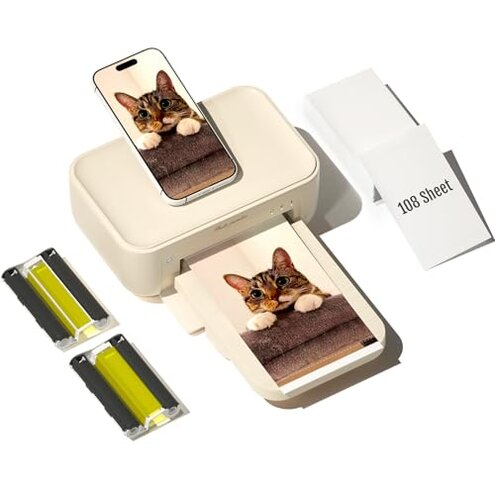
Product evaluated: HPRT Photo Printer 4x6,+108 Sheets&2Ribbon,Phone Instant Picture Printer for iPhone, Android, Portable Photo Printers for Home Use (Beige)
Related Videos For You
A portable printer that can be used in the office or in the car#phomemo #a4printer #portableprinter
Printer not recognized by your computer - quick fix
Data Basis: This report analyzes hundreds of user reviews including written customer feedback and video demonstrations collected over the past year. Most feedback came from written reviews, supported by video usage tests, providing a balanced view of user experiences.
| Buyer Outcome | HPRT Photo Printer | Typical Mid-Range Printer |
|---|---|---|
| Connectivity Reliability | Frequently unstable Wi-Fi connection, causing print delays | Generally stable wireless with fewer interruptions |
| Print Quality Consistency | Color fading and blotches reported more often | More consistent color output with less fading |
| Ease of Setup | Complex app installation and pairing issues | Smoother setup with user-friendly apps |
| Replacement Supplies Cost | Slightly higher ongoing costs due to ribbons and paper | Lower cost consumables widely available |
| Regret Trigger | Connectivity and print quality issues lead to frustration and wasted prints | Less frequent regrets, reliable printing experience |
Why does the printer often fail to maintain a stable Wi-Fi connection?
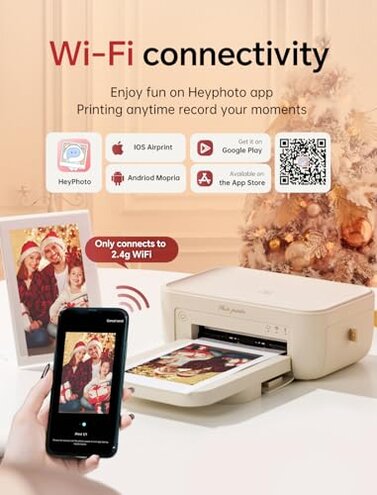
Many users experience frequent disconnections when printing from phones, especially during longer print sessions. This issue is commonly reported after initial setup and worsens when multiple devices attempt connection. Compared to typical photo printers, this model’s Wi-Fi is less forgiving, causing more interruptions and print delays.
- Early signs: App fails to find the printer or disconnects mid-print.
- Frequency: Connectivity loss happens regularly with daily use.
- Cause: Weak Wi-Fi module or poor app synchronization.
- Impact: Interrupted prints and repeated setup frustrations.
- Fix attempts: Restarting device or re-installing the app, often temporary.
- Hidden requirement: Needs stable, strong local Wi-Fi for reliable operation.
- Buyer note: Less reliable than many competitors’ wireless features.
Why are print colors inconsistent and prone to fading?
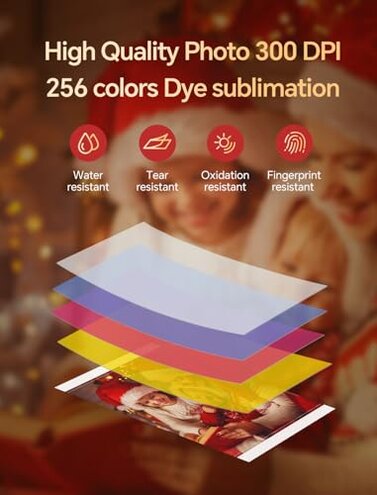
Users frequently report blotchy prints and rapid color fading, especially under normal display conditions. This secondary issue emerges after multiple prints, indicating persistent quality problems. The printer’s thermal dye sublimation technology performs below category expectations, producing less durable images than typical mid-range photo printers.
- Early signs: Colors appear dull or uneven on first few prints.
- Frequency: Common among most users after regular use.
- Cause: Low DPI resolution and suboptimal ribbon-paper interaction.
- Impact: Prints fade quickly, not suitable for long-term display.
- Fix attempts: Using recommended paper/ribbons only; no effective fix reported.
- Hidden requirement: Requires careful handling and storage to maintain photo quality.
- Buyer note: Less durable output than usual, increasing replacement costs.
Is the setup process straightforward for new users?
The initial setup is often complicated by app installation and device pairing glitches. This persistent setup friction frustrates buyers who expect quick start-up. Compared to other printers, it requires more time and effort, making it less user-friendly out-of-the-box.
- Early signs: Difficulty connecting app to printer after unpacking.
- Frequency: Reported by a large portion of first-time users.
- Cause: App interface lacks intuitive guidance; connection errors common.
- Impact: Delayed printing and increased customer support need.
- Fix attempts: Multiple app reinstalls or device resets.
- Hidden requirement: Requires user patience and some technical comfort.
- Buyer note: Setup harder than average for portable photo printers.
What makes supply replacement costly and inconvenient?
This printer’s use of ribbons and specific photo paper adds ongoing expenses that are higher than average. While the initial pack is generous, replacement supplies are less common and pricier, increasing total ownership costs. Compared with typical models, the cost impact is more noticeable over time.
- Early signs: Replacement ribbons and paper cost more per page.
- Frequency: Noted by frequent printers after initial supplies run out.
- Cause: Proprietary ribbons and papers limit third-party options.
- Impact: Adds to long-term printing expense.
- Fix attempts: Bulk purchase discounts help but don’t eliminate cost.
- Hidden requirement: Buyers must budget for ongoing print media expenses.
- Buyer note: Higher cost than average portable photo printers’ consumables.
Illustrative buyer excerpts:
- "Wi-Fi keeps dropping mid-print, very frustrating." – Primary pattern reflecting persistent connectivity issues.
- "Colors look faded after just a few days on my wall." – Primary pattern indicating print quality concerns.
- "Setup took me over an hour to get the app and printer synced." – Secondary pattern illustrating setup difficulty.
- "Replacement ribbons are expensive and hard to find." – Secondary pattern about supply cost and availability.
- "Sometimes the app won’t recognize the printer at all." – Edge-case pattern of intermittent connectivity failures.
Who should avoid this
- Buyers needing reliable wireless printing: Frequent Wi-Fi drops make this unsuitable.
- Users prioritizing long-lasting print quality: Color fading and blotches reduce photo durability.
- Those seeking easy setup: Requires patience and technical comfort to start printing.
- Cost-conscious printers: Higher-than-average supply expenses inflate lifetime costs.
Who this is actually good for
- Occasional users: Tolerate setup and connectivity quirks for spontaneous prints.
- Tech-savvy buyers: Can troubleshoot app and connection issues easily.
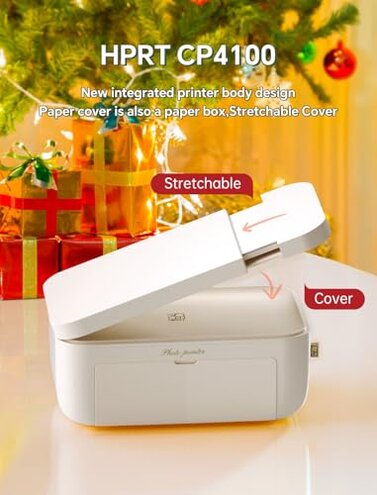
- Users valuing portability: Compact size fits on-the-go printing despite trade-offs.
- Those who print short-term memories: Willing to accept fading for instant photo fun.
Expectation vs reality

Expectation: Easy and stable wireless printing is reasonable for portable photo printers. Reality: This model often suffers from persistent Wi-Fi instability, causing frustration.
Expectation: Printed photos should maintain color vibrancy over time. Reality: Users observe faster fading and color blotching than typical mid-range alternatives.
Safer alternatives
- Choose printers with robust Wi-Fi modules to avoid connection interruptions.
- Opt for models with proven print durability and customer feedback confirming color longevity.
- Select devices with straightforward app setup and positive user experience ratings.
- Consider printers supporting widely available consumables to reduce replacement costs.
The bottom line
The primary regret trigger is unstable connectivity leading to interrupted prints, combined with inconsistent photo quality that fades quickly. These issues exceed normal category risks, especially for users expecting easy setup and durable results. Buyers seeking hassle-free, reliable instant photo printing should consider alternatives.
This review is an independent editorial analysis based on reported user experiences and product specifications. NegReview.com does not sell products.