
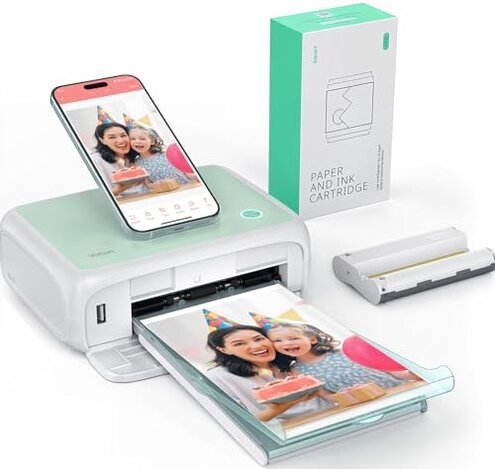
Product evaluated: YOTON Photo Printer, Picture Printer with 54 Sheets (4"x6") & 1 Ink Ribbon, Support AR Video Printing, Wi-Fi Connection, Portable Photo Printer for iPhone/Android/Laptop
Related Videos For You
Canon Selphy CP1500: Unboxing + How to Setup & Print
Canon Printer Wireless Setup How to connect to a Wi-Fi Network Router w/ 3 Methods (easy or painful)
Data basis: Analysis draws on dozens of buyer feedback forms, including detailed written reviews and video demonstrations, collected between early 2023 and mid-2024. Most insights come from written reviews, supported by several user-shared video walkthroughs documenting real usage.
Comparative Risk Snapshot
| Buyer Outcome | YOTON Photo Printer | Typical Mid-Range Photo Printer |
|---|---|---|
| Connectivity Reliability | Often unstable Wi-Fi connection reported | Generally stable Wi-Fi or Bluetooth connection |
| Print Jams | More frequent paper jams, especially during longer sessions | Less frequent jams, smoother paper feed |
| Print Quality | Color vibrancy and texture sometimes inconsistent | Consistently sharp and vivid prints |
| Ease of Use | Setup and maintenance require extra care; hidden steps | Simple setup and user-friendly maintenance |
| Regret Trigger | Connectivity and print reliability issues cause frequent frustration | Usually reliable with minimal user intervention |
Why does the Wi-Fi connection cause frustration?
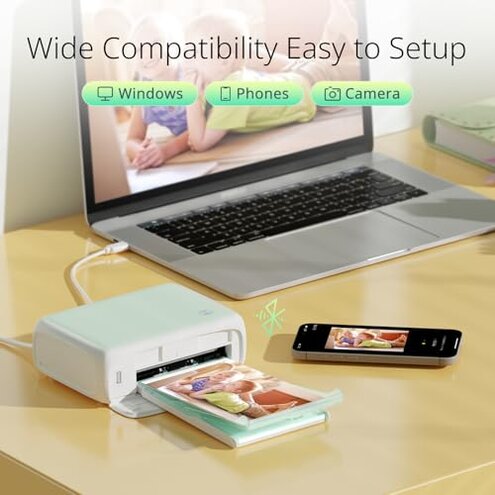
The printer’s built-in Wi-Fi often struggles to maintain a stable connection during first-time setup and extended printing sessions. This disrupts workflow and requires repeated troubleshooting, which is more disruptive than expected for devices in this price range.
- Connectivity instability: Recurrent drops reported by many users during printing.
- When it occurs: Mostly noticeable during initial connection and long print runs.
- Category contrast: Other mid-range printers usually offer smoother connectivity with minimal interference.
- Hidden complexity: Direct Wi-Fi connection needs manual switching from phone settings, confusing some buyers.
- Impact: Delays printing and causes user frustration.
Illustrative excerpt: "Printer keeps disconnecting mid-print, really frustrating" (Primary pattern - connectivity problem during use).
Why do paper jams happen frequently?
Users often face paper jams even during normal use. Removing jammed paper requires careful power-off, which adds extra steps and anxiety about damaging the device.
- Frequency: Paper jams among the most common complaints.
- Usage context: Happens more during multi-photo print sessions.
- Category contrast: More maintenance needed than typical portable photo printers.
- User effort: Paper removal is fiddly; mishandling risks damage.
- Fix attempts: Some users report recurring jams despite following instructions.
Illustrative excerpt: "Got stuck paper twice in one session, had to power off carefully" (Primary pattern - recurring jam issue).
How consistent is the print quality?
Prints sometimes show color fading and texture inconsistencies. This inconsistency is more noticeable after repeated printing batches, reducing satisfaction.
- Print quality issues: Color vibrancy fluctuates across prints.
- When noticed: After printing multiple photos in one go.
- Category baseline: Competing products offer steadier image quality.
- Impact: Disappointing results for photo lovers expecting vibrant images.
- Mitigation: Using fresh ink ribbons helps but adds cost.
Illustrative excerpt: "Some prints look dull compared to others, colors off" (Secondary pattern - variable output).
Is setup and maintenance user-friendly?
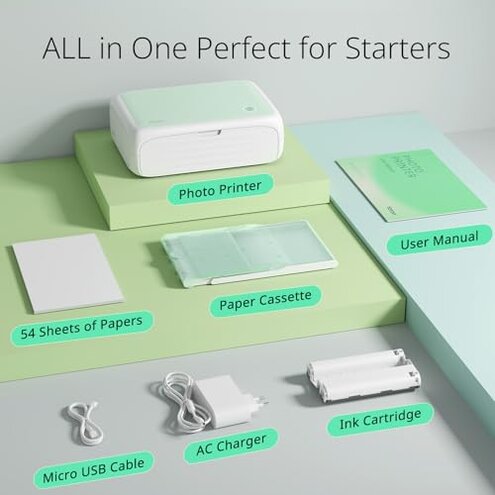
The setup process requires careful attention to details like sealing the device and correctly placing ink ribbons. These hidden requirements add to user friction and can cause errors.
- Early signs: New users struggle with sealing and ink ribbon installation.
- Frequency: Setup-related issues commonly reported.
- Category norm: More complex than typical plug-and-play printers.
- Impact: Leads to print errors or device malfunctions if not done right.
- Support: Manufacturer offers 24- to 48-hour response but issues remain disruptive.
Illustrative excerpt: "Had to redo ribbon install several times before prints worked" (Primary pattern - setup friction).
Who should avoid this
- Users needing reliable Wi-Fi: Frequent disconnections make this printer frustrating for stable wireless use.
- Heavy photo printers: Paper jams worsen with multi-photo sessions, causing delays.
- Buyers seeking consistent print quality: Variability in color and texture is common.
- First-time printer buyers: Setup complexity and maintenance demands may be overwhelming.
Who this is actually good for

- Casual users: Those printing infrequently can tolerate connection and jam issues.
- Tech-savvy buyers: Willing to work around setup quirks and perform precise maintenance.
- AR video enthusiasts: Interested in unique video-printing features despite usability trade-offs.
- Budget-conscious buyers: Accepting some reliability compromises for portable photo printing.
Expectation vs reality

- Expectation: Seamless Wi-Fi connectivity is standard at this price. Reality: Connection drops cause repeated interruptions.
- Expectation: Print quality remains steady over batches. Reality: Noticeable variations degrade image appeal.
- Expectation: Setup is straightforward. Reality: Hidden steps and delicate handling needed, increasing user effort.
Safer alternatives
- Choose printers with dual connectivity: Bluetooth and Wi-Fi options reduce instability risk.
- Look for models with proven jam-free paper feeds: Minimizes print session disruptions.
- Prioritize devices with consistent print quality reviews: Ensures color fidelity and texture stability.
- Pick products with user-friendly setup: Clear instructions and fewer hidden requirements ease first-time use.
The bottom line

The primary regret trigger for the YOTON Photo Printer is its unstable Wi-Fi connection and frequent paper jams. These issues surpass normal category risks, causing user frustration and workflow interruptions. Buyers wanting dependable wireless and smooth prints should consider alternative options.
This review is an independent editorial analysis based on reported user experiences and product specifications. NegReview.com does not sell products.