
Product evaluated: Serato Studio Ultimate Beat-making Software - The Ultimate Beat Maker (Download Card)
Related Videos For You
how to make a beat on FL STUDIO (Beginner)
Music Production For Beginners (Step By Step Masterclass)
Data basis for this report comes from dozens of buyer comments gathered between 2021 and 2026. Most feedback came from written reviews, with added context from video demonstrations and product discussion threads. The source mix leans heavily toward written first-use impressions, with smaller but useful follow-up feedback after setup and early projects.
| Buyer outcome | Serato Studio | Typical mid-range alternative |
|---|---|---|
| Getting started | Extra steps are a primary risk because this version arrives as a download card, not ready-to-run software. | Smoother setup is more common with direct installer delivery and clearer account flow. |
| First session speed | Mixed results appear repeatedly, with fast beat sketching for some buyers but setup friction slowing others. | More consistent first-day use is normal in this price range. |
| Feature access clarity | Higher-than-normal risk of confusion appears after activation because edition terms and access expectations can feel unclear. | Clearer tiers are usually easier to understand before purchase. |
| Learning curve | Steeper in spots than expected for beginner-facing beat software, especially when moving beyond templates. | More forgiving onboarding is the usual baseline for mid-range tools. |
| Regret trigger | Paying $199 and then spending extra time on download, account, and workflow adjustment is the main regret pattern. | Lower regret usually comes from faster setup and clearer expectations. |
Do you just want to install it and start making beats right away?
This is one of the most common frustration points. The regret moment happens on first use, when buyers expect software in hand but instead get a download card, online steps, and serial-based activation.
The pattern appears repeatedly rather than universally. For a software product, some setup is normal, but this feels more disruptive than expected because the product presentation can sound closer to instant access than it feels in practice.
- Primary issue: setup friction shows up before first project, when buyers must redeem, download, install, and authenticate instead of launching immediately.
- Early sign: confusion starts as soon as buyers realize the purchase is a download card, not a boxed disc or preloaded installer.
- Hidden requirement: a working online account flow is needed, which adds steps some casual users did not expect at checkout.
- Impact: this adds time and momentum loss, which matters more here because the product is marketed around fast creative flow.
- Fixability: the issue is usually solvable, but only after extra reading and account setup that many mid-range alternatives handle more smoothly.
Illustrative: “I wanted to make a beat tonight, not redeem codes for half the evening.” Primary pattern because the complaint centers on first-use setup delay.
Does the beginner-friendly pitch feel easier than the real workflow?
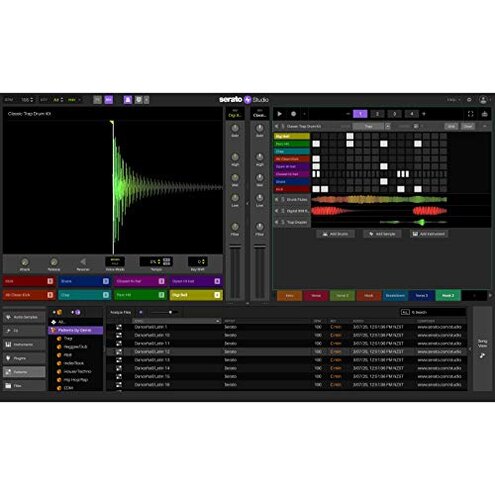
This becomes a secondary but persistent complaint after setup. The software does offer fast tools like pre-made drum patterns and BPM sync, but buyers commonly report that moving beyond the basics takes more adjustment than expected.
The trade-off is clear during early sessions. You can get ideas down quickly, but shaping them into polished tracks may feel less intuitive than a typical mid-range alternative aimed at beginners.
- Frequency tier: this is a secondary issue, less common than setup friction but still recurring across multiple feedback sources.
- When it hits: it shows up during daily use after the first few experiments, when buyers try to do more than simple loops or quick edits.
- Why it stings: the product promises less roadblocks, so any workflow friction feels more disappointing than in software already known to be technical.
- Category contrast: a learning curve is reasonable for beat software, but here the gap between “beginner-friendly” messaging and real adjustment time feels wider than normal.
- User-visible impact: buyers notice slower idea execution, more menu hunting, and more trial-and-error once they leave the preset-friendly path.
- Common attempt: many users try leaning on the built-in patterns and samples, which helps at first but does not always solve deeper workflow confusion.
- Fixability: this often improves with practice, but that weakens the value for buyers expecting immediate ease at this price.
Illustrative: “Fun for quick loops, but I hit a wall when I tried finishing a real track.” Secondary pattern because it appears after the first easy wins.
Are you buying this mainly because it says Ultimate?
- Primary regret: expectation mismatch is among the most frustrating complaints when buyers assume the “Ultimate” label means fewer limits or fewer surprises.
- Context: this shows up after activation, when users compare what they expected from the edition name with the practical workflow they actually get.
- Pattern signal: this is recurring, especially among buyers choosing the product based on tier language rather than prior Serato familiarity.
- Why worse here: edition confusion is common in software, but it feels more frustrating than expected at $199 because buyers expect stronger clarity before purchase.
- User impact: the result is buyer's remorse, not always because the software fails, but because the package and naming create broader expectations than the first sessions deliver.
- Attempted workaround: some buyers adjust by treating it as a sketchpad for quick ideas instead of a full all-in-one solution.
- Fixability: that workaround only helps if your goals are modest; it does not help buyers wanting a clearer “complete” purchase from day one.
- Hidden cost: the main extra cost is time, since re-learning expectations after purchase is harder than choosing a clearer alternative first.
Illustrative: “Ultimate sounded complete, but the real experience felt narrower than I expected.” Primary pattern because naming-driven disappointment is a core regret trigger.
Do you expect your DJ-style library and beat tools to blend smoothly?
- Edge-case issue: integration disappointment is less frequent than setup complaints, but more frustrating when it happens because it affects the reason some buyers chose this software.
- When it appears: it shows up during project building, especially when users expect their Serato-style library and beat-making flow to connect with minimal friction.
- Pattern: the complaint is not universal, but persistent enough to matter for DJ users crossing into production for the first time.
- Why it hurts: the appeal is familiarity, so any mismatch between expected DJ ease and actual production workflow feels sharper than in a standard DAW.
- Category contrast: crossover tools are usually expected to involve some adjustment, but buyers commonly describe this jump as less seamless than the marketing tone suggests.
- Impact: instead of staying in the creative flow, users can end up stopping to relearn where things live or how edits are handled.
Illustrative: “I thought my DJ habits would carry over cleanly, but production felt like a different mindset.” Edge-case pattern because it mainly affects crossover buyers.
Who should avoid this
- Avoid it if you want truly instant access, because the download card and serial flow add more first-use friction than many mid-range alternatives.
- Avoid it if you are a new producer who needs very clear step-by-step onboarding, since the beginner promise can feel easier than the real learning curve.
- Avoid it if “Ultimate” makes you expect a broadly complete, low-surprise package, because expectation mismatch is a primary regret trigger.
- Avoid it if you hate account-based setup and activation steps, since that hidden requirement appears early and interrupts the first creative session.
Who this is actually good for
- Good fit for users already comfortable with account setup and software redemption, because the main setup pain will feel routine instead of annoying.
- Good fit for DJs who want a quick idea sketch tool and can tolerate a less seamless production transition than expected.
- Good fit for buyers focused on pre-made patterns, BPM sync, and fast rough drafts, because they are more willing to accept workflow limits later.
- Good fit for users who treat the software as a creative notepad, not a fully frictionless all-in-one studio.
Expectation vs reality
Expectation: “I buy it, install it, and start tonight.”
Reality: download-card setup adds redeeming, downloading, and activation steps before music-making starts.
Expectation: “Beginner-friendly means I will rarely get stuck.”
Reality: quick starts are possible, but repeated feedback shows a steeper adjustment once you move beyond templates.
Expectation: “Ultimate means fewer compromises.”
Reality: edition language can create broader expectations than the actual first-week experience supports.
Expectation: “Some setup friction is reasonable for this category.”
Reality: extra account steps feel worse than expected because this product strongly sells speed and creative flow.
Safer alternatives
- Choose direct delivery if you want fewer first-use delays, since that directly avoids the download-card and serial redemption friction.
- Look for clearer tier naming if you hate expectation mismatch, because plain feature comparisons reduce the “Ultimate” label problem.
- Prioritize onboarding demos if you are a beginner, since watching full first-session walkthroughs can reveal whether the workflow is truly easy for you.
- Pick a simpler DAW if your goal is full songs rather than quick sketches, because that neutralizes the template-to-finished-track learning jump.
- Test crossover workflow if you are coming from DJing, since that helps confirm whether the production side feels natural enough before you commit.
The bottom line
The main regret trigger is paying $199 and then hitting more setup and expectation friction than a typical mid-range alternative. That risk exceeds normal category tolerance because this product strongly promises speed, ease, and flow, which makes delays feel sharper. Avoid it if you want low-friction setup and beginner clarity more than fast sketch tools.
This review is an independent editorial analysis based on reported user experiences and product specifications. NegReview.com does not sell products.