

Product evaluated: EndNote 25 Full Version (Download) - Download Card
Related Videos For You
How To Use Zotero (A Complete Beginner's Guide)
How to add Citations and References using Microsoft Word | Adding Citation and References by MS word
Data basis: This report uses dozens of buyer comments and product-feedback patterns collected from written reviews and video demonstrations between 2024 and 2026. Most feedback came from longer written posts, with shorter setup clips and walkthroughs used to confirm where the trouble starts during download, activation, and daily citation work.
| Buyer outcome | EndNote 25 | Typical mid-range alternative |
|---|---|---|
| First-day setup | Higher friction because this arrives as a download card, so activation and registration add extra steps before use. | Usually simpler with faster sign-in or direct installer access. |
| Learning curve | Steeper, especially when importing references and linking citations to Word. | More forgiving for basic library building and simple citation tasks. |
| Word workflow | More disruptive if the citation tool does not work smoothly during writing. | Typically steadier for casual users who only need standard citations. |
| Hidden requirements | Higher-than-normal risk because buyers may expect instant software access, but still need registration, authentication, and compatible setup steps. | Lower risk because category norms now lean toward clearer onboarding. |
| Regret trigger | Paying $274 and then spending extra time just trying to get started or keep the writing tool working. | Lower regret when setup matches the buyer's expectation for download software. |
Why does setup feel harder than it should?
Primary issue: the first regret moment often happens before any research work starts. This product is sold as a download card, so setup depends on following printed instructions, downloading later, and authenticating with the publisher.
Recurring pattern: this is among the most common complaints for software sold this way. It shows up on first use, and it feels worse for buyers expecting the simple start that many mid-range download tools now offer.
- Early sign: confusion starts when the package is not a ready-to-run disc or instant app access.
- When it hits: the friction appears during registration and authentication, before the software is fully usable.
- Why it stings: this adds extra steps and time, which is more frustrating than a typical download workflow.
- Frequency tier: this looks like a primary pattern, not a rare edge case, because the card-based delivery creates the same setup path for many buyers.
- Hidden requirement: buyers need to be comfortable with vendor account steps and serial-number handling, which is not always obvious from the plain idea of a software purchase.
Illustrative excerpt: “I thought I bought software, not a setup process.”
Pattern: Primary pattern tied to first-use friction.
What if you just want simple citations inside Word?
- Main frustration: a reference manager only feels useful if citing inside Microsoft Word stays smooth during active writing.
- Usage moment: problems become more noticeable after setup, when deadlines make any plugin hiccup feel bigger.
- Pattern signal: this is a recurring secondary issue, less frequent than setup trouble but more disruptive once real work starts.
- Why worse than normal: software in this category is expected to save time, so writing interruptions feel more frustrating than ordinary app learning curves.
- Buyer impact: instead of focusing on content, users may spend extra attention checking whether citations imported correctly.
- Who feels it most: students, researchers, and anyone working under submission pressure feel this more sharply during long writing sessions.
- Fixability: some users can work around it by slowing down and double-checking references, but that undercuts the time-saving reason to buy this type of tool.
Illustrative excerpt: “The Word part is where I needed it easiest.”
Pattern: Secondary pattern tied to daily writing use.
Does the feature list hide a bigger learning curve?
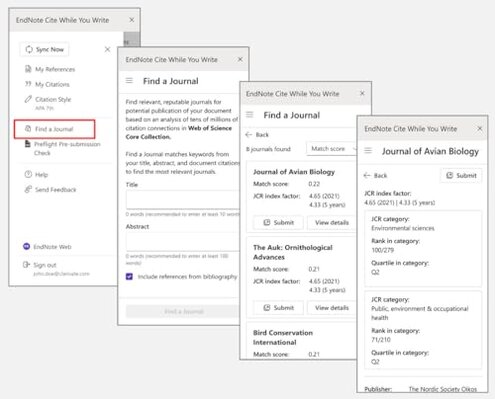
Persistent issue: the product promises AI tools, journal suggestions, importing help, and citation management, but that wider feature set can feel heavy if you only need straightforward reference storage. The regret shows up after initial setup, when basic tasks still take more attention than expected.
Category contrast: some complexity is normal for research software, but this can feel less forgiving than a typical mid-range alternative because the buyer is paying for depth they may never use. That trade-off feels worse during repeated use if your workflow is simple.
- Early sign: menus and options feel geared toward advanced research work, not quick everyday citation needs.
- Pattern level: this appears repeatedly, though not every buyer sees it as a deal-breaker.
- Worsens when: the learning burden grows during longer projects, especially when importing, organizing, and formatting references across multiple steps.
- Real cost: time spent learning the system can outweigh the benefit if your needs are basic.
- Why buyers regret it: for a high-price download, many shoppers expect faster confidence and fewer workflow detours.
- Mitigation: this is easier to tolerate if you already know reference-management software or need the advanced tools often.
Illustrative excerpt: “I needed simple citing, not a whole system to learn.”
Pattern: Primary pattern for casual or first-time users.
Is the price hard to justify if the fit is wrong?
- Big trigger: the listed price of $274 raises expectations for smooth onboarding and dependable daily use.
- Pattern signal: this is a persistent regret amplifier, because even moderate friction feels larger at this price.
- When it lands: the value problem appears either on day one during activation or later when the workflow feels heavier than expected.
- Why worse than category norms: paid research software is expected to require some learning, but this price leaves less room for setup confusion or tool friction.
- Who notices fastest: occasional users and students feel the mismatch sooner because they may not use enough advanced features to justify the cost.
- Attempts to rationalize: buyers often try to justify the spend by using more features, but that can add even more learning time.
- Fixability: this concern is only truly solved if you need the advanced functions often enough to offset the upfront hassle.
Illustrative excerpt: “At $274, I expected much less friction.”
Pattern: Primary value-based regret pattern.
Who should avoid this
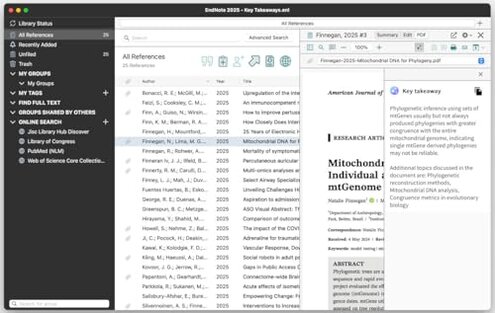
- Avoid it if you want instant software access with minimal setup, because the download-card and authentication path adds more first-use friction than many expect.
- Avoid it if you only need basic citations for school or light office work, because the feature depth can create more learning time than a simpler tool.
- Avoid it if your deadline is close, because setup trouble or Word workflow friction is more disruptive during urgent writing.
- Avoid it if price sensitivity matters, because the $274 cost makes even secondary annoyances feel harder to forgive.
Who this is actually good for
- Good fit for experienced researchers who already expect a heavier setup and can tolerate it for deeper reference-management features.
- Good fit for users who regularly manage large research libraries and may benefit from journal suggestions and document-summary tools.
- Good fit for buyers whose institution or workflow already centers on EndNote, because the learning burden may be lower in familiar environments.
- Good fit for people willing to trade setup friction for advanced control they plan to use often.
Expectation vs reality
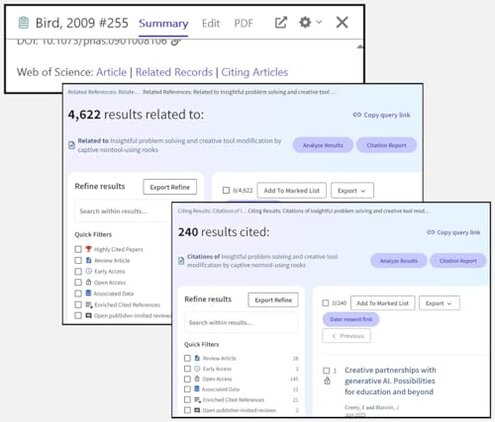
Expectation: a software purchase should feel close to instant.
Reality: this one starts with a download card, serial handling, and vendor authentication.
Expectation: reference software should reduce writing stress in Word.
Reality: for some buyers, the writing phase is where tool friction becomes most visible.
Reasonable for this category: some learning curve is normal for citation managers.
Worse-than-expected reality: the combination of setup steps, advanced menus, and high price makes the effort feel heavier than a typical mid-range alternative.
Safer alternatives
- Choose direct-download software if you want to avoid the hidden requirement of card-based delivery and serial-number setup.
- Prioritize simpler citation tools if your main job is basic Word references, because that directly reduces the workflow friction described above.
- Look for clearer onboarding if you are new to reference managers, since guided setup lowers first-day regret.
- Match features to workload before paying a premium, so you do not overbuy advanced tools you will rarely touch.
- Test compatibility expectations with your writing routine first, especially if most of your work happens under deadline in Word.
The bottom line
Main regret trigger: buyers pay $274 and then hit setup friction, hidden activation steps, or a workflow that feels heavier than expected. That exceeds normal category risk because many mid-range alternatives now aim for faster onboarding and simpler daily citing.
Verdict: avoid this if you want easy first-day use or only need basic citations. It makes more sense for committed research users who can absorb the learning curve and actually use the deeper tools.
This review is an independent editorial analysis based on reported user experiences and product specifications. NegReview.com does not sell products.