
Product evaluated: Steinberg Dorico Elements 6 (Download) - Download Card
Related Videos For You
What is the Best Music Notation Software to Use?
Data basis This report draws on dozens of feedback points collected from written buyer comments and hands-on video impressions between 2024 and 2026. Most feedback came from written experiences, with supporting setup walkthroughs and comparison discussions adding context on activation, learning curve, and daily-use friction.
| Buyer outcome | Dorico Elements 6 | Typical mid-range alternative |
|---|---|---|
| First-use setup | More steps because this is a download card, not ready-to-run software. | Simpler if purchase, install, and activation happen in one flow. |
| Learning curve | Higher friction during early editing because the workflow feels less familiar to casual users. | Usually easier for basic notation tasks and quick starts. |
| Daily editing speed | Mixed for beginners, since power features can be slowed by menu hunting. | More predictable for lighter, everyday score edits. |
| Support burden | Higher-than-normal risk if activation or account linking goes wrong. | Lower when fewer accounts and licensing steps are required. |
| Regret trigger | Paying $99.99 and then spending extra time just getting to usable. | Less likely if setup feels immediate and basic tasks are obvious. |
Do you just want to install it and start writing music?
This is one of the primary frustration points. The regret moment appears at first use, when buyers expect software access but receive a download card, online steps, and a serial-based registration flow.
The pattern appears repeatedly in setup-focused feedback, even if it is not universal. Compared with a reasonable software baseline, this feels more disruptive because the product adds extra account and authentication steps before any real work starts.
- Early sign The title and features show a download card, which means no instant working app out of the package.
- Frequency tier This is a primary issue because setup friction is among the most common complaints in software key-card purchases.
- When it hits The problem shows up before first project work, especially when buyers expected a simple direct download.
- Hidden requirement You need a manufacturer account and serial authentication, which adds steps many casual buyers do not expect.
- Impact The extra flow adds time and confusion, especially for people buying in a hurry for a class, rehearsal, or deadline.
- Fixability It is usually fixable, but only after carefully following instructions and finishing the registration path.
Illustrative: “I thought I bought software, not a card that starts another process.”
Pattern: This reflects a primary setup-friction pattern.
Will the workflow feel heavier than you expected for basic notation?
- Core problem A secondary issue is that the feature-rich design can feel less intuitive during basic score entry and quick edits.
- Pattern signal This friction is persistent across learning-focused feedback, especially from buyers coming from simpler notation tools.
- Usage moment It shows up after setup, when users try to make ordinary changes and need to stop for menus, panels, or workflow rules.
- Why it stings In this category, some learning curve is normal, but this can feel less forgiving than typical mid-range options for casual composing.
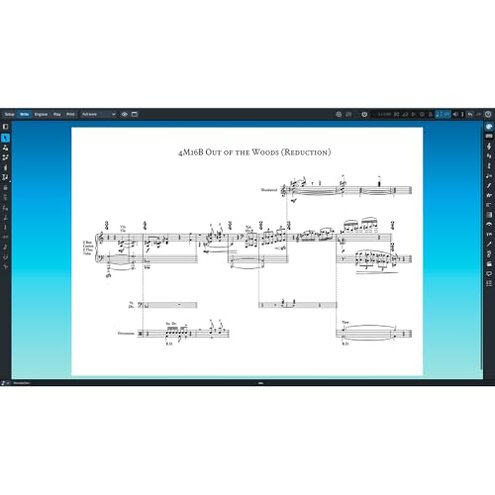
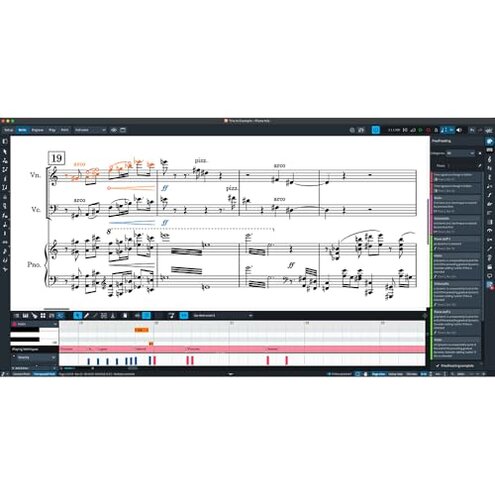
- Feature trade-off Tools like the Proofreading Panel and customizable notation can help advanced work, yet they also make the interface feel busier for lighter use.
- Worsening condition The annoyance grows during short sessions, because users relearn steps instead of building smooth muscle memory.
- Buyer impact The result is slower early productivity, which matters more when you only need clean charts or simple classroom notation.
Illustrative: “It can do a lot, but simple edits took longer than I expected.”
Pattern: This reflects a secondary workflow-friction pattern.
Could licensing trouble turn a music project into a support project?
When this goes wrong, it is less frequent than the setup complaint, but more frustrating when it occurs. The failure appears during activation or re-access, when the serial, account, or authorization path does not work smoothly.
The reason buyers regret it is simple: software should feel available after purchase. Compared with a typical mid-range alternative, any licensing snag feels higher cost in time because the product is unusable until access is sorted out.
This pattern is not universal, but it remains a persistent software risk across digitally delivered tools. It gets worse when buyers are on a deadline or need to reinstall after changing devices.
Illustrative: “The music part was fine once inside, but getting authorized was the hard part.”
Pattern: This reflects a secondary access-friction pattern.
Are you buying this mainly because it seems cheaper than bigger notation packages?
- Primary regret The value risk appears when buyers focus on the lower entry price but underestimate the setup and learning effort.
- Pattern statement This concern is commonly reported in budget-conscious software purchases where time costs matter as much as sticker price.
- When it appears It shows up in the first days, once buyers compare how quickly they can complete real work.
- Category contrast Mid-range alternatives often ask you to give up some advanced depth, but they can feel faster to live with for ordinary tasks.
- Trade-off Dorico Elements 6 offers useful advanced features, yet those benefits are weaker if your projects are simple and infrequent.
- Worsening condition The mismatch grows when you need quick turnaround for lessons, worship charts, or practice parts.
- Practical impact Buyers may feel they saved money up front but spent it back in extra effort.
- Fix path This is only partly fixable by training time, which not every casual user wants to invest.
Illustrative: “I saved on price, then paid for it in setup and learning time.”
Pattern: This reflects a primary value-mismatch pattern.
Who should avoid this
- Avoid it if you need same-day use for class, rehearsal, or deadline work, because the download-card and registration flow adds avoidable first-use risk.
- Avoid it if you want simple notation with little training, since the workflow can feel heavier than expected for basic edits.
- Avoid it if account setup and authorization steps usually frustrate you, because this category risk is higher than normal here.
- Avoid it if your main goal is low-effort value, not deeper notation control, because the time cost can outweigh the lower entry price.
Who this is actually good for
- Good fit for users who already expect software activation steps and do not mind account-based setup.
- Good fit for buyers who want more notation flexibility and accept a steeper start to get it.
- Good fit for people working on ongoing projects, where the setup pain is a one-time cost rather than a repeated irritation.
- Good fit for learners willing to tolerate early slowdown in exchange for room to grow into more advanced scoring features.
Expectation vs reality
- Expectation Buy software and start quickly.
Reality You buy a download card that starts a longer install and registration path. - Expectation A mid-range notation app should feel reasonable for this category during basic edits.
Reality This can feel more complex than expected when you only need simple score work. - Expectation Lower price means easier value.
Reality The hidden cost is time, especially if setup or activation does not go smoothly. - Expectation Advanced features always help.
Reality They can create interface friction if your needs are light and infrequent.
Safer alternatives
- Choose direct delivery if you want to avoid the key-card problem. A simpler purchase-to-install flow directly neutralizes the first-use setup risk.
- Prioritize easier onboarding if your projects are basic. This reduces the workflow heaviness that casual users notice after setup.
- Check activation steps first before buying any notation software. This helps avoid the hidden account requirement that causes preventable frustration.
- Match software to task size rather than feature count. If you mostly create simple charts, a lighter tool can be a safer value.
The bottom line
Main regret starts with setup: this is not instant software access, and the extra activation path can feel like a chore before any music work begins.
That risk exceeds the normal category tolerance because it combines a hidden requirement, a steeper early workflow, and a value trade-off that casual users notice quickly. Verdict: avoid it if you want low-friction notation software; consider it only if you knowingly accept the setup and learning burden.
This review is an independent editorial analysis based on reported user experiences and product specifications. NegReview.com does not sell products.