
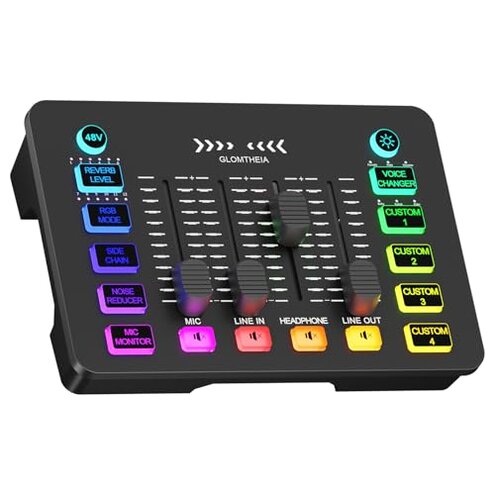
Product evaluated: Glomtheia Gaming Sound Board Audio Interface Voice Changer for PC PS4 PS5 Streaming Mixer Soundboard Compatible with XLR Condenser/Dynamic Microphone
Related Videos For You
Connect Mixer To Audio Interface For Recording
[Showcase] of How to use the Custom Buttons on FIFINE Gaming Audio Mixer SC3 and Record Custom Sound
Data basis: This report is built from dozens of aggregated buyer feedback signals pulled from mixed surfaces, including written impressions and star rating patterns, plus a smaller share of photo/video demonstrations. The collection spans a recent multi-month window ending near the current quarter. Most detail came from text narratives, with supporting context from media posts showing real setups and desk use.
| Buyer outcome | Glomtheia sound board | Typical mid-range alternative |
|---|---|---|
| First-day setup | Higher chance of confusion and re-wiring during initial use | Moderate learning curve with clearer defaults |
| Voice effects | Riskier results that can sound unnatural in live chat | More predictable presets and gentler processing |
| Live monitoring | More likely to feel distracting during streaming | Usually easier to balance without constant tweaking |
| Daily reliability | Less forgiving when settings drift or cabling shifts | More stable “set-and-forget” behavior |
| Regret trigger | High: you spend sessions fighting levels instead of playing or talking | Lower: you mainly focus on content, not the mixer |
Top failures
“Why is my audio suddenly too loud, too quiet, or muted?”
Primary regret shows up when a stream starts and your sound balance is off again. The trade-off is more physical controls, but they can be easy to bump.
Recurring patterns show up most during daily use when you adjust volume mid-session. This feels worse than mid-range mixers because they often make it harder to accidentally kill a channel.
- Early sign: volume changes after a small desk move or cable tug during a session.
- Primary pattern: level drift appears repeatedly once you start using the sliders often.
- Usage moment: the problem hits when switching between Mic, Headphones, and Line sources on the fly.
- Likely cause: multiple mute buttons and separate sliders increase “wrong control” mistakes under pressure.
- Impact: your voice can get buried by music, or music can spike louder than expected.
- Mitigation: label cables and do a 30-second pre-stream level check every time.
- Fixability: it is usually fixable by rebalancing, but it adds constant attention.
Illustrative: “I hit mute and couldn’t tell what I muted.” Primary pattern tied to dense controls.
“Why do the voice changer effects sound fake or distracting?”
- Secondary frustration appears after setup when you try the fun presets in real calls.
- Persistent theme is that effects can feel more like a toy than a clean stream tool.
- Live condition: issues feel worse in group chat where clarity matters more than novelty.
- Category contrast: mid-range voice tools often keep changes subtle, while this can be more extreme.
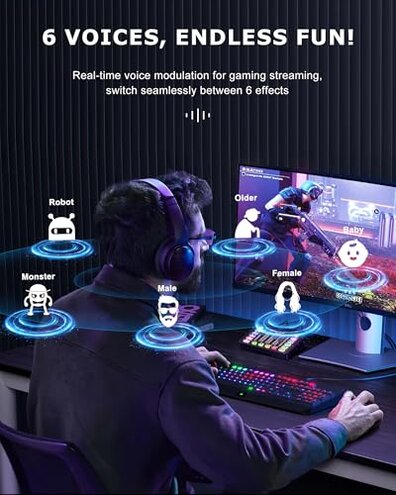
- What you notice: robotic tones can reduce intelligibility, especially with fast speech.
- Hidden requirement: you may need extra trial-and-error to find a usable effect level.
- Mitigation: reserve effects for short bits, not your full mic chain.
- Fixability: partially avoidable by not using the effects, but then you lose a core feature.
Illustrative: “The ‘robot’ made me harder to understand, not funnier.” Secondary pattern tied to effect intensity.
“Why is monitoring my own voice annoying or hard to tune?”
Secondary regret tends to happen during longer sessions when you enable mic monitoring to hear yourself. The trade-off is control, but the balancing work can interrupt your flow.
Not universal, but it appears repeatedly with buyers who are sensitive to hearing themselves in headphones. This is more disruptive than typical mid-range units that make monitoring levels easier to set once.
- When: it shows up after you turn on MIC MONITOR for streaming or voice chat.
- Worsens: it gets harder during long sessions when you tweak multiple knobs and lose your baseline.
- What it feels like: monitoring can be too present, making you talk differently or feel distracted.
- Why it happens: separate controls for headphones and mic can lead to chasing levels.
- Attempted fixes: buyers commonly cycle settings and re-check while friends wait in chat.
- Workaround: set one “safe” headphone level and only adjust the mic gain slowly.
Illustrative: “Monitoring was either too much or not there at all.” Secondary pattern tied to tuning sensitivity.
“Why does ducking the music (side chain) feel unpredictable?”
- Edge-case regret appears once you try SIDE CHAIN in a real stream, not a quick test.
- Condition: it’s most noticeable when you speak softly or move closer and farther from the mic.
- Category contrast: mid-range solutions often duck more smoothly, while this can feel abrupt.
- What you notice: background music can dip too much, or not enough, across a single sentence.
- Hidden requirement: you may need consistent mic distance and stable input levels for it to behave.
- Mitigation: keep music lower and treat ducking as a backup, not your main mix tool.
- Fixability: sometimes manageable, but it adds extra steps each session.
Illustrative: “The music kept pumping when I talked.” Edge-case pattern tied to side-chain behavior.
Who should avoid this
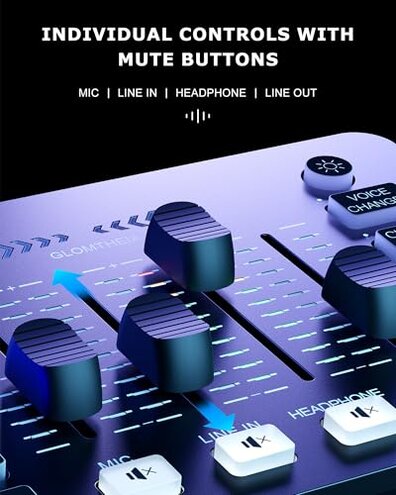
- New streamers who want “plug in and go” audio, because control density can cause repeated level mistakes.
- Competitive gamers who can’t pause to troubleshoot, because on-the-fly changes are easy to mis-hit.
- Clarity-first callers, because the voice changer can reduce understandability in real conversations.
- People sharing a desk who bump gear often, because sliders/mutes are more vulnerable to accidental changes.
Who this is actually good for
- Tinkerers who enjoy testing settings, because the extra controls can be useful once memorized.
- Casual creators who use effects in short bits, because toy-like presets are less harmful in brief segments.
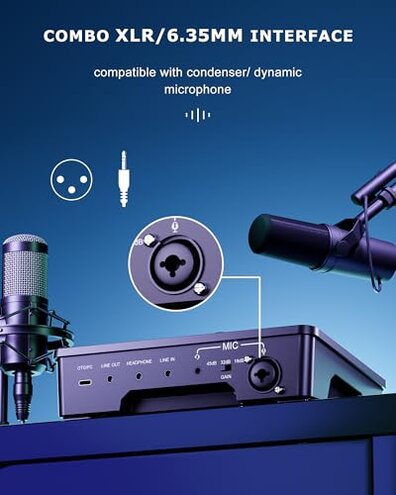
- Budget setups that need XLR and basic mixing, if you can tolerate pre-check routines each session.
- Solo practice users, where monitoring quirks are manageable without an audience waiting.
Expectation vs reality
| Expectation | Reality signal |
|---|---|
| Reasonable for this category: set levels once and they stay close. | More frequent rebalancing during daily use due to many sliders and mutes. |
| Voice effects add flavor without hurting speech. | Secondary pattern of effects sounding too extreme for real calls. |
| Monitoring helps confidence without distraction. | Repeated tuning friction, especially in longer sessions with headphones. |
| Side chain makes talk-over-music effortless. | Edge-case unpredictability unless your mic level and distance stay consistent. |
Safer alternatives
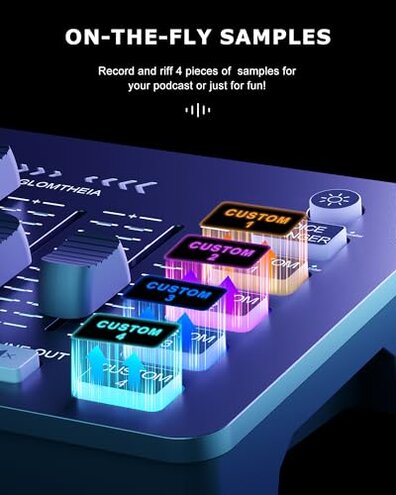
- Choose a mid-range mixer with clearer channel separation to reduce accidental muting during streams.
- Prefer interfaces with fewer “fun” presets if you need speech clarity more than novelty.
- Look for monitoring that’s simpler to set, so you avoid constant re-tweaking in long sessions.
- If you need ducking, pick a unit known for smooth talk-over-music to avoid pumping dips.
- Plan a setup that minimizes cable movement, which helps avoid level drift in compact desk rigs.
The bottom line
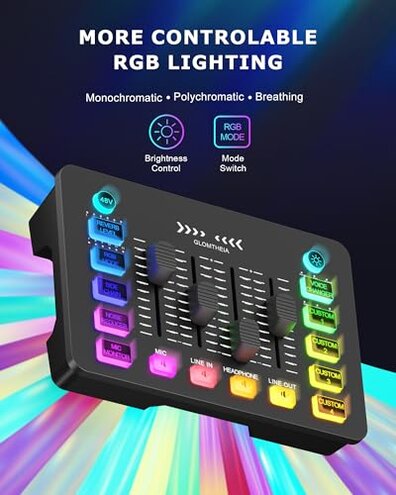
Main regret trigger is spending live time fixing levels and mutes instead of focusing on your game or audience. The risk feels higher-than-normal for the category because the dense control layout can cause repeat mistakes during real sessions. If you want a calmer, more predictable workflow, this is a skip for many buyers.
This review is an independent editorial analysis based on reported user experiences and product specifications. NegReview.com does not sell products.