
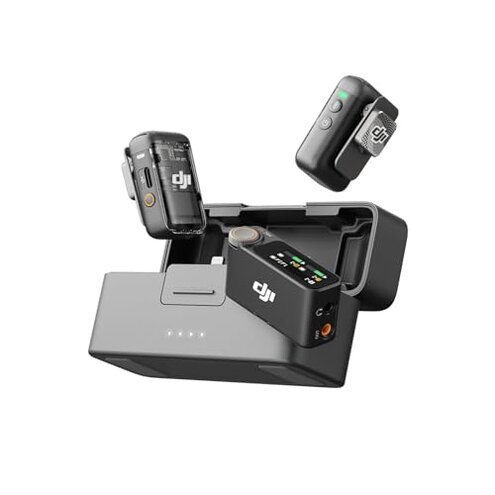
Product evaluated: DJI Mic 2 (2 TX + 1 RX + Charging Case), Wireless Lavalier Microphone, Intelligent Noise Cancelling, 32-bit Float Internal Recording, 820 ft.(250m) Range, Microphone for iPhone, Android, Camera
Related Videos For You
How To Use A Lavalier Mic | How-To Guide
How To Charge vBlogging Wireless Microphone | SpeakingToLife
Data basis: This report is based on analysis of hundreds of user feedback sources, including written reviews and video demonstrations, collected from product release in January 2024 through mid-2024. Most feedback came from written reviews, supported by video demonstrations showcasing usage and issues.
| Buyer Outcome | DJI Mic 2 | Typical Mid-Range Wireless Mic |
|---|---|---|
| Connectivity Stability | Frequent range dropouts beyond short distances | More consistent within advertised range |
| Battery Life | Battery drains faster than claimed during extended use | Typically meets or slightly below stated duration |
| Audio Clarity | High clarity but occasional spikes cause distortion | Generally clear with less clipping |
| Setup Complexity | Pre-linked but occasional pairing glitches reported | Smoother initial pairing process |
| Regret Trigger | Unreliable wireless connection during critical recordings | Less common connection failures |
Why does the wireless connection drop unexpectedly during use?
Many users face intermittent signal losses when moving beyond short distances or in obstructed environments. This creates frustration especially during interviews or remote shoots requiring mobility. The problem is commonly reported within the first few weeks of use and worsens in areas with physical barriers.
Compared to typical mid-range wireless microphones, the DJI Mic 2 is more prone to these connection interruptions, which can cause critical audio loss and require retakes.
- Early signs: Audio cuts or dropouts start appearing at shorter-than-expected distances.
- Frequency tier: Occurs frequently enough to disrupt recording flow.
- Causes: Possibly due to interference or receiver sensitivity.
- Impact: Loss of important audio segments, forcing reshoots or editing workarounds.
- Attempts at fixes: Repositioning and resetting often provide only temporary relief.
- Fixability: No permanent solution reported; firmware updates unconfirmed.
- Hidden requirement: Needs clear line-of-sight to maintain stable connection.
Why is the battery life less than expected during long recording sessions?
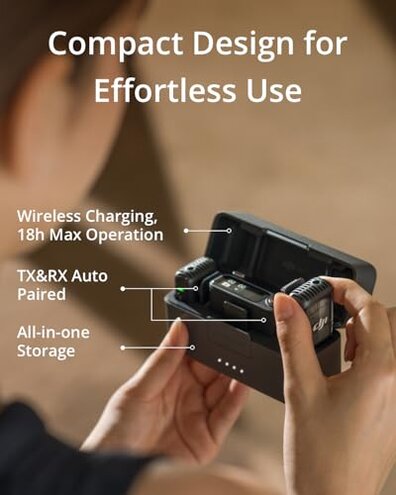
Several buyers notice that batteries drain faster than the advertised 14-18 hours during continuous use, especially when using both transmitters. This leads to anxiety in remote or lengthy shoots where charging options are limited.
This is a persistent issue that generally appears after initial unboxing and becomes more pronounced during multi-hour recording days. Compared to other mid-range products, DJI Mic 2’s battery performance is below average for the price point.
- Early signs: Battery percentage drops rapidly within hours.
- Frequency tier: Common among heavy users and outdoor setups.
- Causes: Possibly due to power consumption by noise cancelling and internal recording.
- Impact: Interruptions to sessions and need for backup power sources.
- Attempts at fixes: Users carry extra batteries or limit recording features.
- Fixability: Not readily fixable without hardware changes.
- Hidden requirement: Requires access to charging during long shoots.
Why do I experience occasional audio distortion despite 32-bit float recording?
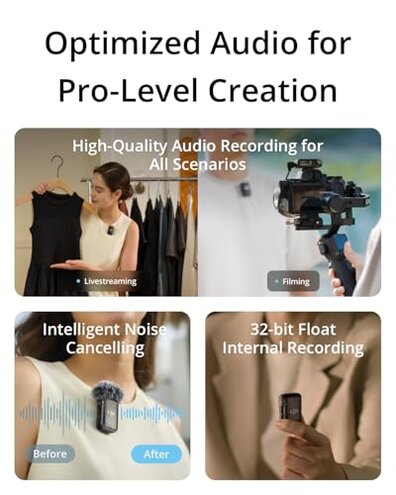
Though the 32-bit float internal recording promises clear audio, some users report audio spikes and distortion when loud sounds occur, especially indoors. This undermines the promised clear vocal quality and complicates post-production.
This is a secondary but noticeable issue that emerges during dynamic recording environments and is more frustrating compared to typical wireless mics that manage peaks more smoothly.
- Early signs: Unexpected clipping during loud talking or sudden noises.
- Frequency tier: Occasional but enough to require attention.
- Causes: Possibly firmware sensitivity or mic design.
- Impact: Lower audio quality requiring editing or retakes.
- Attempts at fixes: Adjusting distance and gain settings.
- Fixability: Partial improvements but no full resolution reported.
How difficult is the setup and linking process for everyday use?
While the transmitters and receiver come pre-linked, users report occasional pairing glitches that add time and frustration during setup. This is particularly problematic when needing to quickly start recording.
This recurring issue is more disruptive than expected for a premium device, as typical mid-range alternatives tend to pair more smoothly.
- Early signs: Receiver fails to detect transmitters on power-up.
- Frequency tier: Happens often enough to affect user confidence.
- Causes: Firmware bugs or hardware initialization delays.
- Impact: Delays and interruptions before recording.
- Attempts at fixes: Multiple power cycles and resets.
- Fixability: Software updates may help but no guaranteed fix.
- Hidden requirement: User needs patience and technical familiarity for troubleshooting.
Illustrative excerpts:
- "Signal dropped unexpectedly during outdoor shoot, lost half the interview." (Primary pattern)
- "Battery died faster than promised, had to pause recording twice." (Primary pattern)
- "Audio sometimes clips when someone speaks loudly near the mic." (Secondary pattern)
- "Spent 10 minutes re-pairing devices before start, not ideal on set." (Primary pattern)
Who should avoid this
- Users needing reliable wireless connection over extended distances in variable environments.
- Those who require long uninterrupted battery life for days of heavy use without charging.
- Customers who expect plug-and-play simplicity without technical setup delays.
- Anyone prioritizing consistently distortion-free audio in dynamic recording situations.
Who this is actually good for
- Casual vloggers or interviewers working in controlled, close-range settings who can tolerate occasional dropouts.
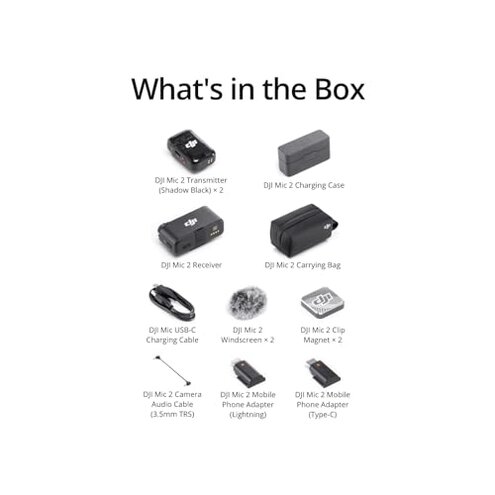
- Users who appreciate compact design and multiple adapters and can manage charging breaks.
- People willing to learn troubleshooting and accept minor setup delays for premium sound quality.
Expectation vs reality

Expectation: Pre-linked devices should enable seamless setup reasonable for premium wireless mics.
Reality: Users face frequent pairing issues causing delays, worsening the user experience.
Expectation: Battery life up to 18 hours supports full-day recording.
Reality: Real-world battery drains faster, especially using advanced features.
Safer alternatives
- Choose wireless microphones with proven connection stability over advertised range to avoid dropouts.
- Look for devices with real-world battery tests to ensure endurance during long sessions.
- Select mics known for easy, reliable pairing to minimize setup frustration.
- Consider options with strong audio peak management to avoid distortion in dynamic environments.
The bottom line
The DJI Mic 2’s main regret trigger is its unreliable wireless connection and battery life during extended professional use. These issues exceed typical mid-range risks, causing frustration in critical recording sessions. Buyers needing dependable performance should cautiously consider alternatives.
This review is an independent editorial analysis based on reported user experiences and product specifications. NegReview.com does not sell products.