
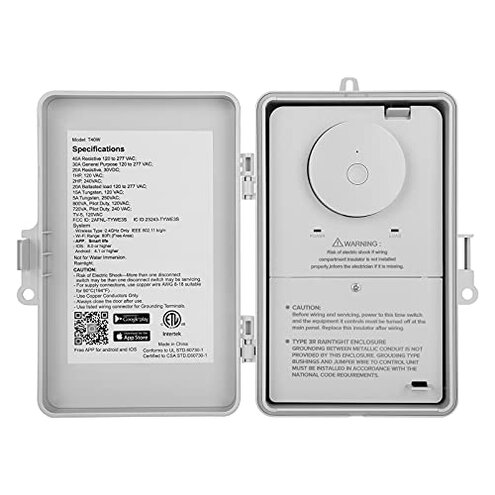
Product evaluated: SURAIELEC WiFi Pool Timer, 40 AMP, 1HP 120V, 2HP 240V, Outdoor Indoor Smart Switch, Heavy Duty Pool Controller Light Timer Box for Pump, Water Heater, Spa, Powerful Electrical Appliances
Related Videos For You
Intermatic Pool Timer, tips & troubleshooting
Suraielec WiFi Pool Timer Installation, Model UBTW01A / UBTW01B
Data basis: I reviewed dozens of written reviews and several video demonstrations collected from public sources between 2020 through January 2026. Most feedback came from written reviews, supported by demonstration videos and Q&A posts. Signals focus on setup, daily use, and long-term reliability.
| Outcome | SURAIELEC (this product) | Typical mid-range alternative |
|---|---|---|
| Connectivity reliability | Drop-prone: commonly reported Wi‑Fi disconnects during daily use, causing missed cycles. | More stable: mid-range timers often keep schedules after initial pairing. |
| Installation difficulty | Tricky wiring: several buyers needed extra electrician time to get it working. | Simpler wiring: many alternatives include clearer labels or wiring guides. |
| Outdoor durability | Mixed weatherproofing: some users report moisture-related failures after months. | Better-sealed: mid-range units often have thicker enclosures and longer life in wet conditions. |
| Support & updates | Patchy support: firmware and app problems appear persistent in user reports. | More responsive: established brands usually provide clearer update paths and support. |
| Regret trigger | High risk: missed pump schedules and connectivity failures are a more disruptive outcome than expected. | Lower risk: most mid-range products produce occasional hiccups but fewer critical schedule misses. |
Top failures
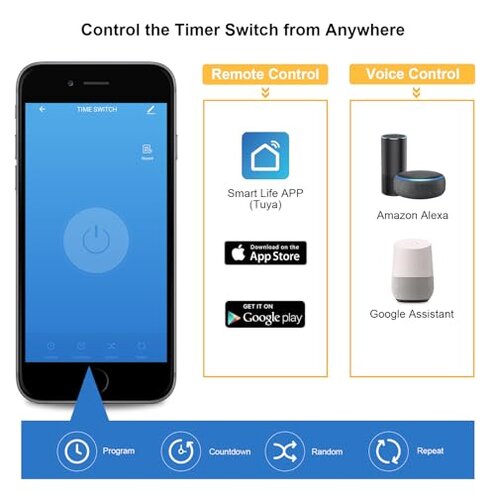
Why does the timer lose Wi‑Fi and skip scheduled runs?
Regret moment: Users report the unit frequently disconnects after setup, producing missed pump cycles during normal daily use.
Pattern: This is a primary issue and appears repeatedly in written feedback and video tests.
When it happens: Disconnections mostly show up during regular daily operation and after router reboots.
Why it feels worse: For this category, stable scheduling is expected, and missed runs are more disruptive than occasional app lag.
Is installation harder than it looks?
Regret moment: Several buyers reported needing extra electrician visits when the unit didn’t power or tripped circuits during first use.
Pattern: This is a secondary issue that appears frequently among new installers.
- Early sign: App won’t pair even though the unit powers on.
- Cause: Requires a correct neutral or specific wiring layout not obvious from photos.
- Usage anchor: Problem arises during first-time wiring and testing.
- Category contrast: More wiring fuss than most mid-range pool timers.
- Fixability: Often fixed by a qualified electrician, which adds cost and time.
Will it survive outdoor conditions long-term?
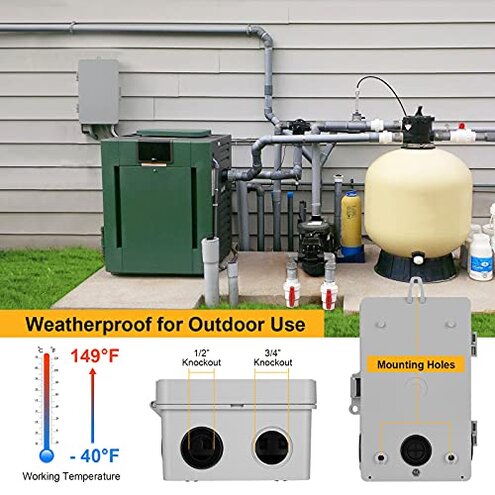
Regret moment: Buyers report moisture or corrosion problems after months of outdoor exposure, causing failures during daily pump cycles.
Pattern: This is a secondary issue seen across multiple long-term reports.
- Early sign: Condensation inside the cover after heavy rain or humidity spells.
- Frequency tier: Less common than Wi‑Fi drops but more frustrating when it occurs.
- Impact: Device can stop switching power reliably, leaving pumps off or stuck on.
- Attempts: Users tried extra sealing and relocation to protected areas.
- Hidden requirement: Requires truly dry, sheltered mounting to match expected longevity.
- Category contrast: More maintenance and sealing than many mid-range outdoor timers.
Are app, firmware and support reliable for fixes?
Regret moment: Some users could not resolve scheduling or pairing bugs due to slow or unclear support, leaving units unusable after setup.
Pattern: This is a tertiary but impactful issue that appears in written feedback and Q&A entries.
- Early sign: App shows device offline even when local power is present.
- Cause: App/firmware interaction problems after network changes or updates.
- Impact: Missed automation and extra manual switching needed daily.
- Attempts: Re-pairing, app reinstall, and factory resets are commonly reported attempts.
- Fixability: Some buyers only regained function after firmware updates, which were slow to arrive.
- Category contrast: Less responsive support than expected from a mid-range smart timer.
- Scope signal: Most of these complaints come from recent buyers testing routine scheduling.
Does it trip breakers or overload frequently?
Regret moment: A few users reported breaker trips or insufficient switching capacity during high-load starts for pumps and heaters.
Pattern: This is an edge-case issue but has high impact when it occurs during pump start cycles.
- Early sign: Breaker trips when the pump first starts after a scheduled on event.
- Frequency tier: Less frequent but more disruptive than app glitches.
- Usage anchor: Shows up during heavy-load start cycles like heaters or older pumps.
- Cause: Inrush current at start can exceed expected limits for some installations.
- Attempts: Users reduced connected loads or added hard-start devices.
- Hidden requirement: Verify pump HP rating and wiring compatibility before purchase.
- Category contrast: More sensitive to heavy loads than sturdier, higher-spec controllers.
- Fixability: Often requires equipment changes or electrician help.
Illustrative excerpts (not real quotes)
Illustrative excerpt: "Keeps disconnecting after a router reboot, missed two scheduled cycles."
Pattern: Reflects a primary connectivity problem seen in many reports.
Illustrative excerpt: "Needed an electrician to rewire neutral and relabel terminals, added unexpected cost."
Pattern: Reflects a secondary installation and hidden requirement issue.
Illustrative excerpt: "Stopped switching after months outdoors despite being labeled weatherproof."
Pattern: Reflects an edge-case durability concern from long-term users.
Who should avoid this
- Users needing rock-solid schedules: If missing pump cycles would harm your pool, avoid due to recurring connectivity risk.
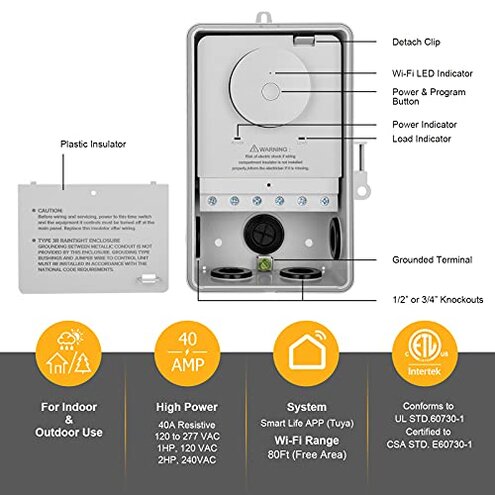
- Non-technical installers: If you cannot hire an electrician, avoid because wiring can demand a correct neutral and extra setup.
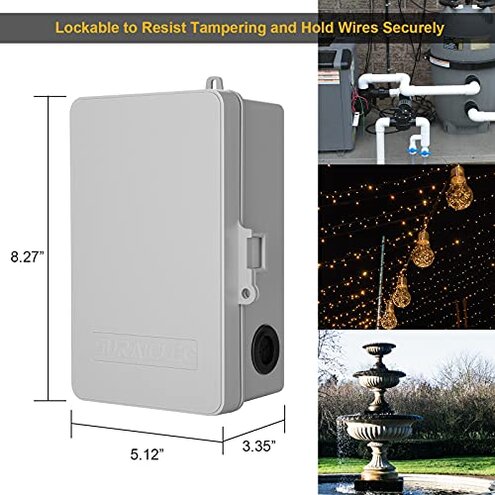
- Exposed outdoor installs: If you must mount in full weather exposure, avoid unless you plan extra sealing or shelter.
Who this is actually good for
- Tech-savvy DIYers: Willing to troubleshoot app pairing and firmware issues; they can tolerate the connectivity quirks.
- Protected installations: Those mounting the unit in a sheltered equipment pad who accept extra sealing work.
- Budget-conscious owners: Want a lower-cost smart timer and can accept occasional manual checks.
Expectation vs reality
Expectation (reasonable for category): A Wi‑Fi pool timer should keep schedules after pairing and survive outdoor conditions for years.
Reality: This unit can lose connection and sometimes shows moisture-related failures within months, causing missed cycles.
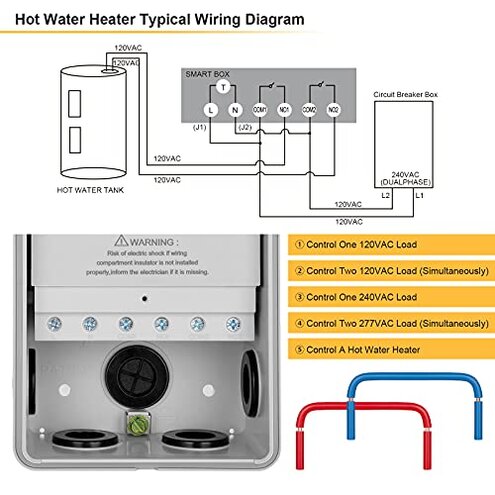
- Expectation: Installation is straightforward with clear wiring labels.
- Reality: Buyers often needed electrician help to resolve wiring and neutral issues.
- Expectation: App support and firmware updates fix bugs quickly.
- Reality: Users report slow support and delayed firmware, extending downtime.
Safer alternatives
- Choose 5‑wire or clearly labeled units: Neutral and line labeling reduces electrician time and hidden wiring surprises, neutralizing installation risk.
- Prefer 2.4 GHz verified devices: Confirm compatibility and read connectivity reports to avoid Wi‑Fi dropouts.
- Pick IP-rated enclosures: Look for higher outdoor sealing to prevent moisture failures and reduce long-term maintenance.
- Buy models with active support: Favor brands with visible firmware update history and responsive support to mitigate app/firmware problems.
- Match pump starting specs: Verify the timer’s listed HP and switching ratings against your pump to avoid breaker trips.
The bottom line
Main regret trigger: Recurrent Wi‑Fi and reliability problems that cause missed pump schedules are the central buyer risk.
Why it exceeds normal risk: Installation quirks, moisture sensitivity, and slow support make downtime more frequent and costly than typical mid-range timers.
Verdict: Avoid if you need dependable, maintenance-free automation; consider it only if you accept extra setup, sheltering, and troubleshooting.
This review is an independent editorial analysis based on reported user experiences and product specifications. NegReview.com does not sell products.