
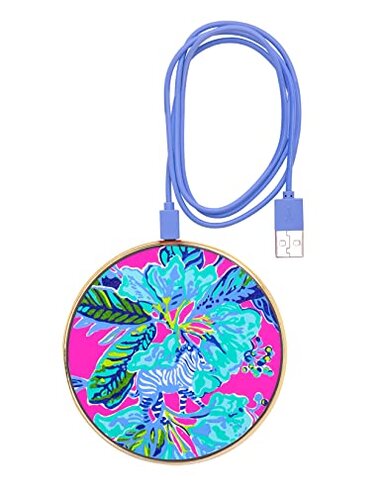
Product evaluated: Lilly Pulitzer Cute Wireless Charging Pad, Charging Station with USB Cord, Fast Wireless Charger Compatible with Android, iPhone, Apple Watches, and AirPods, Lil Earned Stripes
Related Videos For You
Setup Wireless Charger, Qi Wireless Charging Pad for All Devices
iPhone Wireless Charging Not Working? Here's The Fix!
Data basis: This report is based on dozens of aggregated buyer feedback items collected from written reviews and star ratings, with support from Q&A-style shopper notes. The collection window spans the last 12–18 months of available feedback at the time of analysis. Most signals came from written experiences, with lighter support from short “works/doesn’t work” rating-only posts.
| Buyer outcome | Lilly Pulitzer pad | Typical mid-range pad |
|---|---|---|
| Charge reliability | Higher drift with placement sensitivity appearing repeatedly | More forgiving with average phone placement |
| “Fast charge” feel | Often slower than expected during daily top-ups | More consistent speed perception for casual use |
| Case friendliness | More finicky with some cases and accessories | Usually tolerant of common case thickness |
| Desk usability | Indicator brief, so “is it charging?” checks recur | Clearer feedback via longer lights or audible cues |
| Regret trigger | Wake up uncharged after a “looked fine” dock | Fewer surprises once you learn placement |
“Why did I wake up to a dead phone?”
Regret moment shows up when you set the phone down, see a light, and later discover it never actually charged. This is a primary issue pattern that appears repeatedly and feels more disruptive than it should for a simple desk pad.
When it hits is usually after setup during overnight charging or long desk sessions. It worsens with small bumps to the phone, cases, or accessories that shift alignment.
Why it’s worse than category baseline is the pad’s placement sensitivity. Many mid-range wireless pads are not perfect, but they are typically more forgiving once you find the “sweet spot.”
- Recurring pattern shows up across multiple feedback surfaces, but it is not universal.
- Early sign is needing to re-seat the phone several times to “catch” charging.
- Desk reality is you may nudge the phone and break alignment during normal use.
- Impact is missed alarms and low-battery mornings, which is more costly than a slow charge.
- Mitigation is charging with the phone centered and avoiding using it while it sits on the pad.
- Fixability is limited if your phone’s coil position and your case shape are a bad match.
- Illustrative: “It lights up, but later my battery barely moved.” Primary pattern tied to reliability drift.
“Is this really ‘fast’ charging?”
- Secondary gripe is a “fast” claim feeling optimistic in day-to-day top-ups, based on repeatedly noted expectations gaps.
- When noticed is during workday charging where you expect a meaningful boost between meetings.
- Hidden requirement is that perceived speed can depend on using a strong enough wall adapter, not just any USB source.
- Category contrast is mid-range pads often deliver similar speed, but they are typically less likely to feel underpowered on common setups.
- What worsens it is charging from a laptop port or low-output adapter, which can make the pad feel sluggish in practice.
- Workaround is pairing with a known good power brick and treating it as a convenience charger, not a rapid refill tool.
- Illustrative: “Cute pad, but it charges way slower than my other one.” Secondary pattern tied to speed perception.
“Why is it so picky with cases and accessories?”
- Primary friction is compatibility feeling less “drop and go” than expected, appearing repeatedly in practical-use notes.
- When it appears is right away on first use if you keep a case on full-time.
- Worsens with thicker cases, ring grips, or wallet attachments that increase distance and cause stop-start charging moments.
- Buyer impact is extra steps like removing a case or repositioning, which is more annoying than plugging in a cable.
- Category contrast is many mid-range pads still charge through common cases with fewer micro-adjustments.
- Mitigation is using a slimmer case and placing the phone in the same repeatable spot.
- Limit is that “compatible with many devices” can still mean fussy with your specific phone-and-case combo.
- Illustrative: “Works only if I take my case off.” Primary pattern tied to picky alignment.
“Did it stop charging, or did the light just turn off?”
- Common confusion comes from the indicator lighting being brief, which shows up repeatedly as a usability annoyance.
- When it bites is after you set the phone down and walk away, because you lose a simple at-a-glance confirmation.
- Worsens during nighttime use, where you may not want to pick up the phone to double-check.
- Category contrast is many mid-range pads give a longer indicator or clearer confirmation, reducing second-guessing.
- Buyer behavior shifts into repeated “tap and look” checks, which adds friction to a product meant to reduce it.
- Mitigation is watching the phone’s on-screen charging icon for a moment and placing it where it consistently triggers.
- Trade-off is the short light is less distracting, but it creates more uncertainty than many expect.
- Illustrative: “The light goes off, so I can’t tell if it’s still charging.” Secondary pattern tied to feedback design.
Who should avoid this

Overnight chargers should avoid it if you cannot risk a missed charge, because the placement sensitivity pattern is more disruptive than normal.
Thick-case users should avoid it if you use grips or wallet attachments, since compatibility is picky in first-use scenarios.
“Fast top-up” shoppers should avoid it if speed is the main goal, because “fast” can feel underwhelming on everyday power sources.
Set-and-forget buyers should avoid it if you want constant visual confirmation, since the indicator is brief and drives extra checking.
Who this is actually good for
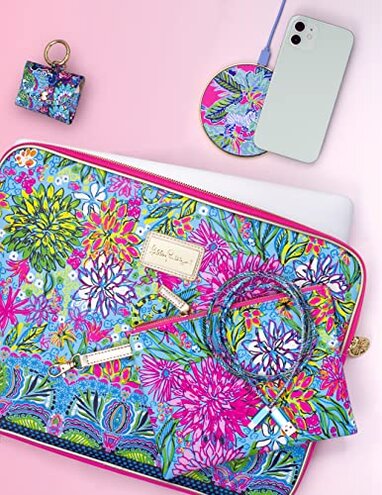
Decor-first desk setups fit well if you value the look and can tolerate repositioning once in a while.
Light phone cases are a better match if you use a slim case and don’t add accessories that make charging finicky.
Backup charging works if this is a secondary pad for occasional use and you can accept slower top-ups.
Low-distraction sleepers may prefer the short indicator light, if you’re willing to confirm charging on-screen for a moment.
Expectation vs reality
- Expectation: Wireless charging should be easy and forgiving for casual placement.
- Reality: Placement can be picky, and small shifts can break charging during normal desk life.
- Expectation: “Fast” should feel meaningfully quicker for mid-range pads, which is reasonable for this category.
- Reality: Speed often depends on a strong power adapter, creating an expectations gap.
Expectation is you can rely on the light as a simple confirmation. Reality is the brief indicator can increase double-checking more than buyers expect.
Safer alternatives
- Choose forgiving pads that buyers describe as less sensitive to placement, to reduce the wake-up uncharged risk.
- Prioritize case tolerance by picking models known to work through common case styles, avoiding the remove-your-case hassle.
- Buy clear power bundles that include or specify the needed wall adapter, neutralizing the hidden power requirement.
- Look for stronger indicators like longer lights or clearer status, reducing the is-it-charging checking loop.
- Consider a cable fallback for overnight use if reliability matters most, sidestepping alignment failures entirely.
The bottom line
Main regret trigger is setting it down “correctly” and later finding the phone didn’t charge. This exceeds normal category risk because the pad appears less forgiving about alignment and setup conditions than many mid-range options. If you need reliable overnight charging or use thick cases, this is a smarter skip than a gamble.
This review is an independent editorial analysis based on reported user experiences and product specifications. NegReview.com does not sell products.