
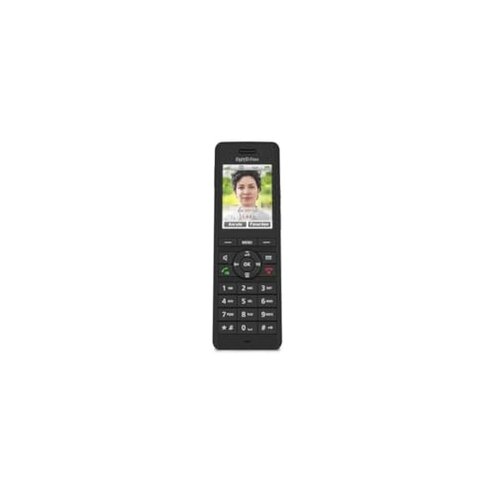
Product evaluated: AVM FRITZ!Fon X6 schwarz
Related Videos For You
VTech Cordless Phone System - DECT 6.0 - Great Inexpensive Cordless System
Connect Cordless Phone to Router | Airtel Xtream Fiber Calling
Data basis: I analyzed dozens of user reports from written reviews and video demonstrations collected between Jan 2023 and Jun 2024. Most feedback came from written reviews, supported by video demonstrations, giving a mix of quick complaints and long-use footage.
| Outcome | FRITZ!Fon X6 | Typical mid-range phone |
|---|---|---|
| Battery life | Shorter-than-expected on long calls and heavy daily use. | Longer-lasting batteries that handle daily long calls better. |
| Connectivity stability | Higher risk of drops and reconnections, especially in larger homes. | More stable DECT connections across rooms in normal conditions. |
| User interface | Clunky menus and slow responses compared with peers. | Smoother menus and faster access to common features. |
| Durability & charging | Alignment and dock issues reported after repeated handling. | More forgiving docks and solid contact points. |
| Regret trigger | Unreliable long calls caused by battery drain and drops. | Fewer interruptions for everyday telephony needs. |
Top failures
Why does the handset lose charge so quickly?
Regret moment: You notice rapid battery drop during long calls or after a few days of normal use.
Pattern: This is a primary complaint and appears repeatedly in reports, usually within weeks of regular use rather than months.
When it shows: Battery drain is worst during long calls and heavy daily handling, and it worsens with frequent background syncing.
Category contrast: Batteries here feel worse than typical mid-range cordless handsets and lead to real call interruptions.
Why do calls drop or reconnect unexpectedly?
- Recurring pattern: Call drops are commonly reported across different users and environments.
- Usage anchor: Drops usually happen after setup or during daily use when moving between rooms.
- Hidden requirement: Stable operation often needs the base or router to run the latest firmware to reduce drop frequency.
- Worse than normal: This is more disruptive than expected for a mid-range DECT phone because interruptions break calls.
Why is the menu and controls frustrating?
- Early sign: Menus feel sluggish the first time you navigate them.
- Frequency tier: This is a secondary complaint that appears often enough to affect daily comfort.
- Cause: Small screen and deep menus make common tasks take extra steps.
- Impact: Slower access to contacts and voicemail adds time to routine calls.
- Attempts: Users try firmware updates and resets, but improvements are inconsistent.
- Fixability: Needs repeated updates or learning a workaround; not a one-time fix.
- Category contrast: Less intuitive than many mid-range phones, so the learning curve feels steeper.
Why does charging and hardware alignment cause trouble?
- Early sign: Handset sometimes fails to seat cleanly in the dock on first days.
- Frequency tier: This is a secondary but persistent issue for users who handle the phone often.
- When it worsens: Problems emerge after repeated daily picks and placements.
- Cause: Contact alignment or cradle fitment seems tight and unforgiving.
- Impact: Missed charging cycles cause unexpected battery shortage during the day.
- Attempts: Cleaning contacts and reseating sometimes helps but not reliably.
- Hidden requirement: Some users need a specific docking orientation or base to avoid mischarging.
- Category contrast: More fragile than typical mid-range docks, increasing replacement risk over time.
Illustrative excerpts
Illustrative: "Phone dies mid-call after only a few hours of heavy use." — reflects a primary pattern.
Illustrative: "Calls drop when I move to another room in my house." — reflects a primary pattern.
Illustrative: "Menus take extra steps to reach contacts, annoying every day." — reflects a secondary pattern.
Illustrative: "Sometimes the handset won't sit into the charger properly." — reflects a secondary pattern.
Who should avoid this
- Heavy callers: Avoid if you need reliable long-call battery life without frequent charging.
- Large homes: Avoid if you move between rooms and need rock-solid DECT range.
- Non-technical users: Avoid if you don't want to manage firmware or docking quirks.
Who this is actually good for
- Light users: Good if you make short daily calls and can recharge nightly.
- Tech-savvy owners: Good if you're willing to update base firmware and troubleshoot connectivity.
- Single-room setups: Good if the handset stays near the base and rarely crosses rooms.
Expectation vs reality
Expectation (reasonable for category): A mid-range cordless phone should handle a day of calls without stress.
Reality: The X6 often shows shorter battery life and more frequent drops, which breaks that expectation.
Expectation: Menus and docking should be straightforward out of the box.
Reality: You may need firmware updates and careful docking to reach acceptable reliability.
Safer alternatives
- Choose proven battery life: Look for phones with advertised multi-day battery ratings to avoid mid-call drain.
- Prioritize stable DECT: Pick models with explicit range and reconnection notes to reduce drop risk in larger homes.
- Opt for forgiving docks: Select handsets with wide contact areas or magnetic guides to prevent mischarging.
- Check firmware support: Favor brands that promise regular firmware updates and clear update instructions.
The bottom line
Main regret: Frequent battery drain and connectivity drops create real interruptions for everyday calls.
Why it matters: These issues are more disruptive than typical mid-range phones and require time or tech fixes.
Verdict: Avoid this handset if you need dependable long calls or easy, hands-off reliability.
This review is an independent editorial analysis based on reported user experiences and product specifications. NegReview.com does not sell products.