
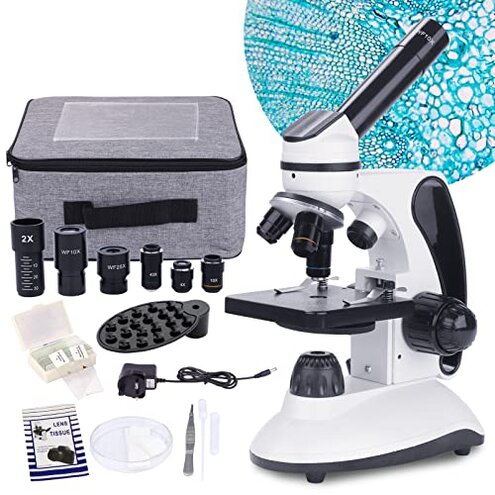
Product evaluated: BEBANG Monocular Microscope for Adults Students,40X-2000X Magnification,Dual LED Beginners Kids Microscopes with Science Kits,Phone Adapter,Carrying Case,AC Adapter,15 Slides for Lab Class Study
Related Videos For You
BIOLOGY 10 - Basic Microscope Setup and Use
Turn Your CELLPHONE Into a Microscope!! Apexel 200x Microscope Adapter!!
Data basis: This report is based on dozens of aggregated buyer feedback collected from written reviews and star-rating comments, plus a smaller set of photo/video-backed impressions. The collection window spans 2023–2026. Most detail came from longer written notes, with supporting context from media showing setup, focus attempts, and what users actually see through the eyepiece.
| Buyer outcome | BEBANG microscope | Typical mid-range alternative |
|---|---|---|
| Getting a sharp view | Higher chance of “looks blurry” during first use | Lower chance with more forgiving optics alignment |
| Usable high power | Riskier at the highest magnifications; more “marketing vs usable” tension | More stable practical top end; fewer steps to get a clear image |
| Build consistency | More variable; some units feel fine, others arrive needing extra tweaking | More consistent out of the box in this price tier |
| Setup effort | Higher; more time spent learning light, focus, and phone adapter positioning | Moderate; fewer “why can’t I see it” moments |
| Regret trigger | Kids lose interest after repeated blurry attempts and shaky phone captures | Less early frustration; more “quick wins” in the first session |
“Why is everything blurry even after I focus?”
Regret moment: You set up a slide, turn the knobs, and the view still looks soft or smeared. That’s among the most common complaints, and it hits right at first use.
Pattern: The problem appears repeatedly in feedback, but it is not universal. It shows up most during early sessions when users jump to higher power quickly.
Worse than expected: Entry microscopes always have a learning curve, but this one is described as less forgiving than typical mid-range options. Buyers report needing extra trial-and-error with lighting and focus to get the first “wow” moment.
Hidden requirement: Many users end up needing thin, well-made slides, careful light adjustment, and a step-by-step approach from lowest power upward. Without that, the high-magnification promise feels like a setup trap.
- Early sign: The image stays hazy even when the specimen is centered and you turn the focus slowly.
- Primary pattern: Blurry results show up commonly during the first hour of use, especially when chasing the top magnification.
- Trigger moment: It worsens after switching objectives, when you expect it to be “mostly in focus” like other student scopes.
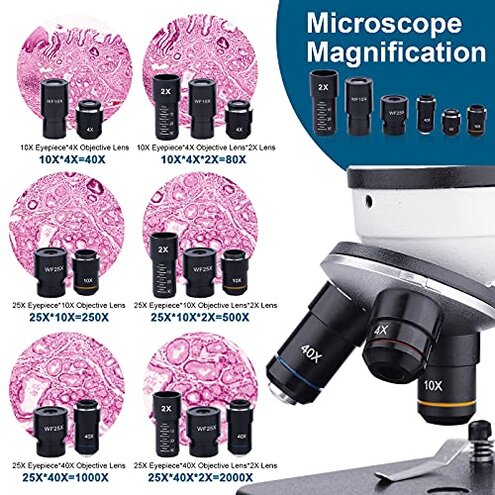
- Likely cause: Reports often point to mismatched expectations of usable magnification versus what the scope can deliver without perfect technique.
- Impact: You spend more time tweaking light and focus than observing, which is a big buzzkill for kids and beginners.
- Mitigation: Start at lowest power, re-center the specimen, then move up one step at a time while adjusting brightness.
- Fixability: Some buyers say it becomes acceptable with practice, but others report never getting crisp results at the “headline” settings.
“Why does the phone adapter feel frustrating to use?”
- Recurring: Adapter complaints show up repeatedly as a secondary issue tied to sharing images.
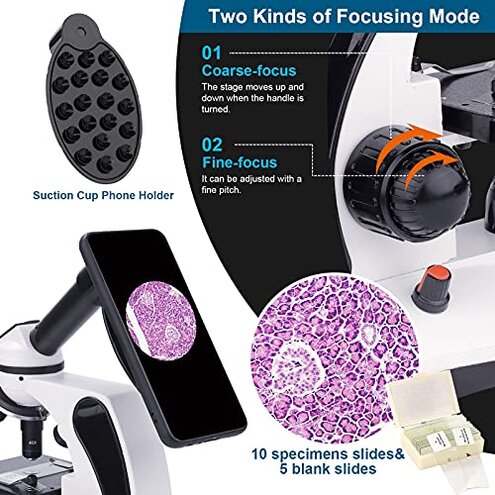
- When it hits: The trouble starts after you finally get focus, then try to align the phone to capture it.
- Worsens with: It gets harder during longer sessions, when small bumps or hand movement throw off alignment.
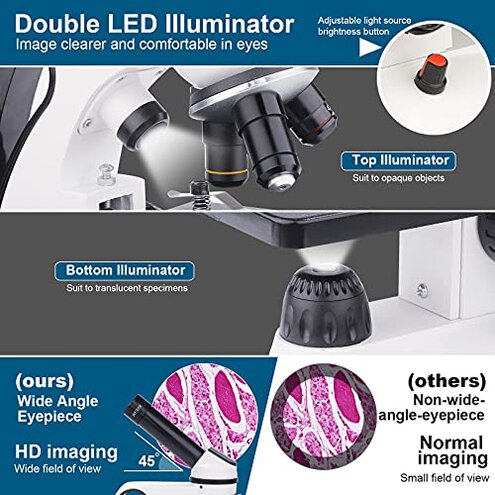
- What you notice: The camera view shows vignetting, drifting, or a hard-to-center circle that doesn’t match what your eye sees.
- Category contrast: Budget phone adapters are often finicky, but this is described as more time-consuming than most mid-range bundles.
- Workaround: Buyers commonly suggest stabilizing the phone, dimming screen glare, and treating recording as a separate step.
- Hidden step: Expect extra time to find the “sweet spot” for your specific phone camera placement.
“Why does the top magnification feel unusable?”
- Intensity cue: This is less common than “blurry in general,” but it is more frustrating because it undermines the main selling point.
- When it appears: It shows up right after you switch to high power expecting a dramatic jump in detail.
- Worsens with: Any vibration, imperfect slide thickness, or over-bright lighting can make the view look worse.
- What buyers expected: Many expect the listed high numbers to be easy to use for everyday looking.
- What happens: Feedback commonly describes high power as dimmer, shakier, and harder to keep in focus.
- Category contrast: It’s normal that high magnification is harder, but the gap between advertised and practical use is reported as bigger than typical.
- Mitigation: Treat the mid-range magnifications as the “real” working range and use the top end only for special cases.
- Decision tip: If the headline magnification is your main reason to buy, this model carries a higher regret risk.
“Did I get a dud or am I doing it wrong?”
- Persistent: A smaller but steady stream of feedback raises concerns about unit-to-unit consistency.
- When it shows: Problems are often noticed at unboxing and the first few attempts to focus.
- What you notice: Some buyers report parts feeling off, misaligned, or not behaving like the instructions imply.
- Impact: You can lose hours troubleshooting a beginner microscope, which is more disruption than expected in this category.
- Category contrast: Mid-range student scopes usually deliver a basic clear image quickly, even if accessories are average.
- Mitigation: Test with the included prepared slides first, in good lighting, before assuming it’s your technique.
Illustrative: “I can’t get a crisp image no matter how I turn the knobs.”
Primary pattern: This matches the common first-use blur frustration.
Illustrative: “The phone mount works, but it takes forever to line up.”
Secondary pattern: This reflects repeated adapter alignment complaints.
Illustrative: “High magnification sounded great, but it’s too dim and shaky.”
Secondary pattern: This aligns with the practical top-end limitation reports.
Illustrative: “I’m not sure if it’s defective or I’m missing a setup step.”
Edge-case pattern: This mirrors the smaller group citing inconsistency or confusing setup.
Who should avoid this
- Gift buyers who need guaranteed “wow” results in the first 10 minutes, because blurry first-use is a primary regret trigger.
- Phone-first users who mainly want photos and videos, since the adapter fiddling adds extra steps and failed captures.
- High-magnification shoppers who are buying for the biggest number, because the top-end usability is a repeated disappointment.
- Low-patience classrooms where many hands will adjust it quickly, since reports suggest it can be less forgiving than typical.
Who this is actually good for

- Curious beginners who enjoy learning technique and can tolerate a trial-and-error first session.
- Budget hobbyists who will treat mid-range magnification as the main use and accept limited top-end performance.
- Families who value the included kit and will use it as a guided activity, accepting that the phone adapter is a bonus, not the core feature.
- Patient tinkerers who will test slides, adjust lighting carefully, and return/exchange fast if they suspect a bad unit.
Expectation vs reality
- Expectation: A reasonable expectation for this category is a clear image at low and mid power with basic setup.
- Reality: Feedback suggests more setup friction than typical to reach that “clear enough” baseline.
| What you expect | What some buyers report |
|---|---|
| Easy focusing with the fine knob | More hunting for focus, especially after switching objectives |
| Phone sharing is quick | Extra alignment steps before you can record anything usable |
| Top magnification feels like a highlight feature | Practical limits make the top end feel like an occasional tool |
Safer alternatives
- Prioritize usable clarity by shopping for models praised for “clear at first use,” which directly reduces the blurry-start regret.
- Downweight big numbers and look for guidance on practical working magnification, to avoid the top-end disappointment.
- Choose a better adapter or a scope with a more stable phone mounting system if photos matter, to cut the alignment struggle.
- Pick consistency-focused brands with strong exchange support, which lowers risk from unit variability at arrival.
The bottom line
Main regret tends to be a blurry or hard-to-achieve clear view during first use, followed by frustrating phone capture. That combination can feel worse than normal for a mid-range student microscope because it delays quick success and makes the top magnification feel unrealistic.
Verdict: Avoid if you need reliable clarity fast or you’re buying mainly for high magnification and easy phone videos. Consider it only if you can tolerate learning steps and troubleshooting.
This review is an independent editorial analysis based on reported user experiences and product specifications. NegReview.com does not sell products.