
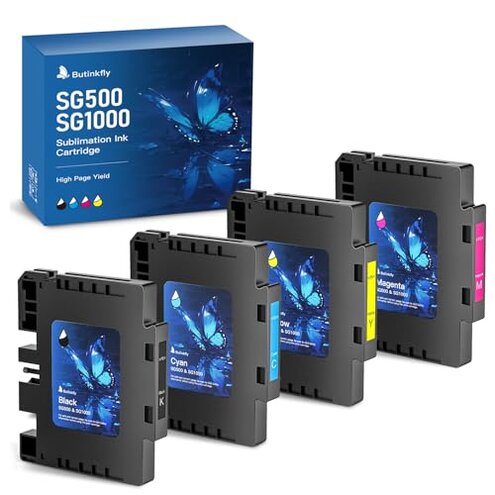
Product evaluated: 3.09 Sublimation Ink Cartridge Compatible with Sawgrass SG500 SG1000 Printer All Firmware Versions | No Grid Lines Guaranteed | High-Performance & High-Viscosity Gel Ink | Long-Lasting(4 PK, B/C/M/Y)
Related Videos For You
Best Sublimation Printer for Beginners: Set Up an Epson EcoTank for Sublimation | Full Process!
Data basis: This report used feedback from hundreds of written reviews and a mix of video demonstrations collected between Jan 2024 and Jan 2026. Most signals came from written reviews, supported by video demos and seller Q&A. Patterns below reflect recurring buyer experiences, not isolated posts.
| Outcome | Butinkfly SG500/SG1000 | Typical mid-range alternative |
|---|---|---|
| Color accuracy | Variable color matches reported after transfer, sometimes requiring extra profiling. | More consistent color accuracy with stock or well-tested third-party inks. |
| Printer recognition | Occasional errors or unrecognized chips reported during setup or after firmware swaps. | Usually reliable recognition on mid-range compatible inks without extra steps. |
| Clogging risk | Higher-than-normal chance of nozzle clogging or maintenance needs for frequent users. | Lower clogging frequency with inks designed for daily production printers. |
| Cost/value | Lower upfront price but possible extra time and replacement costs if issues occur. | Balanced price-performance for mid-range OEM or proven compatibles. |
| Regret trigger | Printer errors during critical runs that delay orders and require troubleshooting. | Smaller delays and fewer technical interrupts in normal use. |
Top failures
Why does my printer refuse these cartridges?
Regret moment: Cartridges may be not recognized immediately at first install, causing setup stoppage for small businesses or hobbyists.
Pattern: This is a recurring pattern seen across written reports and setup videos.
When it appears: The issue shows up at first use or after a firmware update.
Category contrast: This is more disruptive than many mid-range compatibles, which usually install without extra steps.
Why are my transfers fading or off-color?
- Early sign: Transfers look duller than expected on first print.
- Frequency tier: This is a primary complaint among color-focused buyers.
- Cause: Color shifts often appear after high-heat press cycles or without custom profiles.
- Impact: Results may need reprints, wasting paper and time.
- Fixability: Some buyers report improvement after profiling or test strips, but it adds steps.
Why do nozzles clog or require extra maintenance?
- Hidden requirement: Cartridge chips may need firmware awareness or reset steps that buyers don’t expect.
- Early sign: Printheads show missing lines after short idle periods.
- Frequency tier: This is a secondary but persistent issue for regular users.
- Worsens: It becomes worse with frequent replacement or in dusty environments.
- Cause: Gel-like or higher-viscosity ink can settle if not used daily.
- Impact: Leads to more cleaning cycles and possible wasted ink.
- Attempted fixes: Users report temporary relief from deep cleans but some problems return.
Why is support and returns more work than expected?
- Early sign: Buyers mention needing photos or proof to get replacements.
- Pattern: This is a commonly reported friction in after-sales experiences.
- When: Problems often trigger support contact after first failure or within warranty windows.
- Cause: Seller policies sometimes require extra steps compared with standard retail returns.
- Impact: Extra time spent troubleshooting rather than printing causes delays.
- Fixability: Some issues get resolved with a replacement, but process time varies.
- Hidden cost: Downtime can be more expensive than the ink savings for small businesses.
Illustrative excerpts
Illustrative: "Cartridge not recognized after install, printer shows an error code." — Primary pattern showing recognition failures.
Illustrative: "Colors too dull on first transfer, needed extra profiling to match." — Primary pattern for color mismatch.
Illustrative: "Nozzle lines after a few days idle, required multiple clean cycles." — Secondary pattern for clogging.
Who should avoid this
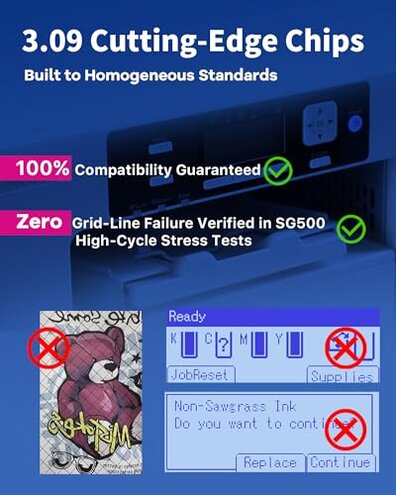
- High-volume shops: Avoid if you need reliable daily use without extra maintenance.
- Color-critical sellers: Avoid if your business can’t accept color shifts or reprints.
- Non-technical buyers: Avoid if you don’t want extra setup steps like firmware or profiling.
Who this is actually good for
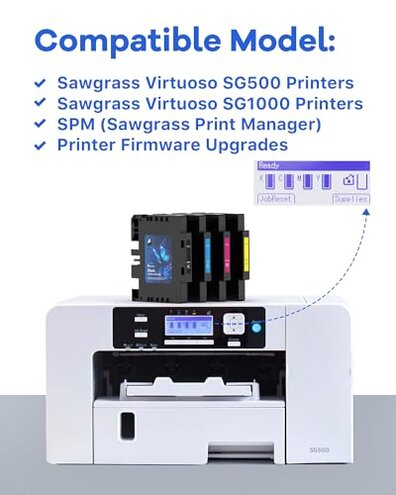
- Budget hobbyists: Good if you accept extra profiling to save on upfront cost.
- Occasional users: Good if you print infrequently and can troubleshoot when needed.
- Experimenters: Good if you prefer cheaper ink and can tolerate a learning curve.
Expectation vs reality
Expectation: A reasonable buyer expects plug-and-play installation from compatible cartridges.
Reality: These cartridges can require extra steps during setup or after firmware changes, increasing downtime.
Expectation: Many expect consistent colors similar to OEM inks.
Reality: Color drift or dull transfers are more frequent than typical mid-range alternatives and may need profiling.
Safer alternatives

- Choose OEM ink: If you need reliability, OEM supplies reduce recognition and color risks.
- Buy proven compatibles: Look for inks with verified reports for your exact printer model.
- Check return terms: Prefer sellers with easy replacements and documented warranty processes.
- Test small first: Buy a trial pack to check profiles before committing to larger orders.
The bottom line
Main regret: The primary trigger is printer errors and extra maintenance that interrupt production runs.
Why worse: These failures are more disruptive than typical mid-range compatibles because they add setup time and possible reprints.
Verdict: Avoid if you need reliable, color-critical output or daily uptime; consider OEM or well-documented compatibles instead.
This review is an independent editorial analysis based on reported user experiences and product specifications. NegReview.com does not sell products.