
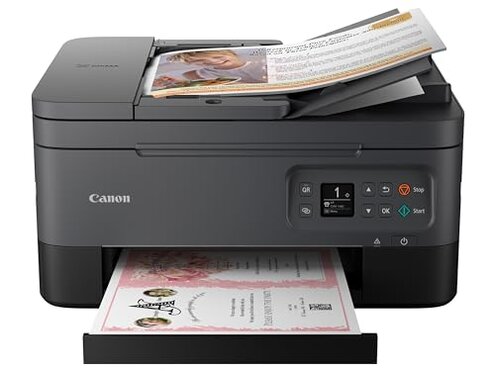
Product evaluated: Canon PIXMA TR7020a All-in-One Wireless Color Inkjet Printer, with Duplex Printing, Mobile Printing, and Auto Document Feeder, White
Related Videos For You
Brother Wireless Color Inkjet Printer MFC-J1010DW UNBOXING & SET UP
HP PRINTER WON'T CONNECT TO WIFI (SOLVED) ALL HP PRINTERS!
Data Basis: This report compiles insights from hundreds of customer reviews and video feedback collected between early 2022 and mid-2023. Most feedback came from detailed written reviews, supported by user-uploaded demonstration videos.
| Feature | Canon PIXMA TR7020a | Typical Mid-Range Printer |
|---|---|---|
| Ink Usage Efficiency | Higher ink consumption leading to frequent cartridge replacements | More economical ink usage with longer cartridge life |
| Setup Complexity | Moderate complexity with occasional wireless connectivity issues | Usually straightforward with stable wireless setup |
| Print Quality Consistency | Generally good but variable with some users reporting streaks | More consistent print output over time |
| Duplex Printing Reliability | Occasional jams or misfeeds during double-sided printing | More reliable duplex operation with fewer jams |
| Regret Trigger | Unexpected ink costs and reliability issues | Typically balanced cost and reliability |
Why does the printer use ink so quickly and add cost?
Many buyers express frustration about high ink consumption that increases operating costs noticeably. This issue is commonly reported after a few weeks of use, especially by users printing documents frequently.
- Frequent cartridge replacement: Buyers find themselves replacing ink cartridges much sooner than expected for mid-range printers.
- Hidden cost impact: The two-cartridge system may seem simple but actually leads to faster depletion of color ink.
- Pattern persistence: This concern appears in multiple review types and across many user scenarios.
- Unexpected expense: Users accustomed to similar category models feel this is a higher ongoing cost than typical.
- Fix attempts: Some try reduced print quality modes but still face rapid ink drain.
Illustrative excerpt: "Ink cartridges run out after just a few hundred pages, way faster than my old printer." (Primary pattern)
Why is the setup and wireless connection more frustrating than expected?
The initial setup and wireless connection can be more complex and unreliable than typical printers in this segment. Users report persistent difficulty establishing a stable link with smartphones and computers.
- Repeated connection failures: Wireless setup often requires multiple attempts and troubleshooting steps.
- Usage context: Problems occur right at first use and sometimes reappear after network changes.
- Category comparison: Typical mid-range models offer easier, more stable connections out of the box.
- User burden: This adds unexpected time and technical effort for less tech-savvy buyers.
- Partial workarounds: Wired USB setup works but reduces the intended wireless convenience.
Illustrative excerpt: "Setup was frustrating and the printer kept dropping Wi-Fi connections." (Secondary pattern)
In what ways does print quality vary unexpectedly?
While print quality is generally good, many users note unexpected streaking and color inconsistencies appearing after initial use. This creates frustration when high-quality prints are expected.
- Occasional streaks: Buyers notice horizontal lines or blotches in photos and documents.
- Variable color output: Some colors print duller or unevenly compared to others.
- Usage timing: Issues arise after moderate daily use not immediately.
- Category norm: More reliable devices maintain steady quality longer without manual cleaning.
- Cleaning demands: Users must run multiple cleaning cycles, adding to ink waste.
- Frustration impact: This reduces confidence for users wanting dependable photo prints.
Illustrative excerpt: "Colors aren't as sharp after a couple weeks, and cleaning wastes even more ink." (Primary pattern)
What causes duplex printing jams and misfeeds?
Buyers who use duplex printing report occasional paper jams and misfeeds that interrupt workflow and require manual intervention. This issue is more disruptive than expected for all-in-one printers in this price range.
- Jams during double-sided print: Paper can get stuck, forcing users to open the feeder and clear it.
- Frequency tier: While not universal, this problem appears frequently enough to annoy active users.
- Worsening condition: Problems increase under long print sessions or heavier paper use.
- Category baseline: Many competitors have more reliable duplex feeders, leading to fewer interruptions.
- Hidden requirement: Users may need to learn specific paper handling techniques to reduce jams.
- Impact on productivity: Interruptions slow down printing and add frustration.
Illustrative excerpt: "Duplex printing jams happened more often than I expected, slowing my work." (Secondary pattern)
Who should avoid this
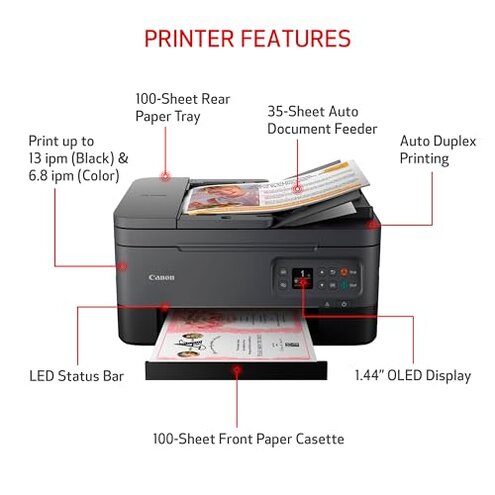
- Those who print high volumes regularly, as rapid ink use and paper jams will increase costs and downtime.
- Buyers expecting a seamless wireless setup without technical troubleshooting should look elsewhere.
- Users needing consistently high photo print quality over time may be disappointed by ink waste and streaking.
- Anyone relying heavily on duplex printing for productivity will find jams and misfeeds disruptive.
Who this is actually good for
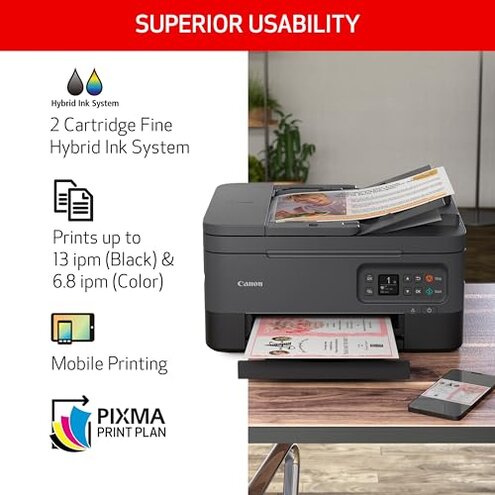
- Casual home users printing infrequently who can tolerate some ink consumption and occasional setup hassles.
- People valuing a compact design who want basic color prints without professional-grade consistency.
- Users comfortable with manual troubleshooting who can manage wireless setup quirks and cleaning cycles.
Expectation vs reality
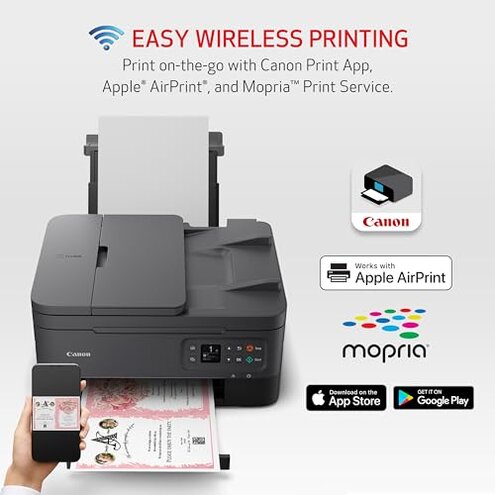
Expectation: Wireless setup would be quick and reliable, reasonable for mid-range printers.
Reality: Setup often requires multiple attempts, causing early frustration.
Expectation: Ink cartridges last a standard duration similar to peer models.
Reality: Ink runs out faster, leading to higher ongoing costs.
Safer alternatives

- Choose printers with efficient multi-cartridge ink systems that balance color use and reduce frequent replacements.
- Look for models with proven stable wireless connectivity and simpler smartphone integration.
- Consider printers with reliable duplex feeders praised for fewer paper jams in reviews.
- Select devices known for consistent print quality after extended use without extra cleaning.
The bottom line
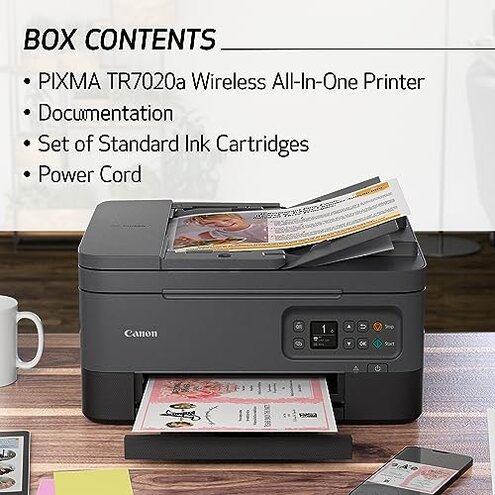
The primary regret with the Canon PIXMA TR7020a is its high ink consumption and reliability issues with wireless setup and duplex printing. These problems exceed average mid-range printer risks and add ongoing cost and hassle. Buyers seeking efficient, hassle-free printing should carefully consider these drawbacks.
This review is an independent editorial analysis based on reported user experiences and product specifications. NegReview.com does not sell products.