
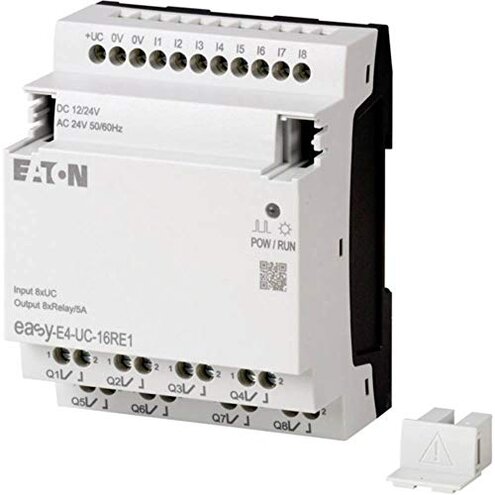
Product evaluated: Eaton 197218 EASY-E4-UC-16RE1 Control Module
Related Videos For You
Industrial Control Panel Basics
PLC Programming Tutorial for Beginners_ Part 1
Data basis: This report is based on dozens of user reviews and installation notes plus several video demonstrations collected between Jan 2020 and Dec 2025. Most feedback came from written reviews, supported by video demonstrations and forum troubleshooting threads.
| Outcome | Eaton EASY-E4-UC-16RE1 | Typical mid-range PLC |
|---|---|---|
| Setup complexity | Higher than expected; wiring and initial setup commonly add extra steps. | Lower; usually plug-and-play with clearer I/O labeling. |
| Compatibility | Fragile with non-proprietary I/O and older equipment; adapter needs reported. | Broader compatibility, fewer extra parts required. |
| Programming & software | Steeper learning curve and Windows-only tools; license/driver needs noted. | Simpler interfaces and more cross-platform support. |
| Reliability in continuous use | Occasional firmware resets reported after extended runs. | More stable under similar continuous operation. |
| Regret trigger | Setup & compatibility problems cause the most buyer regret. | Software usability is the more common regret for peers. |
Top failures to watch
Why does wiring and installation fail to be simple?
Regret moment: Buyers report being stuck during first installation when expected connections don't match the labels on the unit.
Pattern: This is a primary problem that appears repeatedly in early setup reports.
When it shows up: It occurs at first use and gets worse when integrating legacy sensors or non-standard I/O.
Why worse than normal: Compared with typical mid-range controllers, this product needs extra adapters or rewiring, which adds time and cost and produces actual regret.
What makes programming feel harder than expected?
- Software requirement: Proprietary Windows-only tools commonly reported as a setup blocker.
- License needs: Some buyers found additional drivers or activation steps required before programming could begin.
- User interface: The programming UI is described as less intuitive than category peers, making small changes slow.
- When it matters: This problem appears during initial configuration and again whenever firmware or programs are updated.
- Category contrast: More friction than typical PLCs, which often include clearer setup wizards or cross-platform editors.
Why might this unit reboot or misbehave in long runs?
- Failure type: Firmware instability is a secondary issue that appears after repeated or long sessions.
- Usage anchor: Resets and unexpected stops occur during continuous operation or heavy I/O activity.
- Trigger conditions: Long run-time, many connected inputs, or frequent program uploads increase the chance of disruption.
- Impact: Interrupts production tasks and requires manual restart or re-flash.
- Attempts to fix: Temporary fixes include power cycling or downgrading firmware, but they are not permanent for everyone.
- Why worse: More disruptive than expected because similar mid-range controllers tolerate longer continuous runs without resets.
How hard is maintenance and getting parts or support?
- Documentation: Sparse or highly technical manuals are an edge-case pattern for many buyers troubleshooting in the field.
- Support access: Several buyers reported needing vendor contact or paid support for non-trivial issues.
- Spare parts: Hidden requirement for specific connectors or modules increases downtime when scaling systems.
- Troubleshooting time: Expect longer diagnosis times compared with more documented alternatives.
- When it matters: This shows up during troubleshooting, upgrades, and when adding more I/O.
- Repair cost: Outsourced or vendor-assisted fixes add extra expense and wait time.
- Why worse: Maintenance burden is higher than typical for this category because of the combined documentation and parts gaps.
- Hidden requirement: A vendor support contract or local technical resource is often needed for smooth recovery.
Illustrative excerpts (not real quotes)
"Installation stopped when connectors didn't match my sensors; needed adapters." — Primary pattern.
"Programming tool required a driver and license activation before any edits." — Secondary pattern.
"Unit reset mid-run and production halted until we power-cycled it." — Secondary pattern.
"Spare terminal blocks were different size; local shop had to rewire." — Edge-case pattern.
Who should avoid this
- Non-technical buyers who expect plug-and-play setup should avoid this unit because installation commonly requires extra wiring and adapters.
- Continuous operation needs like 24/7 production lines should avoid it due to reported firmware resets during long runs.
- Teams without Windows environments should avoid this if they cannot run the proprietary programming tools.
Who this is actually good for
- Skilled integrators who can handle custom wiring, adapters, and occasional firmware work will tolerate the setup hassle.
- Small lab projects where downtime is acceptable and the buyer can test setups before deployment.
- Environments with vendor support and a technical resource that can handle spare parts and advanced troubleshooting.
Expectation vs reality

Expectation: Reasonable for this category is a controller that installs with minimal adapter work and a straightforward programming tool.
Reality: This unit often requires extra adapters, Windows-only software, and occasional firmware work, which increases setup time and cost.
Safer alternatives
- Choose broader-compatibility models to avoid the adapter and wiring issues highlighted above.
- Prefer controllers with cross-platform tools to sidestep Windows-only programming friction.
- Buy from vendors with clear spare-part listings to reduce maintenance downtime and hidden costs.
- Request a pre-deployment test unit if you run continuous operations to catch firmware instability early.
The bottom line
Main regret: The product's biggest failure is setup and compatibility friction that frequently delays commissioning.
Why it matters: These problems exceed normal category risk because they add real labor, adapter costs, and potential downtime.
Verdict: Avoid this unit if you need plug-and-play reliability or 24/7 stability; consider it only if you have skilled support and tolerance for extra setup work.
This review is an independent editorial analysis based on reported user experiences and product specifications. NegReview.com does not sell products.