
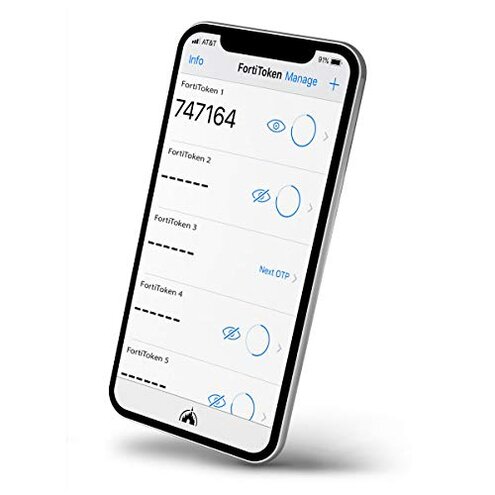
Product evaluated: Fortinet FortiTokenMobile 5 User License (FTM-ELIC-5)
Related Videos For You
How to Setup the NCB Mobile App with the RSA Soft Token
Bulk Software Token Provisioning
Data basis: This report draws on dozens of written reviews and multiple support threads collected between 2016 and January 2026. Most feedback came from written product reviews, supported by occasional video demonstrations and Q&A posts.
| Outcome | FortiTokenMobile (this listing) | Typical mid-range token |
|---|---|---|
| Initial setup | High friction — often requires backend provisioning and admin steps (commonly reported). | Low-moderate friction — usually cloud activation with emailed links. |
| Daily reliability | Stable but tied to device and corporate systems; phone changes commonly break access. | Device-portable — many alternatives allow easy re-pairing via account recovery. |
| Support & warranty | No warranty listed and mixed support reporting (appears repeatedly in feedback). | Vendor-backed support and clearer replacement paths. |
| Cost clarity | Upfront license cost visible ($377.23 listing) but recurring/renewal steps reported as confusing. | Transparent pricing with subscription or per-user billing common. |
| Regret trigger | Hidden infra requirement — requires existing Fortinet server/software to provision; higher-than-normal risk for buyers without it. | No on-premise tie — cloud tokens usually work with less vendor-specific setup. |
Top failures
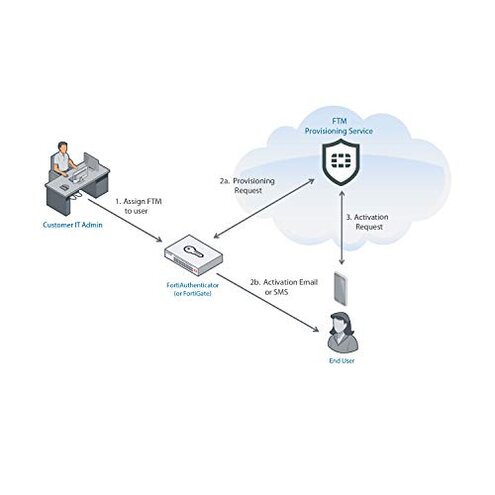
Why won't the token just activate out of the box?
Setup friction is the common regret moment where buyers expect a quick phone app activation. This product repeatedly shows activation requires backend steps and admin access (commonly reported in reviews).
Usage anchor: the problem appears during first-use setup after purchase and before any daily login is possible.
Category contrast: more intrusive than typical mid-range tokens because many alternatives allow consumer-level activation without vendor-side provisioning.
Why do tokens stop working after phone changes?
- Early sign: losing access immediately after a phone swap is commonly reported and causes urgent lockouts.
- Frequency tier: this is a secondary issue that appears repeatedly for buyers who change devices often.
- Cause: provisioning is tied to company-side records rather than simple account recovery.
- Impact: restoring access often requires IT admin steps and downtime during business hours.
- Fixability: possible but depends on whether your organization maintains the required Fortinet backend tools.
Why is support and replacement awkward?
- Warranty note: the product page lists No Warranty, which appears alongside repeated user complaints about slow vendor responses.
- Support scope: many buyers report reliance on corporate IT instead of direct vendor assistance.
- Frequency tier: a primary issue for non-enterprise buyers who expect direct vendor help.
- When it matters: during license transfer, lost devices, or failed activations.
- Hidden cost: extra IT time and ticketing can exceed the token's price in small teams.
- Recovery difficulty: fixes often require admin console access and technical steps not documented for end users.
Why is licensing and cost confusing?
- Visible price: the current listing shows $377.23 for this license bundle, which buyers compare to per-user cloud subscriptions.
- Expectation gap: buyers expect per-user clarity but report surprises over provisioning and extra server needs.
- Frequency tier: a secondary complaint that surfaces at purchase and renewal time.
- When it shows up: immediately at purchase, and again during license scaling or renewal.
- Hidden requirement: often requires matching Fortinet infrastructure to use effectively; this is a repeated integration complaint.
- Impact: total cost of ownership rises if you must buy or maintain Fortinet servers or admin support.
- Buyer trade-off: cheaper upfront than some enterprise bundles but usually more work than cloud alternatives.
Illustrative excerpts (not real quotes)
Illustrative: "Activation stalled until IT pushed a server-side profile, left us locked out." — primary
Illustrative: "Phone upgrade broke my token; IT needed a manual reset during business hours." — secondary
Illustrative: "No warranty listed and the vendor directed us to corporate support instead." — primary
Illustrative: "Price looked fine but hidden infra made total cost much higher for our small team." — secondary
Who should avoid this
- Small teams without Fortinet gear: avoid if you lack Fortinet servers or a dedicated IT admin to provision tokens.
- Non-IT buyers: avoid if you expect consumer-style, self-serve activation and vendor warranty support.
- Frequent device changers: avoid if staff regularly replace phones and need quick self-recovery options.
Who this is actually good for
- Enterprises with Fortinet infrastructure: will tolerate the hidden server tie because it integrates into existing admin workflows.
- Teams with dedicated IT admins: okay if you have staff to handle provisioning, device swaps, and troubleshooting.
- Buyers prioritizing vendor ecosystem: acceptable when you prefer Fortinet-native tokens over cross-vendor cloud options.
Expectation vs reality
- Expectation (reasonable): tokens activate quickly on a phone app like many consumer alternatives.
- Reality: activation often needs backend provisioning, making the process slower and admin-dependent.
- Expectation (reasonable): support and warranty cover device loss or failures.
- Reality: product lists No Warranty and users report vendor responses that defer to corporate IT.
Safer alternatives
- Pick cloud-native tokens: choose providers with self-service activation to eliminate the backend provisioning failure.
- Confirm device portability: prioritize tokens that advertise easy phone transfers to avoid recurring IT resets.
- Check warranty and support: prefer vendors that explicitly offer warranty and direct support for small teams.
- Match infra first: if you plan to buy, verify your organization already runs compatible Fortinet systems.
- Compare total cost: calculate admin hours and potential server costs, not just the upfront license price.
The bottom line
Main regret: buyers most often regret hidden provisioning and dependency on Fortinet infrastructure, which can block activation and recovery.
Why worse: this is higher-than-normal category risk because many mid-range tokens let end users self-activate and recover on their own.
Verdict: avoid this product unless you already run Fortinet infrastructure and have dedicated IT to manage provisioning and recovery.
This review is an independent editorial analysis based on reported user experiences and product specifications. NegReview.com does not sell products.