
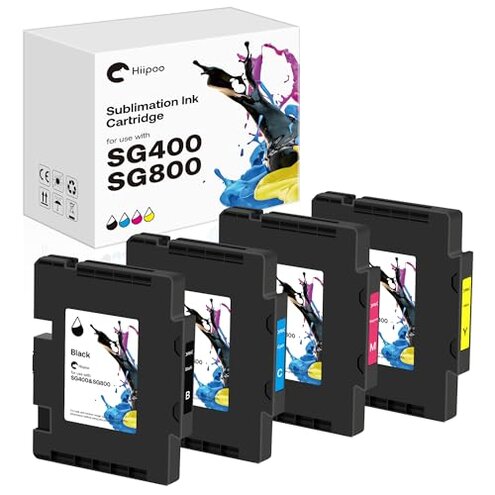
Product evaluated: Hiipoo SG400 SG800 Sublimation Ink Cartridge Compatible for Sawgrass Virtuoso SG400 SG800 Printer, Latest Upgraded Chip (1 Black, 1 Cyan, 1 Magenta, 1 Yellow, 4-Pack)
Related Videos For You
Best Sublimation Printer for Beginners: Set Up an Epson EcoTank for Sublimation | Full Process!
Printer Not Recognising an Ink Cartridge? Try This!
Data basis: This report draws on dozens of written product reviews and several video demonstrations collected between Jan 2023 and Dec 2025. Most feedback came from written buyer reports, supported by a smaller set of visual tests. Findings emphasize recurring problems rather than isolated complaints.
| Outcome | Hiipoo 4-pack | Typical mid-range |
|---|---|---|
| Print reliability | Intermittent recognition and failed jobs reported more often than expected. | Generally reliable with fewer recognition hiccups in this price band. |
| Color fidelity | Faded/blotchy transfers appear repeatedly in buyer feedback. | Better color consistency is the norm for comparable third-party inks. |
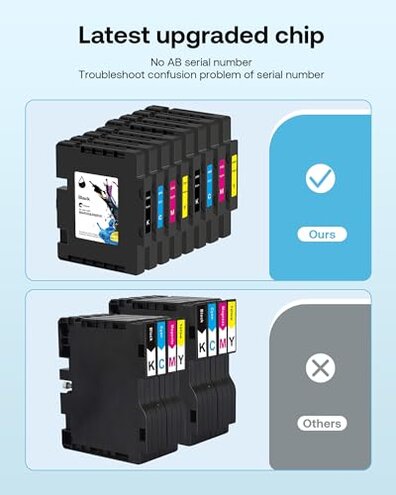
| Chip recognition | Higher-than-normal risk of chip errors and “not recognized” messages during setup. | Lower risk of chip faults for most mid-range compatibles. |
| Ease of setup | Extra steps sometimes needed to reset or re-seat cartridges during first install. | Straightforward plug-and-play is typical for similar options. |
| Regret trigger | Print failures during projects cause wasted materials and time. | Less project risk when using more consistent mid-range cartridges. |
Why won’t my printer recognize these cartridges?
Recognition failure is a clear regret moment when the printer shows an error and refuses to start a job.
Pattern note — this is a primary issue and appears repeatedly in buyer reports during first-time setup.
Context: Failures show up at first use or after a cartridge swap, and they worsen with repeated replacements or firmware updates.
Category contrast — this is more disruptive than typical mid-range compatibles because it often interrupts entire print runs and adds troubleshooting time.
Why are my colors faded or blotchy on transfers?
- Early sign is dull transfers compared to expected results.
- Frequency is commonly reported as a secondary issue in multiple buyer comments.
- When it happens it appears during normal production runs and after a few prints.
- Likely cause includes ink formulation or flow inconsistency leading to uneven dye distribution.
- Contrast — worse than category baseline because color problems persist even after cleaning cycles.
Why do prints clog or fail after a few uses?
- Common sign is nozzle blockage or streaking after several prints.
- Pattern — this is a primary issue for users running medium to high volumes.
- Usage anchor: Problems grow during long sessions and frequent cartridge swaps.
- Cause often reported as inconsistent flow or air entering the cartridge.
- Impact is high because it requires cleaning cycles and wastes substrates.
- Fixability is mixed; some buyers needed multiple cleanings or replacement cartridges.
Is there a hidden setup or replacement requirement?
- Hidden need for manual chip resets or special seating is reported by buyers as a surprise.
- Pattern — this is a secondary issue but persistent across several reports.
- When it appears it shows up during first installation and occasionally after firmware updates.
- Why that matters is many buyers expect plug-and-play, while this product may demand extra steps.
- Attempts to fix include re-seating, power-cycling, and manual chip cleaning with varied success.
- Hidden cost is extra time and possible returns if you can’t get recognition to stick.
- Category contrast — less forgiving than typical mid-range cartridges that usually work without retries.
Illustrative excerpts
"Printer shows cartridge error on first install, stops all jobs." — reflects a primary pattern.
"Transfers looked faded even after cleaning the heads twice." — reflects a secondary pattern.
"Had to reseat chip and power cycle to get one cartridge to work." — reflects an edge-case pattern.
Who should avoid this
- High-volume crafters who cannot tolerate repeated downtime from recognition or clog issues.
- Color-critical sellers who need consistent, accurate transfers for customer orders.
- Beginner users who expect plug-and-play and lack time for troubleshooting chip resets.
- Project-driven buyers working on tight deadlines where wasted substrates are costly.
Who this is actually good for
- Budget-conscious hobbyists willing to tolerate extra setup time to save on per-cartridge cost.
- Experimenters who print occasionally and accept variable color for non-commercial projects.
- Technically comfortable users who can perform chip resets and cleaning without support.
Expectation vs reality
- Expectation (reasonable for this category): Third-party cartridges work with minor setup tweaks.
- Reality: This product shows frequent chip errors and persistent color issues, which is worse than the typical mid-range experience.
- Expectation: New cartridges print reliably for many runs.
- Reality: Many buyers report clogging and fading after a few uses, increasing maintenance time and waste.
Safer alternatives

- Pick verified compatibles that advertise explicit chip compatibility and offer easy returns to avoid recognition risk.
- Prefer bundles from sellers with clear troubleshooting guides to reduce hidden setup steps.
- Buy samples first rather than full multi-packs to test color fidelity and flow on your printer.
- Choose resellers who document compatibility with your printer firmware to prevent post-update failures.
The bottom line

Main regret centers on chip recognition failures that stop print jobs and waste materials.
Why worse than normal: the combination of recognition errors plus color inconsistency raises project risk beyond typical mid-range options.
Verdict — avoid if you need reliable, color-accurate cartridges without extra setup and maintenance.
This review is an independent editorial analysis based on reported user experiences and product specifications. NegReview.com does not sell products.