
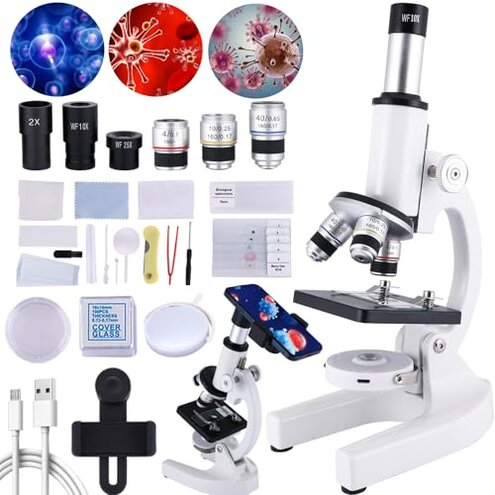
Product evaluated: Microscope for Kids,40X-2000X Mobile Phone Adapter with Microscope Slide Microscope kit for Home School Laboratories for Children Students
Related Videos For You
Educational Microscope 🔬For Students Unboxing & Testing - Compound Microscope - Chatpat toy tv
NexYZ 3-Axis Universal Smartphone Adapter Product Tour
Data basis: This report is based on dozens of aggregated buyer feedback collected from written reviews and Q&A style posts over a recent multi-month window ending in early 2026. Most detail came from short written complaints, supported by a smaller share of setup-focused notes that describe what happened during first use and classroom-style use.
| Buyer outcome | This kids microscope kit | Typical mid-range alternative |
|---|---|---|
| First-day success | Lower odds without extra setup steps | Higher odds with simpler focusing and steadier results |
| Image clarity | Higher-than-normal risk of blurry views at higher zoom | More consistent clarity within practical magnification ranges |
| Phone adapter use | More fiddly alignment and more time to capture a photo | Less fiddly adapters or better alignment tolerance |
| Accessory completeness | More reports of missing or low-utility extras | Fewer surprises, fewer “toy-like” add-ons |
| Regret trigger | Kid loses interest after repeated failed focusing attempts | Kid stays engaged because results are easier to repeat |
“Why is it still blurry after we focus?”

Regret moment hits when a child finally gets a slide in place, then only sees a dim, fuzzy blob. This is among the most common complaints, and it feels worse because the box promises very high magnification.
Pattern: The blur issue appears repeatedly, especially when buyers try the highest labeled zoom early. Not universal, but frequent enough that it changes the odds of a “wow” moment.
When it shows: It usually shows up on first use, right after setup, when users jump to the big-number magnification. It worsens with shaky tables, fast knob turns, and thicker DIY samples.
Why worse than mid-range: Some blur at extreme zoom is reasonable for kids microscopes, but the frustration is higher here because the top-end numbers invite people to use the least forgiving settings first.
- Early sign: The image looks “large” but not detailed even after multiple focus passes.
- Primary issue: Clear viewing at the highest labeled zoom is hard to achieve in normal home conditions.
- Common trigger: Starting at high zoom before centering and focusing at low power adds extra steps.
- Hidden requirement: You often need thin samples and careful lighting before high zoom looks acceptable.
- Workaround: Buyers report better results by staying in lower magnifications for longer and moving up gradually.
- Fixability: This is partly fixable with technique, but not always, which is what drives returns.
- Impact: The main cost is lost attention, because kids stop trying after repeated “nothing looks right” attempts.
“Why does the phone adapter feel impossible to line up?”
Regret moment shows up when you try to take a photo for school and spend more time aligning than observing. This is a secondary but persistent complaint, and it is more disruptive than expected because the feature is a headline promise.
- Recurring friction: Adapter alignment problems show up repeatedly in feedback, but they are not universal.
- When it happens: It appears after setup, right when you switch from viewing to photographing.
- Worsens with: It gets harder during long sessions because small shifts knock the camera off the eyepiece.
- User-visible symptom: You get vignetting (dark circle edges) or a fully black frame unless alignment is perfect.
- Category contrast: Mid-range kits often have a more forgiving adapter fit, so beginners get usable shots faster.
- Extra effort: Expect two-person help at times, with one person holding the phone steady.
- Mitigation: Using a stable surface and starting with low magnification reduces re-aiming.
- Trade-off: If the phone feature was the reason to buy, this friction can be a deal-breaker.
“Did we get a complete kit, or are parts missing?”
Regret moment is opening the bag and realizing an experiment can’t start without an item you assumed was included. This is a primary-tier complaint in the accessory category, and it creates more hassle than expected for a “starter set.”
- Pattern: Missing or unhelpful accessories show up commonly reported across feedback that focuses on unboxing.
- When it shows: It appears on day one, before any learning happens.
- What buyers notice: “Complete set” feels overstated when key items are absent or too basic to use.
- Category contrast: Many mid-range kits still vary, but they more often include usable basics that match the learning path.
- Time cost: You may need an extra shopping trip for slides, covers, or better samples.
- Mitigation: Plan to supply store-bought prepared slides if this is for a class deadline.
“Why does it feel shaky when my kid touches it?”
Regret moment happens when the image jumps every time a child adjusts focus, making it hard to keep a specimen centered. This is a secondary issue, but it can be more frustrating than expected because microscopes are already sensitive to movement.
- Persistent theme: Stability complaints appear repeatedly, especially from households with younger kids.
- When it happens: It shows up during daily handling, focusing, and slide changes.
- Worsens with: Lightweight tables and fast knob turns make the shake more obvious.
- Category contrast: Some wobble is normal in kids microscopes, but it feels worse when paired with hard-to-achieve clarity.
- Impact: You spend more time re-centering than observing.
- Mitigation: Put it on a solid desk and teach slow, tiny focus movements.
- Fixability: This is partly manageable with setup, but not eliminated for active kids.
Illustrative excerpt: “We turned the knob forever and it never got sharp.” Primary pattern tied to clarity at high zoom.
Illustrative excerpt: “The phone holder works, but only if you don’t breathe.” Secondary pattern tied to adapter alignment.
Illustrative excerpt: “The kit says complete, but we still had to buy slides.” Primary pattern tied to accessories.
Illustrative excerpt: “Any touch makes the view jump off the sample.” Secondary pattern tied to stability.
Illustrative excerpt: “It’s fine at low power, but the big numbers feel fake.” Primary pattern tied to magnification expectations.
Who should avoid this

- School deadline buyers who need reliable phone photos, because adapter alignment is a persistent time sink after setup.
- High-zoom seekers who mainly want the 1000x–2000x experience, because clarity complaints are among the most common early-use regrets.
- Young kids who bump gear, because stability issues are repeatedly reported during normal handling.
- Gift buyers expecting a ready-to-run box, because missing or low-utility extras are commonly reported at unboxing.
Who this is actually good for
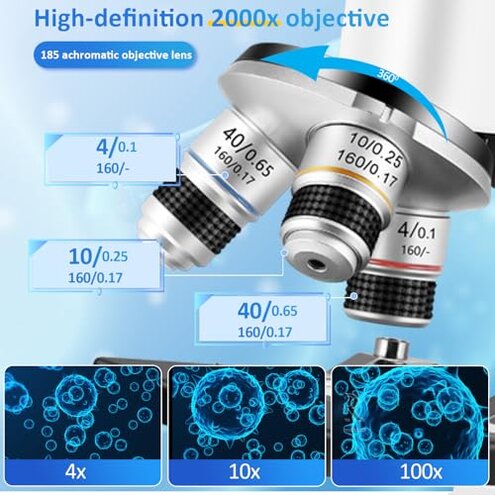
- Curious beginners who will stay at lower magnification, because they can tolerate the high-zoom disappointment and still learn basics.
- Hands-on parents willing to coach technique, because they can offset the setup friction with step-by-step focusing habits.
- Budget classrooms using it as a starter station, because students can rotate quickly and not rely on the phone adapter feature.
- Prepared-slide users, because thin, clean samples reduce the blur that shows up with DIY specimens.
Expectation vs reality

Expectation: High magnification numbers mean you’ll see crisp “tiny details” quickly.
Reality: Clear results at the top end are hard to reproduce, and the disappointment shows up on first use.
Expectation: A phone adapter makes sharing photos easy.
Reality: Alignment is fiddly, and it can take extra time each time you reposition.
Expectation: A “complete accessories” kit is ready for a science activity.
Reality: Some buyers report missing or low-utility extras, forcing extra shopping steps.
Expectation (reasonable for this category): Kids microscopes need some patience and practice.
Reality: The practice burden feels higher than typical mid-range options because multiple pain points stack at once.
Safer alternatives
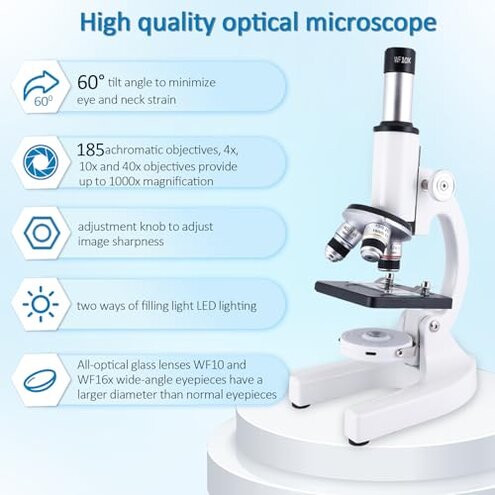
- Choose realistic zoom ranges, because this directly reduces the blurry high-magnification regret trigger.
- Prioritize stability in the base and stage, because it prevents the image jumping that derails kids during focusing.
- Buy for photos only if the adapter is proven easy, because this neutralizes the alignment time sink.
- Verify kit contents before gifting, because it avoids the missing accessory surprise on day one.
- Start with prepared slides, because they lower the hidden requirement of thin samples for acceptable detail.
The bottom line

Main regret is chasing high magnification and getting blur, then spending extra time troubleshooting instead of observing. This exceeds normal kids-microscope risk because the biggest advertised features invite you into the least forgiving settings.
Verdict: Avoid if you need dependable clarity and easy phone photos on day one. Consider it only if you can accept lower magnification use and more hands-on coaching.
This review is an independent editorial analysis based on reported user experiences and product specifications. NegReview.com does not sell products.