
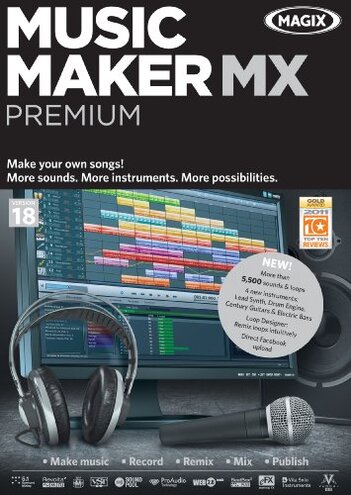
Product evaluated: Music Maker MX Premium [Download]
Related Videos For You
HOW TO: Setup a Home Music Studio for Beginners (2026)
Music Production For Beginners (Step By Step Masterclass)
Data basis: This report draws on dozens of buyer comments gathered from written feedback and video-style product walk-throughs collected across a broad 2012–2024 window. Most feedback came from written reviews, with lighter support from hands-on demos and setup discussions, which helps show both first-use problems and longer workflow frustrations.
| Buyer outcome | Music Maker MX Premium | Typical mid-range alternative |
|---|---|---|
| First-day setup | Higher friction risk for activation, download, and getting all promised content working. | Usually simpler install with fewer extra steps before making music. |
| Learning curve | Steeper for basic song building if you expect quick results from the box. | More guided workflow is common at this price tier. |
| Included content access | Less direct because some sounds are tied to archives or extra retrieval steps. | More self-contained content is more typical. |
| Daily workflow | More disruptive if you hit interface friction during editing or exporting. | More forgiving for casual repeat use. |
| Regret trigger | Paying full price and then spending extra time on setup instead of making music. | Feature limits are more common than setup-related regret. |
Why does making the first song take longer than expected?
Primary issue: One recurring frustration is that the regret starts on first use, not months later. Buyers expecting a quick start often run into setup and activation steps that feel more involved than expected for music software in this price range.
Pattern: This appears repeatedly in aggregated feedback, especially when people try to install and unlock features in one sitting. Compared with a typical mid-range alternative, the time cost feels higher than normal because it delays the very first creative session.
Illustrative: “I wanted to record tonight, but I was still unlocking things.”
Pattern tier: This reflects a primary complaint.
Hidden requirement: Some of the value is tied to getting extra content from archives or online access, so the package can feel less complete right away. That makes the product less forgiving if you want a fully ready offline experience on day one.
Do the extra sounds really feel ready to use?
- Frequency: This is a primary issue, commonly reported around setup and the first few projects.
- When it hits: The frustration shows up after installation when buyers try to find the full set of loops and instruments promised on the product page.
- What worsens it: It gets more noticeable when you want to move fast, stay offline, or avoid account-style retrieval steps.
- Why it stings: Extra sounds are a key selling point here, so access friction feels more frustrating than expected for this category.
- Buyer impact: Instead of exploring creatively, you may spend time checking what is local, what is archived, and what still needs to be pulled in.
- Fixability: The problem is sometimes fixable, but the fix often costs more setup time rather than solving itself naturally.
- Category contrast: Mid-range alternatives often have fewer extras, but they are usually clearer about what is immediately usable.
Illustrative: “It has lots of sounds, but not all of them felt truly there.”
Pattern tier: This reflects a primary complaint.
Is the interface easy if you are not already comfortable with music software?
- Pattern signal: This is a secondary issue, but it stays persistent across beginner-oriented feedback.
- Usage moment: It usually appears during daily use once buyers move beyond dragging loops and try editing notes, effects, or mastering options.
- Early sign: If basic tasks already feel menu-heavy in the first session, later steps usually feel slower rather than easier.
- Why worse here: The software promises beginner access, so workflow friction feels more disappointing than normal when simple changes take extra clicks.
- Trade-off: You do get many options, but the price of that flexibility is added learning time for casual users.
- Real-life impact: Short hobby sessions can disappear into navigation instead of actual music making.
- Comparison: A typical mid-range tool often offers fewer features but a cleaner first path to finishing a track.
Illustrative: “I could see the tools, but not the quickest way to use them.”
Pattern tier: This reflects a secondary complaint.
Do the premium extras justify the price once you live with it?
- Intensity: This is a secondary issue, less frequent than setup complaints but more frustrating when it happens after purchase.
- When buyers feel it: The regret usually appears after setup, once the buyer compares the effort needed against the actual features they keep using.
- Main cause: The package leans heavily on a long list of extras like sounds, mastering tools, and upload features.
- What buyers notice: If those extras do not fit your workflow, the product can feel like a lot of menu depth without matching day-to-day value.
- Why above baseline: Some music software includes filler features, but here the mismatch can feel costlier than expected because the listed price is $99.99.
- Attempted workaround: Buyers often try simplifying their use to just core track building, which can make the premium edition feel underused.
- Regret point: That is when people start wondering if a simpler mid-range option would have been the better fit.
- Not universal: This is not every buyer's experience, but it is a persistent pattern among casual users.
Illustrative: “I paid for premium, but I mostly fought the setup and menus.”
Pattern tier: This reflects a secondary complaint.
Who should avoid this
![Music Maker MX Premium [Download]](/images/imgs284397/img_68fda05738b72.jpg)
- Avoid it if you want a same-day music tool with minimal setup, because first-use friction is among the most common complaints.
- Avoid it if you are buying mainly for the huge sound library, because access to all content can feel less direct than expected.
- Avoid it if you are a casual hobbyist with short sessions, because interface learning time can eat into actual song creation.
- Avoid it if paying $99.99 only makes sense when everything feels instantly polished and self-contained.
Who this is actually good for
- Better fit for patient tinkerers who do not mind extra setup if they get more tools to explore later.
- Better fit for buyers who specifically want loop-heavy music software and are willing to spend time learning the workflow.
- Better fit for users who expect to use the MIDI editor and mastering tools enough to justify setup friction.
- Better fit for people comfortable with software that trades quick simplicity for more creative options.
Expectation vs reality
Expectation: A premium download should feel quick to install and ready to create with.
Reality: The more common regret is that setup time comes before momentum, which feels worse than expected for this category.
- Expectation: More included sounds should mean faster creativity.
- Reality: Access friction can turn that advantage into extra steps.
- Expectation: Beginner-friendly note editing should feel easy with a mouse.
- Reality: Workflow learning can be slower than casual users expect.
- Expectation: Premium extras should add obvious daily value.
- Reality: Feature depth may matter less than smooth use if you only make simple tracks.
Safer alternatives
- Choose software with clearly local included content if you want to avoid archive and retrieval confusion.
- Prioritize onboarding and guided templates over long feature lists if you are new to music creation.
- Look for trials or live walk-through videos before buying, which helps test whether the workflow feels natural.
- Buy for core tasks, not headline extras, if your main goal is finishing simple songs quickly.
The bottom line
Main regret: Buyers most often struggle with setup friction and less-direct access to the promised creative content. That exceeds normal category risk because this kind of software is usually judged by how fast it gets you making music.
Verdict: If you want a smooth, low-effort start, this is easier to skip. It makes more sense only if you are willing to trade time and simplicity for a larger toolset.
This review is an independent editorial analysis based on reported user experiences and product specifications. NegReview.com does not sell products.