
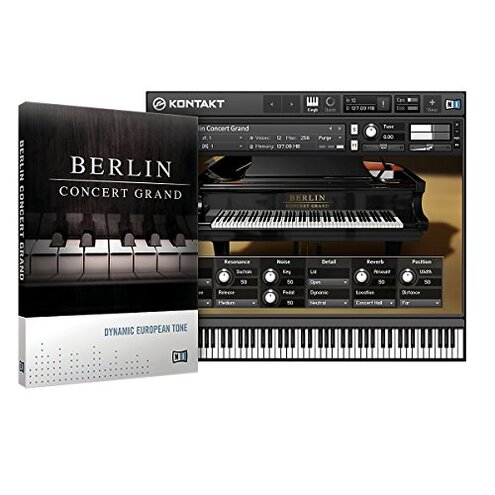
Product evaluated: Komplete Native Instruments Berlin Concert Grand
Related Videos For You
How To Build A Piano Instrument In KONTAKT
How to add 3rd party instruments to Kontakt
Data basis: This report summarizes dozens of buyer feedback items collected from a mix of written reviews and star ratings, with some context taken from Q&A-style buyer discussions. The collection window spans 2016–2025. The source mix was skewed toward written comments, with shorter rating-only feedback used to confirm recurring patterns.
| Buyer outcome | Berlin Concert Grand | Typical mid-range piano library |
|---|---|---|
| Install success | Higher friction during first setup is a primary complaint. | Smoother install flows are more typical. |
| Activation access | More steps and account/manager dependence is commonly flagged. | Fewer steps or clearer handoff is more common. |
| Playback reliability | Less predictable loading/playback is a secondary complaint. | More consistent behavior is expected at this tier. |
| Computer demands | Heavier load complaints appear repeatedly in longer sessions. | Moderate load is typical for mid-range libraries. |
| Regret trigger | “I can’t use it today” after purchase due to setup/authorization friction. | “It sounds okay” is a more typical mid-range regret. |
Why does installation feel harder than it should?
Regret moment: you set aside time to play, and you spend it downloading, locating, and re-trying installers. This is among the most disruptive complaints because it blocks first use.
Pattern: setup friction is recurring, not universal, and shows up across different buyer situations. It tends to hit during first use, especially when you are installing on a new machine.
Category contrast: most mid-range piano libraries still require installs, but they are typically more forgiving about file locations and handoffs. Here, the process is described as more step-heavy than expected for the price tier.
- Early sign: the installer/manager asks you to repeat steps you thought you already completed.
- Primary frequency: “can’t get it installed” style complaints appear repeatedly in first-day feedback.
- Hidden requirement: you may need a separate manager and account flow before the library shows up inside your player.
- Time sink: fixing it often means extra downloads and re-scans rather than a single clean install.
- Fixability: some buyers report success after careful re-install, but the path is not consistently clear.
Illustrative: “I bought it to play tonight, but I’m still installing.” Primary pattern tied to first-use setup friction.
What if authorization blocks you from using it later?
- Regret spike: access problems are less frequent than install failures, but more frustrating when they happen mid-project.
- When it hits: issues commonly show up after setup, like after a computer change or software update.
- Persistent pattern: authorization/account dependency is a secondary issue that appears across multiple feedback types.
- User-visible impact: the instrument may look installed but still won’t load to play.
- Extra steps: buyers describe needing to re-log, re-add libraries, or re-scan before it behaves normally.
- Support burden: resolution can require waiting or searching for the right reset procedure.
- Category contrast: most mid-range alternatives still use activation, but tend to be less disruptive once you are already working.
Illustrative: “It was working yesterday, and today it says I’m not authorized.” Secondary pattern tied to account/manager dependence.
Does it feel heavier on your computer than expected?
- Performance drag: heavier CPU/disk demand is a commonly reported pain point in longer sessions.
- When it shows: problems pop up during long projects with multiple tracks or when switching patches often.
- Worsens with: older machines and limited storage can make loading feel slower and more interruptive.
- Impact: buyers mention dropouts, longer load times, or needing to freeze/bounce more than planned.
- Not universal: some users with stronger systems report smoother playback, so this is not guaranteed.
- Hidden cost: you may end up budgeting for hardware upgrades to get the “indistinguishable” promise.
- Category contrast: big piano libraries are often heavy, but this is described as more demanding than many mid-range options.
- Mitigation: lowering voice counts and using fewer mic options can reduce load, at the expense of realism.
Illustrative: “Great sound, but my session crawls once I add a few tracks.” Secondary pattern tied to heavier-than-expected system demand.
Is the sound “too picky” to sit in a mix?
- Taste mismatch: tonal character complaints are an edge-case issue but show up persistently among certain players.
- When noticed: frustration appears during mixing when you want a piano that drops into pop/rock without much work.
- Impact: some buyers describe needing extra EQ or velocity tweaks to avoid harshness or hollowness.
- Expectation gap: “concert grand” implies versatility, yet some feedback suggests a narrower sweet spot.
- Category contrast: most mid-range pianos ship with a more mix-ready default, even if less realistic solo.
- Fixability: you can often adjust curves and presets, but it adds more tweaking than some shoppers want.
Illustrative: “Solo it’s lovely, but in my track it turns brittle fast.” Edge-case pattern tied to mix-fit preferences.
Who should avoid this
- First-time sample-library buyers who want a one-click install, because setup friction is a primary recurring complaint.
- Deadline-driven users who can’t risk access problems after updates, because authorization steps can interrupt work.
- Older-PC owners who already struggle with heavy plugins, because system load complaints rise in longer sessions.
- Minimal-tweaks producers who need instant mix-ready piano, because some report extra shaping to fit a track.
Who this is actually good for
- Patient users who can tolerate a more complex install to get a detailed concert-grand sound, because setup time is the trade-off.
- Stronger-computer owners who won’t feel the heavier load, because performance risk drops with better hardware.
- Classical players who prefer a more exposed, realistic tone and don’t mind tweaking, because mix-fit is less critical.
- NI-ecosystem users already comfortable with managers and library scans, because the workflow is familiar.
Expectation vs reality
Expectation: a “reasonable for this category” install means you download, point to a folder, and play. Reality: buyers commonly describe extra steps before it appears and works reliably.
| What you expect | What some buyers hit |
|---|---|
| Same-day use after purchase | Delayed use due to install/scan loops |
| Stable access once activated | Re-checks after changes or updates |
| Manageable computer load | Heavier load in big sessions |
- Expectation: a concert grand library should be versatile across genres. Reality: a smaller set of buyers report more tweaking to avoid brittle or thin moments.
Safer alternatives
- Choose simpler licensing: prioritize libraries with clear offline options to reduce the authorization “blocked today” regret.
- Prefer lightweight builds: look for products marketed as low CPU or “stage” pianos to avoid long-session slowdowns.
- Buy from ecosystems you already use: staying within your existing library manager reduces install and scan surprises.
- Test mix-fit fast: before committing, verify demos that show in-a-song contexts, not only solo playing.
- Check reinstall paths: pick vendors with a straightforward re-download process if you swap computers often.
The bottom line
Main regret trigger: buyers most often regret the purchase when setup and authorization keep them from playing right away. That risk is higher than normal for mid-range piano libraries because the failures are reported as more step-heavy and more blocking. If you need dependable same-day use, this is a smart skip.
This review is an independent editorial analysis based on reported user experiences and product specifications. NegReview.com does not sell products.