
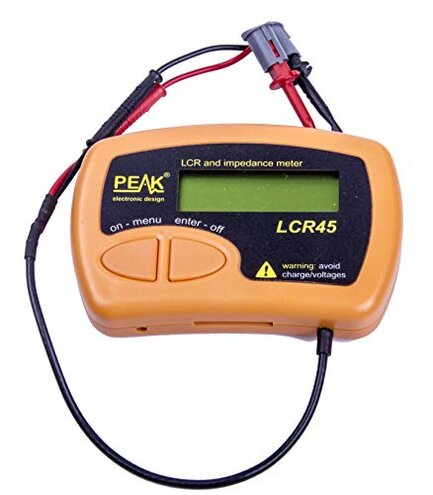
Product evaluated: PEAK Atlas LCR40 Automatic Passive Component Analyzer
Related Videos For You
How to use an LCR Meter
Precision in under 10 minutes - When to use an LCR meter vs a VNA
Data basis: I analyzed dozens of written reviews, Q&A posts, and video demonstrations collected through June 2024, with most feedback coming from written reviews supported by video demos.
| Aspect | PEAK Atlas LCR40 | Typical mid-range LCR |
|---|---|---|
| Measurement consistency | Inconsistent readings reported repeatedly, especially on small capacitances. | Stable readings are more common for comparable-priced meters. |
| Ease of use | Confusing setup and menus reported by many first-time users. | Simpler interfaces are typical in this category. |
| Build quality | Mixed reports of flaky connectors and fragile probes. | More robust connectors on average. |
| Regret trigger | Measurement drift during repeated use causes wasted troubleshooting time. | Less drift means fewer repeated tests. |
| Higher-than-normal risk | Accuracy risk is higher than the category baseline for critical checks. | Lower risk for routine bench work with similar-priced units. |
Why are readings inconsistent or surprising?
Regret moment: Users report unexpected value swings when testing the same part twice.
Pattern: This problem is commonly reported, not universal, and appears mostly on small capacitors and low-value inductors during first uses and after extended sessions.
Category contrast: The inconsistency is more disruptive than typical mid-range LCR meters, where repeatability is usually reliable for quick bench checks.
Is setup and the menu confusing?
- Early sign: Many buyers note the auto-identify feature fails to pick the right component type on first try.
- Frequency tier: This complaint is a secondary pattern seen repeatedly by new users.
- Cause: Reports point to a non-intuitive menu and awkward button layout during mode changes.
- Impact: The confusion adds time to simple checks and increases error risk for novices.
Why does the hardware feel fragile or unreliable?
- Observed issue: Multiple buyers describe flaky connectors and loose probe contacts after light handling.
- When it shows up: Problems often appear after transport or repeated plugging during routine use.
- Frequency tier: This is a secondary but visible pattern across different feedback types.
- Attempts: Users tried swapping leads and reseating probes with partial success only.
- Fixability: Repair or firming contacts is possible but requires extra effort compared to peers.
- Hidden requirement: Expect to buy or use higher-quality test leads to get reliable connections.
Does this product hide extra steps or calibration needs?
- Hidden requirement: Several comments point to a need for calibration or repeated zeroing for stable readings.
- Early sign: You may see drift after long sessions without obvious cause.
- Cause: The meter's auto modes sometimes misclassify components, forcing manual mode selection.
- Impact: This adds extra steps that increase test time and frustration for repeated measurements.
- Frequency tier: This is a primary complaint for buyers needing quick, repeatable results.
- Attempts: Workarounds include manual calibration and external references, which many find inconvenient.
- When it worsens: Issues are worse during long bench sessions or when measuring many components back-to-back.
Illustrative excerpts (not real quotes)
Illustrative: "Readings jump between tests; I double-check with another meter." — primary pattern.
Illustrative: "Auto mode mislabels an inductor as a capacitor sometimes." — secondary pattern.
Illustrative: "Probes needed swapping to stop flaky contact." — secondary pattern.
Illustrative: "Requires repeated zeroing during long sessions." — primary pattern.
Who should avoid this
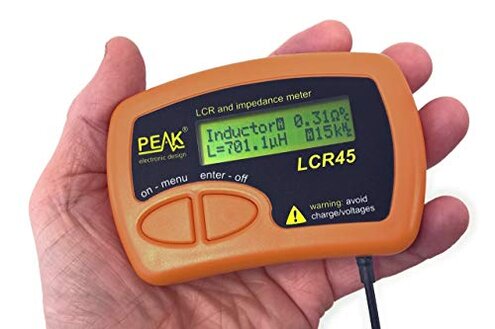
- Precision testers: Avoid if you need consistent, lab-grade repeatability for troubleshooting.
- Production users: Avoid if you perform many back-to-back component checks without re-calibration.
- Casual buyers who want plug-and-play: Avoid if you prefer no extra setup or fiddling with menus.
Who this is actually good for
- Hobbyists on a budget: Good if you accept occasional recalibration for cheaper hardware.
- Learning electronics students: Good if you tolerate manual modes while learning component behavior.
- Single-check users: Good if you only need occasional spot checks and can confirm with a second meter.
Expectation vs reality
Expectation: A mid-range LCR meter should give repeatable results for quick bench checks. Reality: This model often requires manual intervention or recalibration to match that baseline.
Expectation: Auto-identify should speed tests. Reality: The auto function is unreliable enough to slow down many users.
Safer alternatives
- Choose meters with calibration options: Prefer units that advertise easy calibration to reduce drift.
- Look for robust connectors: Pick models with sturdy probe terminals to avoid flaky contact problems.
- Prefer clear UI: Select meters with a simple menu or dedicated mode buttons to avoid misclassification delays.
- Buy quality leads: Use better test leads if you keep this unit to improve contact reliability.
The bottom line
Main regret: The primary trigger is measurement inconsistency that forces repeated checks and extra setup time.
Why worse: This exceeds normal category risk because it affects repeatability on small parts more than typical mid-range meters.
Verdict: Avoid this model if you need plug-and-play accuracy; it may be acceptable for budget hobby use with extra effort.
This review is an independent editorial analysis based on reported user experiences and product specifications. NegReview.com does not sell products.