
Product evaluated: Sibelius Ultimate Music Notation Software (Download Card)
Related Videos For You
What is the Best Music Notation Software to Use?
Crescendo Music Notation Tutorial | Getting Started
Data basis: This report draws from dozens of buyer feedback samples collected from written reviews and video walkthroughs between 2020 and 2026. Most feedback came from detailed written comments, with video demonstrations mainly used to confirm setup friction and daily-use workflow problems.
| Buyer outcome | Sibelius Ultimate | Typical mid-range alternative |
|---|---|---|
| First-day setup | Higher friction; license redemption and account steps can add extra time before writing music. | Lower friction; usually fewer account and activation steps. |
| Learning curve | Steeper; interface depth can slow simple tasks after setup. | Moderate; basic notation work is often easier to find. |
| Long-term cost feel | Higher risk; perpetual license still ties key updates to a 1-year window. | More predictable; upgrade expectations are often clearer at this price tier. |
| Support dependence | More likely; activation and account issues can push buyers toward support early. | Less likely; fewer buyers need help just to get started. |
| Regret trigger | Paying premium money and then losing time to setup, account, or version confusion. | Usually regret comes later, not on day one. |
Why am I doing account work instead of writing music?
Primary issue: setup friction appears repeatedly and is among the most common complaints for this kind of software. The regret moment usually happens on first use, when buyers expect a quick install but hit redemption, sign-in, and entitlement steps.
Category contrast: music notation software is rarely one-click simple, but this feels more disruptive than expected because the product is sold as a premium tool. That trade-off lands harder when the purchase is a download card, not an instantly ready account.
- Early sign: confusion starts when buyers realize the card is a registration code, not a ready-to-run installer.
- Pattern: this is a recurring complaint across mixed feedback, though not every buyer gets stuck.
- When it hits: the problem shows up during initial activation, especially when linking accounts and licenses.
- Why it stings: at $599, buyers expect less admin work before the first score opens.
- Hidden requirement: some buyers underestimate how much account management is part of ownership.
- Impact: failed or delayed activation can turn a same-day purchase into a support task.
- Fixability: many cases are solvable, but the fix often costs extra time and patience.
Illustrative excerpt: “I bought notation software, not a scavenger hunt for my license.”
Pattern note: This reflects a primary complaint.
Why does a perpetual license still feel time-limited?
- Primary concern: buyers repeatedly react to the 1-year update window because it changes the value story after purchase.
- Usage moment: this usually becomes clear after setup, once buyers read the upgrade terms more closely.
- Category baseline: paid creative software often separates ownership from updates, but this feels less forgiving than typical because the upfront price is already high.
- Regret trigger: the phrase perpetual license can create a simpler expectation than the real update timeline delivers.
- Why it matters: buyers planning long-term use may feel pushed toward future spending sooner than expected.
- Frequency tier: this is a primary issue, less immediate than activation trouble but more frustrating once understood.
- Fixability: the problem is not a defect; it is mostly about expectation mismatch that cannot be undone after purchase.
Illustrative excerpt: “It’s mine forever, but staying current clearly is not.”
Pattern note: This reflects a primary complaint.
Why do simple notation tasks feel slower than they should?
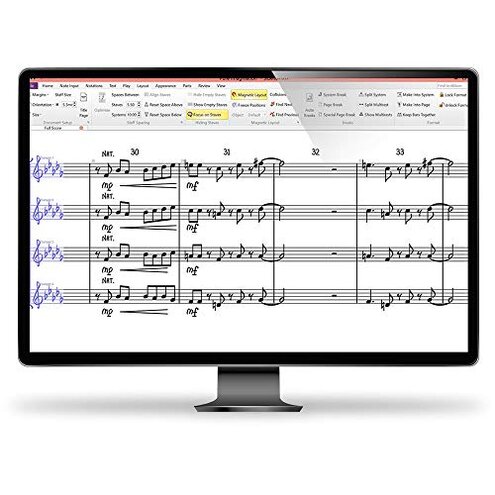
Secondary issue: workflow friction is less universal than activation trouble, but it is a persistent source of regret during daily use. Buyers who only need straightforward scores can feel buried by menu depth and feature overload.
Worse condition: this tends to worsen in short sessions, when you just want to enter notes, print, and move on. A deep interface can be powerful, but it feels worse than expected when even routine edits take more hunting.
Category contrast: advanced notation tools naturally have a learning curve, yet this often feels heavier than a typical mid-range option for casual or occasional users. That gap matters because the software targets serious work, but many buyers still expect common tasks to stay fast.
- Signal: complaints about complexity appear repeatedly, though they are not universal among experienced users.
- Common trigger: frustration shows up when entering parts, changing layout, or finding a setting after a break from the software.
- Trade-off: the same depth that helps advanced scoring can slow buyers with simpler needs.
- Mitigation: this gets better with practice, but that means extra time before the software feels natural.
- Best reading: if you use notation software every day, the pain may be tolerable; if not, it can feel like unnecessary overhead.
Illustrative excerpt: “Great power, but even small edits took me longer than expected.”
Pattern note: This reflects a secondary complaint.
Why do the included extras sound better on paper than in real use?
- Secondary issue: companion tools and bundled features create high expectations, but satisfaction is more mixed in actual use.
- When it appears: this usually shows up after the core install, when buyers try voice input, scan import, or other included extras.
- Hidden requirement: these tools can demand more trial and cleanup than buyers expect from the product page wording.
- Why it disappoints: “included” can sound like friction-free, but extra setup or correction work can erase that value.
- Category contrast: add-on tools often work imperfectly, yet the letdown feels stronger here because they are used to justify a premium package.
- Frequency tier: this is a secondary issue, less common than licensing complaints but still persistent.
- Fixability: usable results may be possible, though buyers often need lower expectations and more manual editing.
Illustrative excerpt: “The extras looked convenient until they added another layer of work.”
Pattern note: This reflects a secondary complaint.
Who should avoid this
- Avoid it if you want a fast same-day start, because setup friction is a higher-than-normal risk for this category.
- Avoid it if you dislike account and license admin, since ownership can feel more conditional than the word perpetual suggests.
- Avoid it if you only write simple scores a few times a month, because the interface depth may exceed your tolerance.
- Avoid it if your budget is already stretched by $599, since update limits can make the long-term value feel less stable.
Who this is actually good for
- Good fit for experienced notation users who already know they can tolerate a steeper setup process.
- Good fit for buyers who need advanced scoring depth and accept that first-day friction is the price of that power.
- Good fit for users with institutional or professional workflows, where account steps and update planning are already normal.
- Good fit for people who will use the bundled extras selectively and do not expect every included tool to save time.
Expectation vs reality
Expectation: A download card should feel close to instant access.
Reality: account linking and activation can add enough steps to break that expectation.
Expectation: A perpetual license should feel settled for the long haul.
Reality: the 1-year updates limit can make ownership feel less complete than buyers first assume.
Expectation: It is reasonable for this category to have some learning curve.
Reality: the workflow burden can feel worse than expected for buyers doing basic notation only.
Expectation: Included extras should save time.
Reality: they may add correction work, which undercuts the convenience pitch.
Safer alternatives
- Choose simpler licensing if first-day setup matters, and favor notation tools with direct download plus fewer account dependencies.
- Check update policy before buying, especially if a perpetual license is important to your budget planning.
- Match depth to needs by picking a lighter notation app if your work is mostly lead sheets, lessons, or small ensemble parts.
- Treat bundle claims carefully and assume scan or voice extras may still need manual cleanup.
- Watch setup demos before purchase, because activation friction is easier to spot in real walkthroughs than on product cards.
The bottom line
Main regret trigger: buyers pay a premium price, then lose time to activation steps, update-limit confusion, and a heavier workflow than expected. That exceeds normal category risk because some friction is expected in pro software, but this package adds more ownership and setup complexity than many mid-range alternatives. Verdict: avoid it if you want straightforward access, clear long-term value, or casual-use simplicity.
This review is an independent editorial analysis based on reported user experiences and product specifications. NegReview.com does not sell products.