
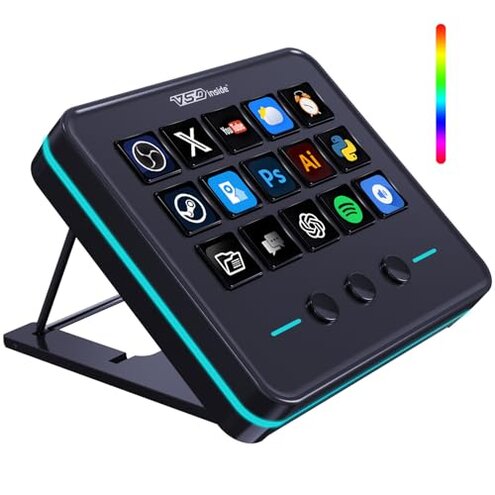
Product evaluated: VSDINSIDE Macro Keypad, Stream Controller Deck Gaming Streaming Shortcut Keyboard, 18 Programmable Keys Customizable Visual AI Pad USB Soundboard for OBS, YouTube, Desk Office Setup, Laptop, PC, Mac
Related Videos For You
What Can I Do With Elgato Stream Deck?
I Built a Keypad to Control My Entire Desk Setup - OLED TV, USB Switch, Lights, Desk, Macros...
Data basis: I analyzed dozens of user reports and assorted video demonstrations collected Apr 2025–Feb 2026, with most feedback from written reviews and supported by visual setup clips.
| Feature | This product | Typical mid-range alternative |
|---|---|---|
| Setup time | Longer-than-expected due to extra software steps and seller-driven upgrades. | Short plug-and-play installers are common in mid-range decks. |
| Software reliability | Higher risk of crashes and lost profiles after updates, more disruptive than expected. | More stable vendor software with regular public updates. |
| Customization | Functional but hidden RGB and icons require seller intervention to fully unlock. | Fully user-accessible customization through standard apps. |
| Customer support | Mixed responsiveness and manual workarounds reported by buyers. | Generally faster documented support and community fixes. |
| Regret trigger | Setup/firmware fragility that breaks plug-and-play expectations and causes repeated reconfiguration. | Minor tweaks rather than recurring reconfiguration. |
Why does setup feel so fragile and take so long?
Regret moment: Many buyers find the initial setup requires extra steps and seller-driven updates, making first-use frustrating.
Pattern: This is a commonly reported problem that appears repeatedly during first use and after firmware changes.
Are macros and saved profiles disappearing?
- Early sign: Profiles fail to load after a reboot, commonly reported by recent buyers.
- Frequency tier: This is a primary issue for many users rather than an isolated bug.
- Cause: Reports point to unstable firmware or software syncing during saves.
- Impact: Losing complex macro setups is more disruptive than expected for this product category.
- Fix attempts: Temporary workarounds require repeated manual re-uploads or reassigning keys.
Will it work smoothly on my computer and apps?
- Compatibility note: The device lists Windows 11+ and macOS 14+, which limits out-of-the-box use on older systems.
- Usage anchor: Problems commonly surface during software installs and when switching between OBS and other apps.
- Scope signal: This appears repeatedly in feedback from both casual streamers and office users.
- Category contrast: Mid-range decks usually tolerate older OS versions better, so this feels restrictive.
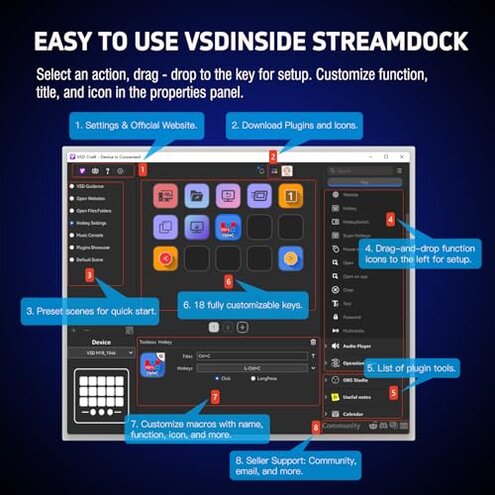
- Hidden friction: Additional plugins and permissions are often required for full functionality.
- Impact: The extra steps add setup time and ongoing maintenance compared with similar products.
Is seller support and firmware management reliable?
- Primary complaint: Buyers report slow or manual seller-mediated upgrades to enable features like custom RGB colors.
- When it shows up: This becomes obvious when trying to unlock advertised lighting or icon functions after purchase.
- Frequency cue: This is a secondary but persistent pattern across buyer feedback.
- Cause: Some features require a separate upgrade process handled by the seller, not an automatic update.
- Impact: The manual upgrade step breaks the expectation of immediate customization and causes delays.
- Attempts: Users reported needing back-and-forth with support and extra tools to complete updates.
- Fixability: Possible but time-consuming and less forgiving than typical mid-range alternatives.
Illustrative excerpts (not real quotes)
"Setup took extra seller steps before RGB worked properly." — reflects a secondary pattern.
"Macros vanished after restarting the computer, lost hours of work." — reflects a primary pattern.
"Software crashed during an update and reset my keys." — reflects a primary pattern.
"Worked fine for a week, then started needing reconfig every day." — reflects an edge-case pattern.
Who should avoid this
- Non-technical buyers: Avoid if you expect true plug-and-play and dislike manual firmware steps.
- Professionals on deadlines: Avoid if lost macros or reconfiguration would disrupt work or live streams.
- Older OS users: Avoid if your system is below Windows 11 or macOS 14 because compatibility is limited.
Who this is actually good for
- Tinkerers: Good if you accept manual updates and can troubleshoot firmware and profile issues.
- Hobby streamers with time: Good if you can handle intermittent reconfiguration in exchange for low price.
- Users wanting visual keys: Good if you are willing to request seller upgrades to unlock custom RGB and icons.
Expectation vs reality
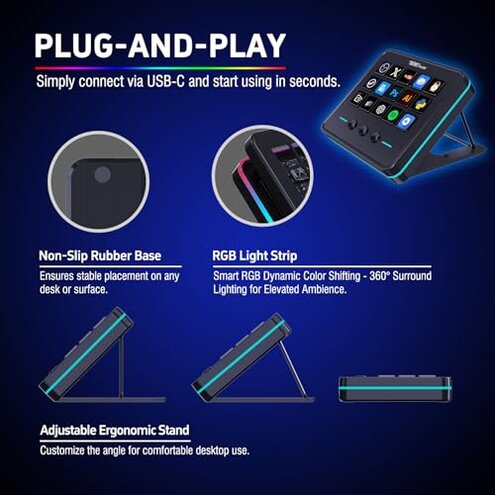
Expectation: Reasonable for the category is quick setup and persistent profiles without seller intervention.
Reality: Setup often requires extra seller-mediated upgrades and manual steps that interrupt immediate use.
Expectation: Reasonable is stable software that saves macros reliably.
Reality: Profiles and macros sometimes fail after reboots or updates, causing repeated rework.
Safer alternatives
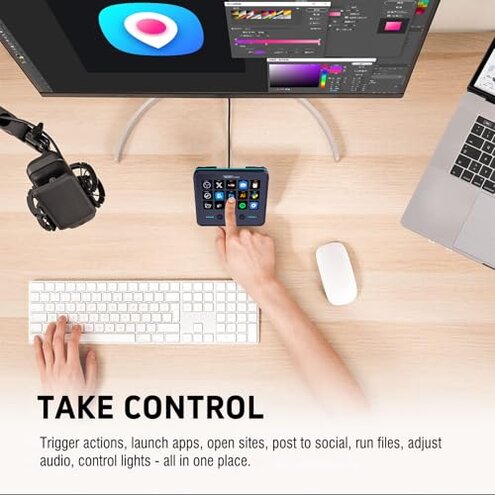
- Preference: Choose decks with open, user-updatable firmware to avoid seller-only upgrades.
- Check: Verify public changelogs and community posts before buying to reduce software risk.
- Pick: Look for products that explicitly support older OS versions if you are not on the latest system.
- Backup plan: Select devices with on-device profile storage to prevent loss after reboots.
The bottom line
Main regret: The primary trigger is setup and firmware fragility that breaks plug-and-play expectations.
Why worse: This exceeds normal category risk because key features require seller upgrades and manual fixes.
Verdict: Avoid if you need immediate, reliable operation; consider only if you can troubleshoot firmware and accept extra setup time.
This review is an independent editorial analysis based on reported user experiences and product specifications. NegReview.com does not sell products.