
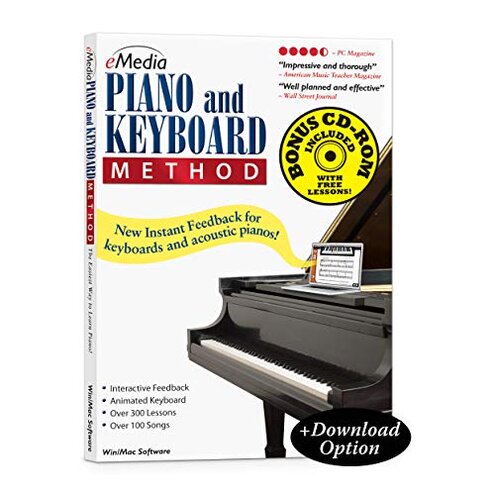
Product evaluated: eMedia Piano and Keyboard Method v3
Related Videos For You
Teach Online Music Lessons with Zoom - Studio Gear & Software Setup
Typing Tutorial: Beginner Keyboard Skills
Data basis: This report draws on dozens of buyer comments collected from written feedback and hands-on demonstration style feedback spanning 2010 to recent years. Most input came from written reviews, with supporting signals from setup-focused demonstrations and buyer follow-ups, which helps separate first-install problems from longer-term daily-use frustration.
| Buyer outcome | eMedia Piano and Keyboard Method v3 | Typical mid-range alternative |
| Getting started | Higher friction; setup and compatibility checks can slow first use | Lower friction; usually installs with fewer extra steps |
| Feedback features | Conditional; full scoring depends on extra keyboard connection requirements | More predictable; core teaching tools usually work without special hardware |
| Modern device fit | Higher-than-normal risk; older CD-ROM format adds compatibility doubt | Lower risk; newer delivery is usually easier on current computers |
| Practice flow | Mixed; lesson tools help, but interruptions from setup or feature limits can break momentum | Smoother; fewer barriers during casual practice |
| Regret trigger | Buying for interactive feedback and learning later that your setup cannot use it fully | Lower chance of feature mismatch at home |
Did you expect it to just install and start teaching?
Primary issue: One of the most common frustrations is that the course can feel older and less forgiving right at first setup. That trade-off hits harder here because a beginner lesson product is supposed to reduce friction, not add more of it.
Pattern: This appears repeatedly in buyer feedback, especially when the product is used on newer computers or by people expecting a simple app-like start. Compared with a typical mid-range piano learning option, the CD-ROM format creates more steps than many buyers now expect.
- Early sign: Trouble starts before practice, when the buyer realizes the course arrives as a disc-based program instead of a simpler modern install.
- When it hits: The problem shows up at first use, especially if the computer no longer fits older software habits.
- Frequency tier: This is a primary complaint, because setup friction blocks the product before lesson quality can matter.
- Impact: Instead of learning piano immediately, the buyer spends extra time on install questions and device fit.
- Why worse: Some setup effort is normal for older music software, but this feels more disruptive than expected for a beginner-focused course.
Illustrative excerpt: “I wanted a lesson tonight, not a computer project first.”
Pattern level: This reflects a primary setup-friction pattern.
Are the best features locked behind gear you may not have?
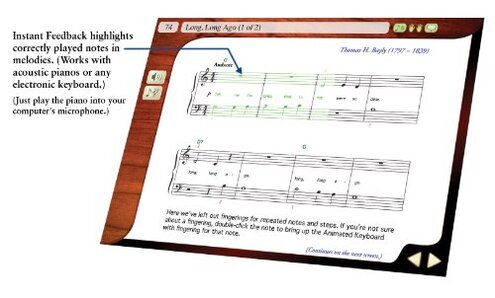
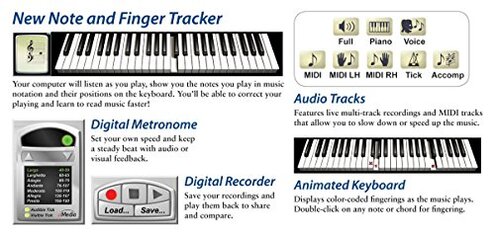
Regret moment: Many buyers are attracted by scoring, instant note checking, and evaluation tools. The catch is that the more detailed feedback depends on a MIDI-connected electronic keyboard, which is a hidden requirement for some shoppers.
- Recurring pattern: This is a primary issue because the product marketing emphasizes interactive learning, yet full use depends on your instrument setup.
- Hidden requirement: Detailed evaluation feedback needs a MIDI connection, so acoustic piano users or buyers without the right keyboard get less than they expected.
- Usage context: The mismatch becomes obvious after setup, when the buyer tries to use scoring or performance feedback during real practice.
- Buyer impact: You may still get lessons and videos, but the most motivating “am I playing it right?” tools can be reduced or unavailable.
- Category contrast: Some learning software always has hardware limits, but this one can feel less transparent than typical if you assumed all feedback features worked the same way.
- Fixability: It is only partly fixable; solving it may require a different keyboard or a new connection method, not just a setting change.
- Why regret follows: Buyers paying for guided feedback often feel the value drops fast when the software becomes mostly a lesson viewer.
Illustrative excerpt: “The lessons worked, but the scoring part wasn’t really for my piano.”
Pattern level: This reflects a primary hidden-requirement pattern.
Does it feel more like old software than a smooth learning tool?
Secondary issue: A less universal but persistent complaint is that the experience can feel dated during daily use. That matters because beginners usually benefit from a cleaner, more modern flow.
Pattern: This is not every buyer’s breaking point, but it appears across multiple feedback sources when users compare it with newer learning options. Against a reasonable category baseline, it can feel less polished than expected.
- Where it shows: The issue surfaces during lesson navigation, repeated practice, and switching between videos, song parts, and feedback tools.
- Why it worsens: In longer sessions, even small interface friction adds up and breaks concentration.
- Intensity cue: This is a secondary complaint, less frequent than setup failure but more annoying once you are trying to build a routine.
- Real effect: Practice can start feeling like software management instead of music learning.
- Comparison: Most mid-range alternatives now aim for quicker resumes and fewer interruptions, so this can feel older than the category norm.
- Mitigation: It fits better for buyers who are patient with older software design and mainly want structured lessons, not a sleek experience.
Illustrative excerpt: “Useful lessons, but the program felt clunky every time I sat down.”
Pattern level: This reflects a secondary usability pattern.
Will the song library matter as much as you think?
Edge-case issue: The product promises over 100 songs, which sounds reassuring. The disappointment tends to appear later, when buyers realize that a big song count does not fully offset setup limits or feedback restrictions.
- Not universal: This is an edge-case complaint, because some buyers are satisfied if they mainly want lesson structure.
- When it appears: It usually shows up after a few sessions, once the novelty of the included songs fades.
- Core problem: A large content list does not help much if the buyer’s device setup or keyboard type blocks the stronger interactive tools.
- Practical impact: The product can start feeling like a basic lesson archive instead of the guided coach some buyers expected.
- Why worse than normal: In this category, content quantity is helpful, but buyers usually regret a purchase when access friction makes that content harder to enjoy consistently.
- Attempted workaround: Some users focus only on the videos and songs, but that does not solve the missing full-feedback experience.
- Best-case use: It works better if you value instructor-led material more than the promise of deep interactivity.
- Bottom risk: The song count is a weaker safety net than it first appears.
Illustrative excerpt: “There’s plenty here, but not in the way I thought I’d use it.”
Pattern level: This reflects an edge-case expectation mismatch.
Who should avoid this
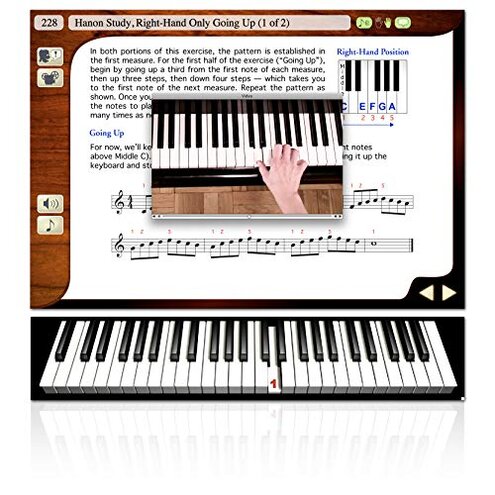
- Beginners wanting simplicity: Avoid it if you want a lesson tool that starts fast on a modern computer with minimal setup guesswork.
- Acoustic piano owners: Avoid it if you are buying mainly for performance scoring, because the most detailed evaluation needs a compatible electronic keyboard connection.
- Low-friction learners: Avoid it if small interface hassles quickly kill your motivation during short daily practice sessions.
- Feature-driven buyers: Avoid it if the interactive feedback is the whole reason you are paying, since that is the area with the biggest mismatch risk.
Who this is actually good for
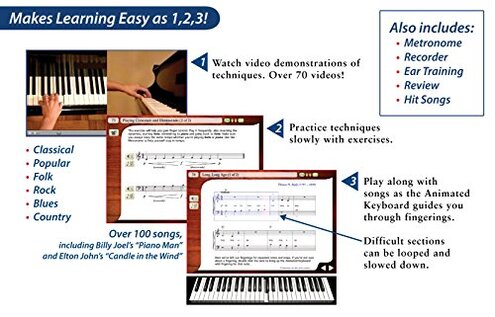
- Patient desktop users: It can still fit buyers who do not mind older software habits and are comfortable working through installation steps.
- MIDI keyboard owners: It makes more sense if you already have the right electronic keyboard setup and can actually use the advanced evaluation tools.
- Lesson-first learners: It may suit someone who mainly wants structured instruction and video guidance, while accepting that the interface may feel dated.
- Budget-tolerant tinkerers: It can work for buyers who see setup effort as acceptable trade-off and do not expect app-level convenience.
Expectation vs reality
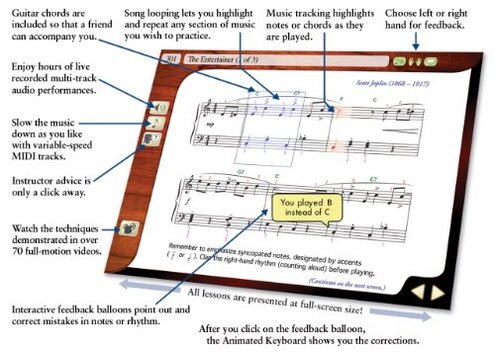
Expectation: A beginner piano course should be easy to launch and easy to understand.
Reality: Here, the older disc-based format can make the first session feel more technical than musical.
Expectation: “Interactive feedback” sounds like it will work for any piano setup.
Reality: The stronger scoring features depend on a MIDI keyboard connection, which is a meaningful limit.
Reasonable for this category: Some setup is normal for music software.
Worse-than-expected reality: This product carries higher compatibility risk than a typical mid-range alternative because of its older delivery format and hardware dependence.
Safer alternatives
- Check delivery style: Choose a piano course that runs through a current download or browser-based system if you want to avoid CD-ROM setup friction.
- Match your instrument first: If you own an acoustic piano, prioritize lesson tools that clearly support non-MIDI use without cutting major features.
- Test feature wording: Look for products that explain exactly which feedback tools need extra hardware, which avoids the hidden requirement problem.
- Prefer smoother practice flow: If motivation is fragile, choose software known for quick lesson access and easy resume, which reduces daily-use friction.
The bottom line
Main regret trigger: Buyers are most likely to regret this purchase when they expect modern, easy interactive piano coaching but run into setup friction and hardware limits. That risk exceeds the normal category baseline because the product’s older format and MIDI-dependent features can block the very benefits that justify the price. If you do not already have a compatible setup and patience for older software, this is a product many shoppers should skip.
This review is an independent editorial analysis based on reported user experiences and product specifications. NegReview.com does not sell products.